
Last Updated 1 week ago
Overview
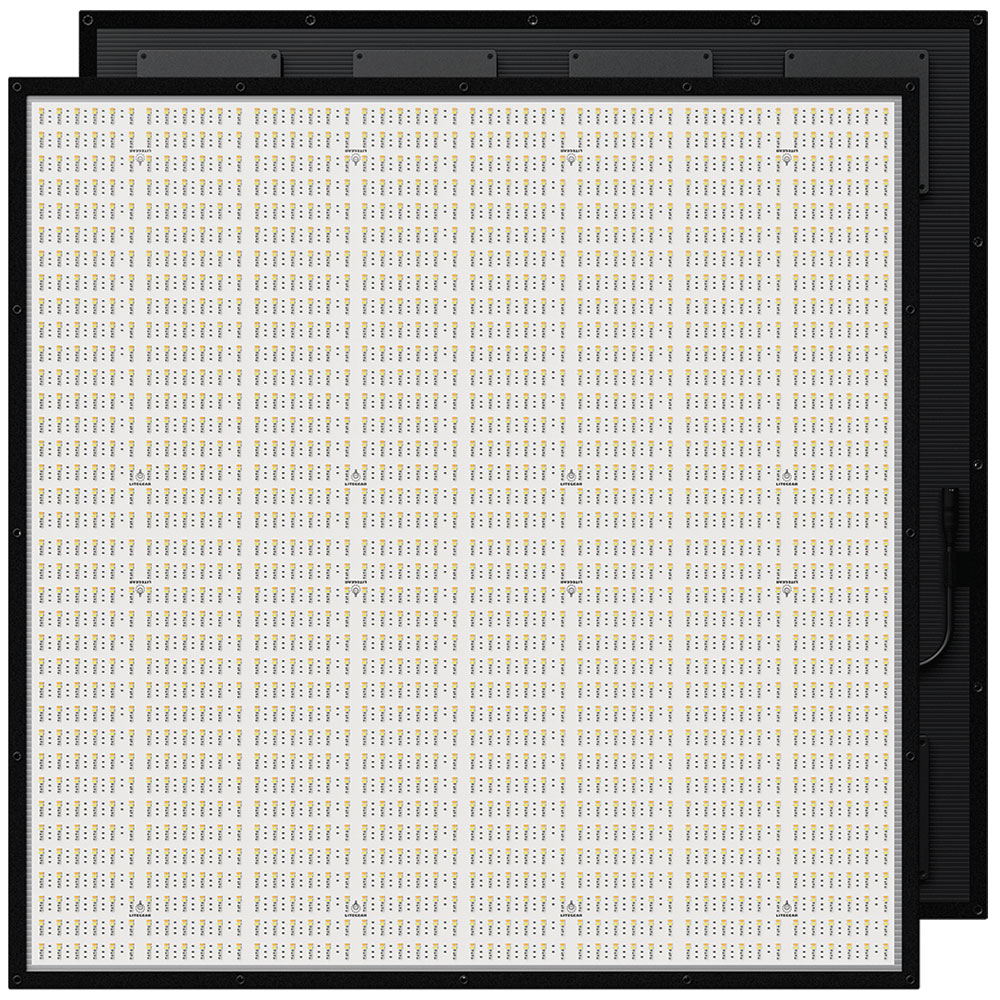
The LiteGear LiteMat Spectrum 8 Gen 2 is a large square full-colour LED head for broad keys, group coverage, overhead soft light and substantial reflected highlights. It combines a thin supported head with an external Spectrum controller and a six-colour light engine.
The 2023/Gen 2 head requires matching Spectrum power and control hardware. It is distinct from the original Spectrum generation and from LiteMat Plus. Its 400 W nominal head rating, 8 large-format pixels and 9.6 kg / 21.1 lb head reference belong to this specific size and generation.
Key specifications
| Specification | Details |
|---|---|
| Exact generation | LiteMat Spectrum Gen 2 / 2023 |
| Item / model | LM-SPECTRUM-EIGHT-G2 / model 256-1 |
| Head class | Six-colour LED head with external compatible controller |
| Nominal head power | 400 W |
| Head input / listed current | 48 V DC / 8.64 A in the model specification |
| White range / tint | 2000–11000 K; full plus/minus green adjustment |
| Colour metrics | CRI ≥95; TLCI ≥95 in manufacturer specifications |
| Pixel count | 8 large-format pixels |
| Beam angle | 53° half-peak angle |
| Head dimensions | 1015.5 × 1015.5 × 25.4 mm |
| Listed head mass | 9.6 kg / 21.1 lb |
| Connection | PDX power/data to compatible LiteDimmer |
| Specified kit controller | LiteDimmer Spectrum AC/DC 400 |
| Dimming / environment | 0–100% with compatible dimmer; IP20; maximum operating ambient 50°C |
Strengths and limitations
Strengths
- The shallow full-colour head supports low-profile keys and large-format pixel effects.
- Separate power and controls allow accessible placement.
Limitations
- The matching Spectrum controller, power supply and PDX cables are essential parts of the kit.
- Use the matching dimmer, connector system and approved battery arrangement.
Practical uses
The approximately metre-square face is useful when a smaller panel appears too small at the required working distance. It can build a broad interview key, a large product reflection or a substantial overhead source with meaningful width and height.
Eight large-format pixels allow more spatial variation than the smaller heads. They remain broad lighting pixels; diffusion and subject distance determine whether their boundaries or gradients remain visible. Check the actual reflected or incident effect rather than treating the mat as a detailed screen.
The 9.6 kg head is a different load from the older 4.72 kg Plus 8. Add the large modifier, mount, controller and cables to the rigging plan. The physical face is about forty inches square, not a literal forty-eight-inch four-by-four frame.
| Setup | Working approach |
|---|---|
| Low-profile overhead | Support the mat and controller separately with the correct frame and retention. |
| Soft key | Build diffusion before metering and use a skirt or grid for spill. |
Output and colour
The values below are read from LiteGear’s April 2023 Gen 2 model data sheet. Both rows are at 5600 K. The sheet separately identifies no diffusion and Full diffusion, making it possible to budget the actual soft-source configuration rather than transferring a bare-head headline to every modifier.
Quarter and Half diffusion tables are also provided in the source sheet. They are separate densities, not interchangeable labels. The grid, skirt orientation and working distance affect the final field and spill, so meter the intended setup across the subject area.
| Configuration | 1 m, lux | 3 m, lux | 5 m, lux |
|---|---|---|---|
| 5600 K, no diffusion | 14,579 | 1,620 | 583 |
| 5600 K, Full diffusion | 8,111 | 901 | 324 |
The six-colour engine provides variable white, tint and saturated-colour control across the documented 2000–11000 K white range. It is a different system from the white-only Plus family. CRI/TLCI scores for white settings do not establish the brightness or spectral behaviour of every saturated cue.
The 8 physical large-format pixels are addressed through a compatible controller and selected profile. Match the pixel mode, grouping, bit depth, colour-space/mode and console personality. The head is not itself a standalone wireless receiver or local dimmer.
Record firmware, colour values, intensity and pixel orientation along with diffusion. Check a simple directional chase before a larger content-driven cue, and inspect skin, fabrics and product colours through the intended production camera.
Power and batteries
The head requires the matching Spectrum power/control system. Its 48 V PDX interface is not the older Plus family’s 24 V PL7 connection. Use the approved controller, head lead and extensions rather than wiring a similar-looking connector or battery directly to the emitter.
The named kit uses LiteDimmer Spectrum AC/DC 400. The 400 W head needs the approved 400-class arrangement; a 200 W controller is not a full-output substitute.
The current AC/DC controller family can accept mains or its specified 48 V DC battery supply. Match the actual controller’s input rating and current capability. Older Spectrum DC200 controllers and newer AC/DC units do not share every battery-input or control detail just because their names contain “200.”
The nominal head power and listed head mass do not describe complete AC consumption, battery duration or packed weight. Support the controller separately, provide strain relief and include the whole system in circuit, battery and rigging plans.
Control, cooling and camera operation
The specification lists continuous 0–100% dimming with a compatible LiteGear dimmer. The controller determines the available console, radio or network route and its response settings. Verify the actual supplied controller and firmware rather than assigning every newer control feature to an older rental package.
Test low fades, blackout, cue response and signal-loss behaviour through the route intended for the shoot. Pixel mapping can increase the channel footprint; make sure the console patch exposes the mode being used. Check the intended shutter and frame rate when running fast effects or very low levels.
Modifiers, rigging and the working package
The kit lists the model-specific PolySkirt, quarter/half/full diffusers, PDX cable and mount. Optional louvers or grids have to fit the correct head size. Choose diffusion while watching reflections and shadow structure, then use a grid or external flags to control spill.
The thin head is designed to remain a supported panel. Protect it from bending, concentrated clamp pressure and heavy objects during transport. Use the specified LiteMount/kMount arrangement, rated support and suitable secondary retention for elevated placement.
IP20 is an indoor protection rating. It does not transfer the weather resistance of a different LiteTile product to this Spectrum head or controller. Keep the complete system within its operating instructions and allow heat to dissipate.
Inspect the face, pixel uniformity, mounting plate, PDX lead and connector retention. Test warm/daylight whites, tint, saturated colours, every pixel and the intended controller route. A used bare head without its compatible controller and cable is an incomplete working package.
Alternatives and related fixtures
The LiteMat 4 Plus is a different variable-white design with a 24 V Plus power/control ecosystem. The Spectrum 4 fills another size in the full-colour range, but its generation still needs to be checked. Choose Spectrum 8 Gen 2 for the actual face geometry, pixel count and complete compatible package described here.
| Fixture | Choose it for |
|---|---|
| LiteMat Spectrum | A full-colour LiteMat family; verify generation and controller. |
| LiteMat Plus | A variable-white family with a different power and connector system. |
What people are saying
CineD: what changed in the 2023 revision
CineD’s NAB report highlights revised dimming and the added LiteMat 8 in the refreshed Spectrum range. Read the report.
Videos
CineD: Spectrum 2023 update
A family introduction to the refreshed generation.
Rental and used-fixture checks
Check the exact model, matching power components and control leads. Inspect the emitting surface, protective parts, mounts and connectors. Test the intended operating mode, low-level control and camera settings before rigging.
Documentation and specifications
official model and kit page, April 2023 model data sheet, Gen 2 user guide and Spectrum controller/profile resources.
September 2026: LiteGear product lines join the Kino Flo portfolio
Product photograph: LiteGear / Kino Flo official product photograph.
Browse Litegear lights · LED mats · all equipment.