
Last Updated 2 days ago
Overview
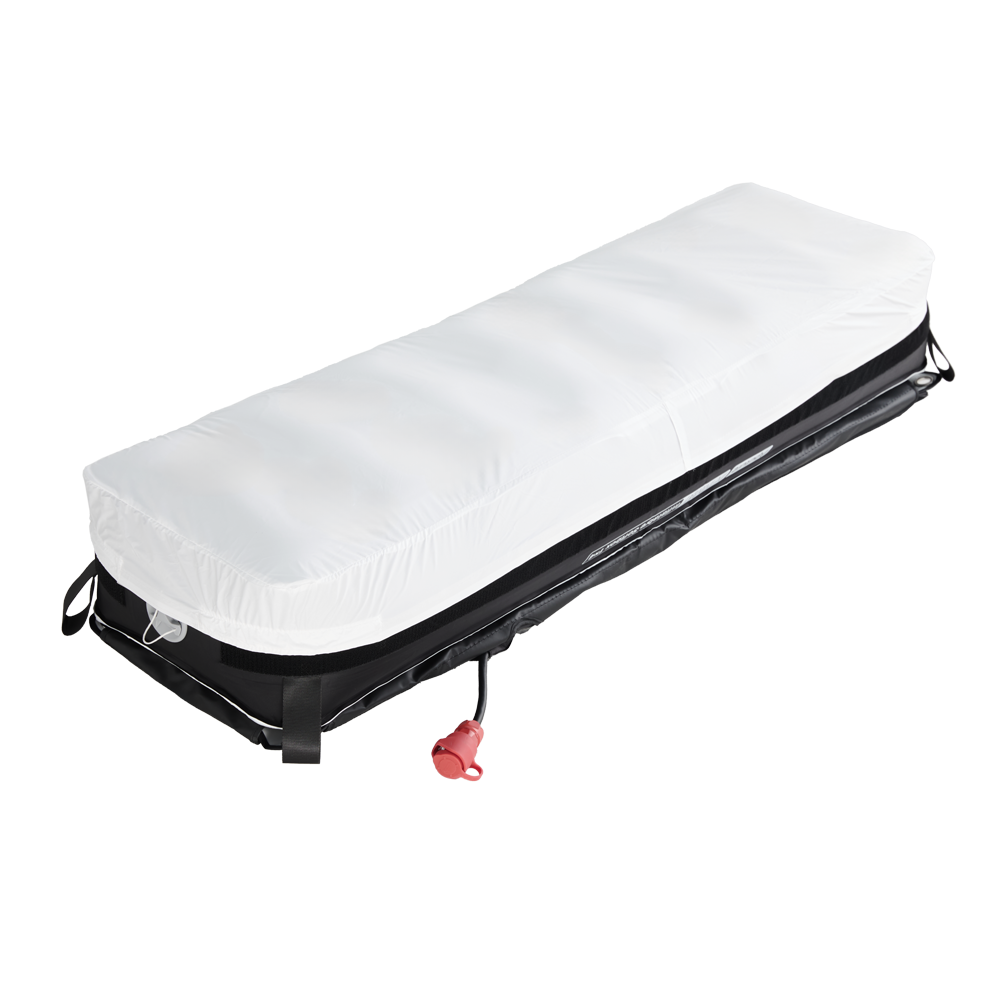


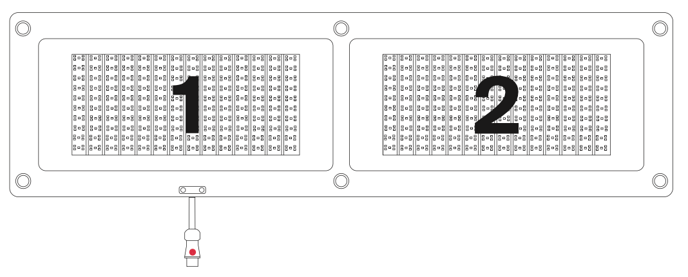
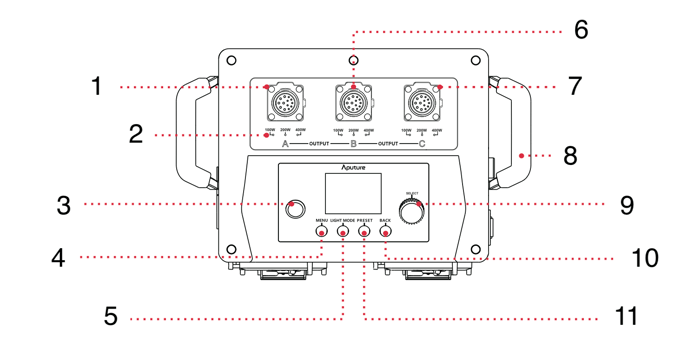
The Aputure INFINIMAT 1×4 is a narrow, two-pixel full-colour mat with a nominal 1 × 4ft face. It can form a long soft reflection, a close strip key or a controlled accent. The current clear-airbag system uses interchangeable diffusion and an external INFINIMAT controller.
The clear airbag is a physical support for interchangeable diffusion. Older INFINIMAT kits used a different softbox arrangement, so identify the supplied airbag and cloth before comparing published output or ordering replacement parts.
- RGBWW LED MatTwo colour zones. Learn about RGBWW
- 201W Single-Mat SetupMaximum Consumption
- Colour Temperature2,000–10,000 K CCT
- Weight 2.40 kg bare mat · 400 W controller 7.2 kg separately. Aputure specifications. Uses its carbon-fibre bracket; controller uses a K-Mount.
- Beam Control No numeric angle in Aputure’s small-mat specifications. Diffusion and the control grid change coverage.
- IP RatingIP65Head and Controller
Weather Protection Read the IP rating guide.
Key Specifications
| Specification | Details |
|---|---|
| Nominal fixture class | 200W |
| Maximum electrical consumption | 201W |
| Listed LED power output | 162W |
| CCT / colour | 2,000–10,000K; full-colour mixing and tint adjustment |
| Colour references | CRI ≥96; TLCI ≥97; SSI tungsten 84 / D56 73 |
| Pixels | 2 |
| Standard controller | 400W INFINIMAT controller package |
| Mat size | 124 × 34cm |
| Mat / clear-airbag weights | 2.40kg / 0.95kg |
| Controller weight | 7.2kg |
| Weather / operating temperature | IP65 lamp head and control box; −20°C to 50°C |
| Control | Onboard, Sidus Link / Link Pro, DMX/RDM, CRMX, Art-Net/sACN |
Output Calculator
Select the published setup and a manufacturer distance, or enter a custom throw where supported. The results describe centre-beam output, not the brightness across the whole beam.
Camera Settings
If the calculator does not load, use the published photometric table or source on this page. JavaScript is required.
F-stop is a planning estimate, not a meter reading. It uses direct, on-axis illuminance and includes only the optics and diffusion named in the selected setup. Meter on set to account for lens transmission, filters, added diffusion, bounce, dimming and ambient light.
How the exposure estimate works
N = √(E × ISO × t / C), where E is illuminance in lux and t = shutter angle ÷ (360 × fps). The default C = 340 is a dome reference; C = 250 is a flat reference. These are calibration constants, not a measured T-stop. A small nonzero digit is tenths of a stop above the displayed full stop.
Distance estimates and comparisons
Published points are used as given. Between published points the calculator fits a curve through the two nearest readings. Outside those points it uses the inverse-square law only when the fixture’s dataset permits it. Distances outside a configuration’s supported range are reported separately. Comparisons use one shared distance and camera setup; equal lux does not imply equal coverage.
View published readings for the selected configuration
Technical reference: Aputure product information and downloads.
Strengths and Limitations
Strengths
- A shallow diffused face is useful where a deeper softbox would obstruct the set.
- Removable diffusion, skirt and grid allow the output and spill to be adjusted as a package.
- Full-colour and pixel control support practical-light and moving-colour motivation.
Limitations
- The narrow face is useful for a strip reflection, but does not produce the same wrap in both axes as a square mat.
- The lamp-mat weight excludes the controller, airbag, accessories and support.
- The inflatable component needs protection from abrasion, punctures and unsuitable contact surfaces.
Practical Uses
| Setup | Working approach |
|---|---|
| Tabletop strip reflection | Place the long face parallel to the product edge you want to describe. Adjust angle and distance to control the reflection rather than trying to solve its shape with brightness. |
| Close portrait edge | Rotate the strip vertically for a narrow soft edge. A grid and flags help keep it off the background and lens. |
| Overhead narrow source | Rig the long mat on the approved bracket and support its cable. Check the long-axis coverage on the subject before choosing the position. |
Output and Colour
The readings below refer to the current clear airbag with its named diffusion cloths. They should not be substituted for the older softbox table. Rigid-softbox configurations also have separate published figures.
Choose the diffusion from the required source appearance, then meter at the subject. The labels “1 stop” and “2 stop” identify cloth options; the complete airbag, cloth and grid combination determines the measured output and spread.
| CCT | Distance | 1-stop (lux) | 1-stop + grid (lux) | 2-stop (lux) | 2-stop + grid (lux) |
|---|---|---|---|---|---|
| 3,200K | 1m | 3,890 | 2,454 | 3,000 | 1,947 |
| 3,200K | 3m | 436 | 329 | 375 | 288 |
| 5,600K | 1m | 4,270 | 2,696 | 3,320 | 2,143 |
| 5,600K | 3m | 478 | 362 | 412 | 316 |
Published photometrics: measurement configurations and full output tables.
Tests and Demonstrations
Identify the airbag generation during prep. Compare the published configuration with the actual diffusion, grid, colour and distance before relying on its exposure figure. For matching, look at skin, wardrobe and reflective set materials through the production camera.
Power and Batteries
The published maximum consumption for this configuration is 201W. The nominal 200W fixture label and the controller model name do not describe the same electrical quantity.
INFINIMAT controllers can operate supported combinations of mats. Both total capacity and the permitted load at each port matter; the number of sockets is not the number of full-power mats that can always be connected. Use the configuration table for the exact controller.
For battery or other DC operation, confirm the controller version, approved voltage/current, cable and permitted output level. Do not assume a small camera-battery pair can deliver the AC photometric specification. Include the controller’s conversion losses and power limit when estimating runtime.
400W Controller Capacity: The controller’s name describes its supported combined lamp load, not the consumption of one 1×4 mat. Aputure’s clear-softbox data book lists three 1×2 mats, two 1×2 plus one 1×4, two 1×4 mats, or one 2×4 as supported 400W-box configurations. These are manufacturer-approved combinations, not a rule to connect three mats of any size. The 400W controller has V-Mount or Gold Mount options and AC pass-through; check the supply, battery and downstream circuit limits for the complete package.
Control, Cooling and Camera Operation
The control box provides local operation, Sidus app control, wired DMX/RDM, CRMX reception and Ethernet lighting protocols. The mat connects to that controller; it is not an independent Bluetooth fixture.
This size has 2 controllable pixels. Select the matching personality and confirm orientation before programming a moving effect. Keep the pixel map and channel footprint in the lighting notes.
The mat has no local fan assembly like a conventional monolight, but the controller uses cooling fans. Keep the controller ventilated and listen to it at the microphone position. Test low fades and any high-speed camera settings with the installed firmware and the complete cue.
Modifiers, Rigging and the Working Package
| Component / accessory | Package considerations |
|---|---|
| Raised lamp package | The long shape introduces leverage at the mounting point. Include bracket position and cable strain in the support plan, even though the bare mat is only 2.40kg. |
| Controller | 400W package; 7.2kg. Position and support it independently of the lamp cable. |
| Diffusion and spill control | Correct-size clear airbag, 1-stop or 2-stop cloth, skirt and grid. |
| Head cable | Use the supported cable and connector for this mat/controller class; include cable weight and strain relief in the rig. |
| Air pump and repair kit | Allow setup access to valves, the specified pump and the supplied patch materials. |
| Mat-only versus complete kit | An LED & Clear Softbox Pack omits the controller; verify the exact rental or purchase contents. |
An inflated airbag is not a structural suspension point unless the manufacturer specifically identifies it as one. Use the approved frame, bracket or rigging points, and protect the airbag from sharp edges.
Leave room to inspect inflation and lower the fixture for service. A large soft surface also catches air movement; weather sealing of the electronics does not remove the mechanical effect of wind.
Alternatives and Related Fixtures
| Fixture | When to compare it |
|---|---|
| amaran F22c | A squarer full-colour mat when more wrap is preferable to a strip shape. |
| INFINIBAR PB12 | A compact pixel bar for on-screen lines and effects rather than a broad diffused strip key. |
| LiteMat Spectrum 4 | Compare footprint, usable area and controller package for close soft-light work. |
What People Are Saying
LensVid at IBC 2024. Its interview with Ted Sim demonstrates INFINIMAT’s large-array concept and pixel-control workflow. Read the family demonstration.
Setup demonstration. Aputure’s current product page includes an INFINIMAT setup tutorial. It covers the system’s assembly rather than claiming a separate independent output test of this size.
Videos
Aputure: INFINIMAT family preview at NAB 2024. Manufacturer system demonstration; the current clear-airbag package is documented separately below.
Rental and Used-Fixture Checks
Before You Book
- Confirm the mat size, controller model and supported port configuration.
- Identify clear-airbag versus older softbox components and match the diffusion and grid.
- Inflate the airbag and inspect valves, seams and contact points before installation.
- Inspect mat backing, mounting hardware, cable strain relief and connectors.
- Test every pixel and the required DMX or wireless-control path.
- Warm the controller, check fan noise and test the intended dimming cue.
- Include all brackets, cables, pumps, patch materials and cases in the order.
Documentation and Specifications
- Aputure product specifications, kit options and firmware downloads
- Product manual (PDF)
- DMX profiles (PDF)
- Manufacturer data sheet (PDF)
- Controller combinations and complete system options
Browse Aputure lights · LED mats · all equipment.