
Last Updated 1 day ago
Overview
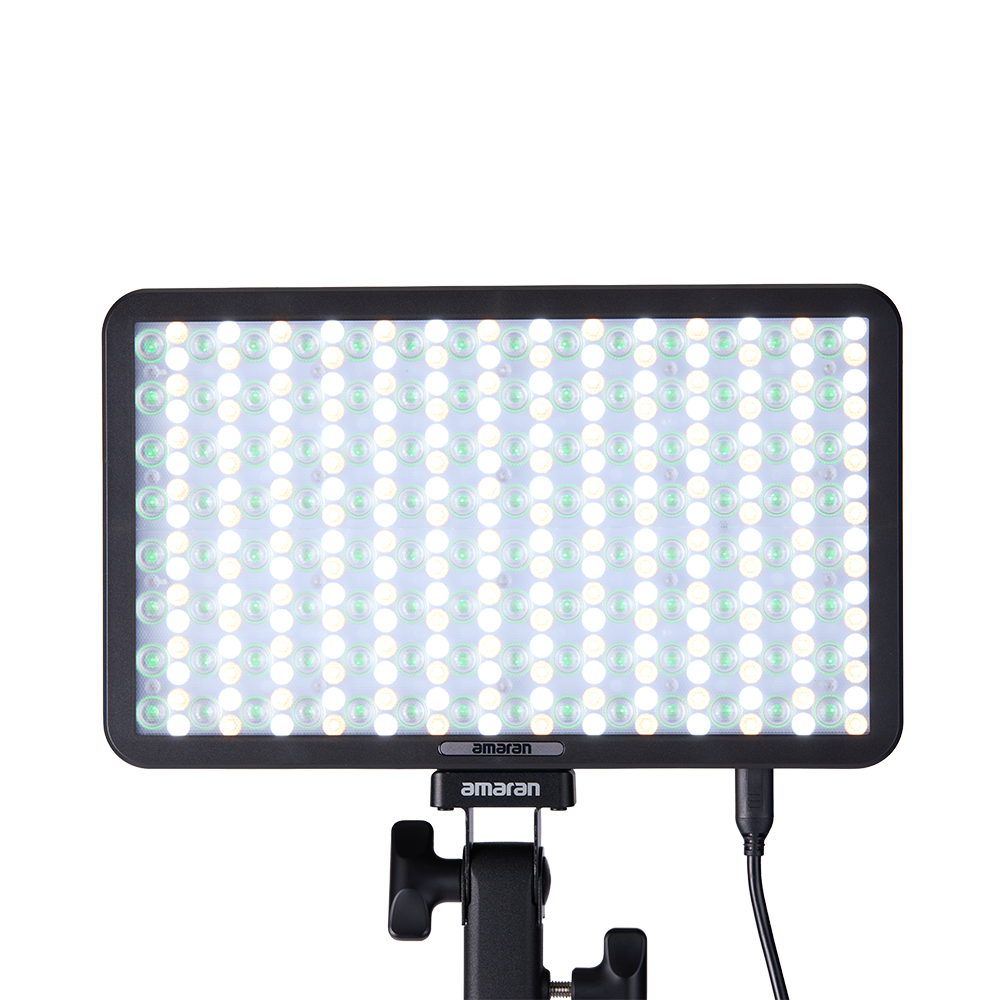
The amaran Pano 60c is a 60W RGBWW panel for portable keys, background colour and compact studio work. It combines a thin rigid head, app control and a fitted softbox package with a relatively concentrated bare beam.


Product photographs: amaran. Select an image to view it at full size.
The 60c is the smaller, lighter Pano. Its tablet-sized head is easy to carry, while the fitted softbox, grid and diffuser provide more control than the bare panel alone.
Key specifications
| Specification | Details |
|---|---|
| LED output / maximum input | 60W / 65W |
| CCT | 2,300–10,000K |
| Colour | RGBWW |
| CRI / TLCI | 96 / 97 |
| SSI P3200 / D56 | 84 / 74 |
| TM-30 Rf / Rg | 93 / 101 |
| Bare beam | 45° |
| Head dimensions | 10.0 x 6.1 x 1.2in |
| Head weight | 610g / 1.3lbs |
| Power | DC 20V |
| Cooling | Active fan; output reduced in fan-off operation |
| Controls | Onboard, amaran app, Sidus Link |
| Battery | External battery accessory or suitable PD bank; not built in |
Strengths and limitations
Strengths
- RGBWW colour and white-light operation in a shallow head.
- Fitted softbox, diffuser and grid reduce separate accessory planning.
- USB-C and Ace E-Lock power options suit a mobile kit.
Limitations
- The 45° bare beam produces a concentrated field rather than an even room-wide wash.
- Fan cooling and a mostly plastic body need consideration near microphones and during transport.
- A small softbox only creates soft light while it remains large relative to the subject.
Practical uses
| Setup | Working approach |
|---|---|
| Location interview | Use the fitted softbox close to the subject and feather the brightest part past the face. The grid reduces spill into a small room, while negative fill controls reflected room light. |
| Background colour | Run HSI or RGB to put colour on a wall, then expose that colour on camera. A white-light meter reading alone cannot predict the brightness of saturated blue. |
| Bounce source | Aim the bare panel at a nearby white or muslin surface. Check that the beam covers the intended bounce; widening the usable source matters more than a centre hotspot. |
Output and colour
The bare-panel and softbox readings are materially different. Judge the exposure of the final source rather than applying the maximum bare figure to a diffused setup. At close distances, source size and the illuminated area also make a simple inverse-square estimate less reliable.
| 5,600K configuration | 1m | 0.5m |
|---|---|---|
| Bare | 6,290 lux | 21,790 lux |
| Softbox | 1,642 lux | 7,130 lux |
| Control-grid configuration | 1,501 lux | 5,780 lux |
CRI, TLCI and SSI describe different aspects of colour reproduction. A high CRI value does not establish a perfect match to daylight, tungsten or another LED. Compare important skin tones, wardrobe and product colours on the camera used for the job.
Power and batteries
The 60c uses a 65W USB-C PD power package at the documented 20V profile. Use a compatible PD power bank or adapter and a suitably rated cable for full output.
The optional Peak battery connects through Ace E-Lock for a compact external power arrangement. It is additional equipment, so include its weight and measured runtime when comparing the complete Pano kit with a panel that has an internal battery.
Control, cooling and camera operation
The onboard screen and controls provide white-light, tint and colour adjustments; amaran app and Sidus Link are documented wireless routes. Store the selected light mode, channel values and fan setting when recording a repeat setup.
Fan-off operation limits available output. Listen at the microphone position and set the intended cooling mode before exposure. Neither the specifications nor the control list identifies wired DMX or built-in CRMX for this panel.
Modifiers, rigging and the working package
Use the size-matched Pano softbox, diffuser, control grid and optional barn doors. These are fitted panel accessories; the head is not a Bowens COB and does not take Bowens optics directly.
Ace Lock and Ace E-Lock serve the mounting and powered accessory arrangement. Check the latch and stand adapter before raising the panel. Support a battery or cable so a bump cannot twist the head or leave the connector carrying the weight.
Alternatives and related fixtures
| Fixture | Choose it for |
|---|---|
| amaran P60c | An earlier RGBWW panel with NP-F battery support and a different modifier package. |
| amaran F21c | A flexible colour source for a low-profile position or broader diffused face. |
| amaran 150c | A point source when interchangeable reflectors, softboxes and other Bowens accessories matter. |
What people are saying
Curtis Judd’s Pano 60c/120c review. Judd tests a bounced setup and discusses the mounting connection, power demand and thermal modes. His supplied review units represent a particular kit and firmware version.
Videos
Pano 60c and 120c: official user guide
Assembly, operation and system settings for the two Pano panels.
Rental and used-fixture checks
- Confirm the exact model and generation on the label, then compare the included supply, cables and accessories with the matching manual.
- Inspect the emitting face, housing, connector pins, mounting threads and locks. Test every supplied modifier and make sure the release mechanism fully engages.
- Run the light at the intended output until it reaches normal operating temperature. Check for flicker, unexpected shutdown, uneven emitters and unusual fan noise.
- Test white light and every available colour mode; check low-level dimming, blackout and the camera/shutter combination used for the job.
Documentation and specifications
- Official model information
- Manufacturer kit contents and accessories
- Model photometrics and technical specifications
- Model operation and controls
- Manufacturer product manual
Browse amaran lights or search the equipment directory.