
Last Updated 1 day ago
Overview
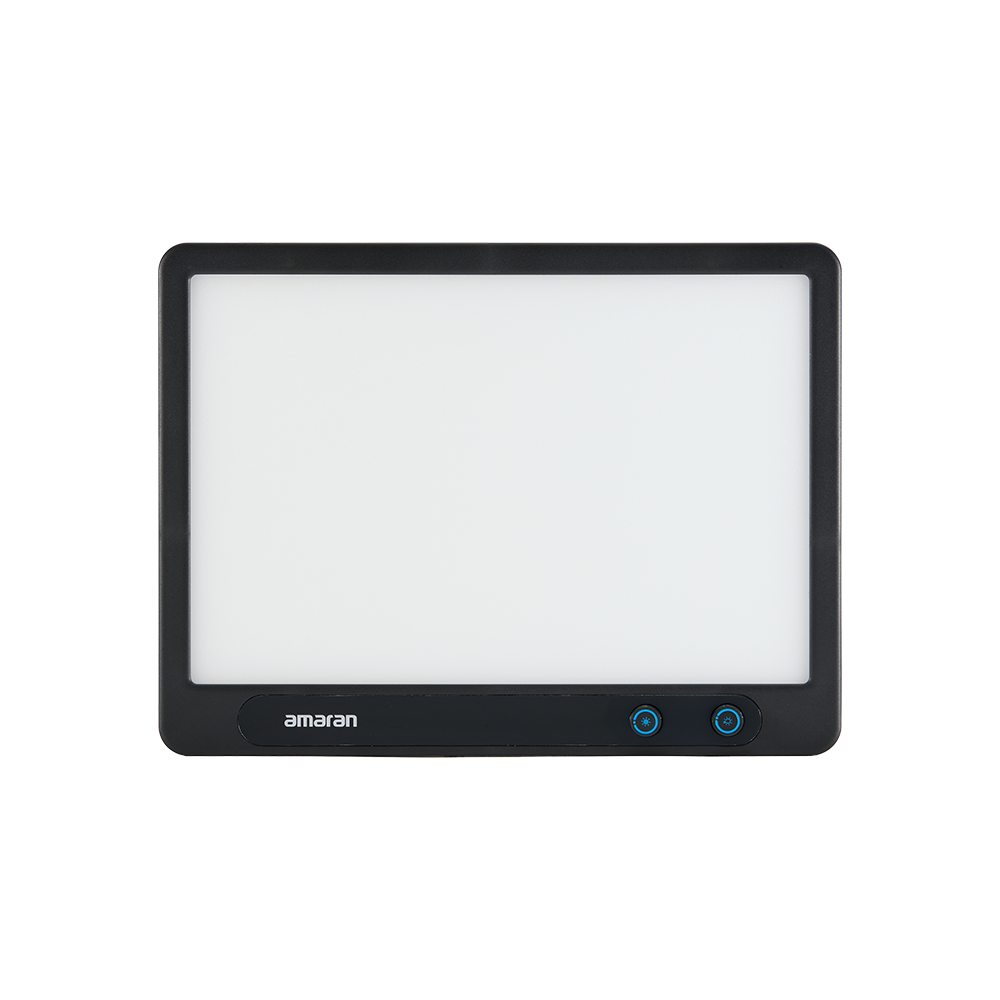
The amaran Verge is a compact rectangular bi-colour edge-lit panel for desks, livestreams, interviews and compact studios. Its emitting surface already includes diffusion, allowing a shallow lighting setup without adding a conventional softbox.


Product photographs: amaran. Select an image to view it at full size.
The rectangular Verge is intended for relatively close lighting. It is easier to place beside a monitor than a large COB softbox, but it does not provide the throw or accessory flexibility of a point-source fixture. The standard Verge has no numeric front display; use the app to record exact settings.
Key specifications
| Specification | Details |
|---|---|
| LED output / maximum consumption | 26W / 30W |
| CCT | 2,700–6,500K |
| CRI / TLCI | 96 / 97 |
| SSI P3200 / D56 | 82 / 73 |
| TM-30 Rf / Rg | 93 / 101 |
| Power | USB-C PD, 20V profile |
| Cooling | Passive, no fan |
| Weight | 940g / 2.1lbs |
| Controls | Front knobs, amaran app, Sidus Link |
| Fixture form | Rectangular edge-lit panel |
| Battery | External power; no internal battery |
| Maximum reference output | 3,160 lux @ 0.5m |
Strengths and limitations
Strengths
- Diffused emitting surface needs little assembly for a desk key.
- Front-facing controls remain accessible from the seated position.
- Passive cooling avoids a fixture fan beside a desk microphone.
Limitations
- Bi-colour white light rather than RGB effects.
- External USB-C power is required; there is no built-in battery.
- The small emitting surface becomes relatively hard as the subject moves farther away.
Practical uses
| Setup | Working approach |
|---|---|
| Desktop key | Position the panel just above eye height and off the lens axis. Balance its level against the monitor and room lighting instead of automatically using maximum brightness. |
| Product demonstrations | Watch the shape of the panel in glossy objects. Rotate or raise it to move the reflection away from labels, screens and curved surfaces. |
| Small interview corner | Bring the panel close for softer shadows, then move the subject away from the wall. A flag or negative fill can retain contrast without needing a brighter fixture. |
Output and colour
The maximum reference is measured at 0.5m. Keep that short distance attached to the number; it cannot be compared directly with another panel quoted at 1m. The large diffused face is chosen for coverage and shadow quality at a working distance, rather than for the centre reading of a narrow spotlight.
| Configuration | 0.5m | 1m |
|---|---|---|
| Bare, 3,200K | 2,860 lux | 756 lux |
| Bare, 5,600K | 3,150 lux | 822 lux |
CRI, TLCI and SSI describe different aspects of colour reproduction. A high CRI value does not establish a perfect match to daylight, tungsten or another LED. Compare important skin tones, wardrobe and product colours on the camera used for the job.
Power and batteries
Use the included 30W USB-C PD power package or a compatible source with the required profile. This is a powered fixture, not a rechargeable light; the USB-C connector should remain accessible for service and changes.
For a shared desktop power station, budget for the light, computer and other accessories together. Keep enough cable slack for the full adjustment range, and support the adapter so it does not load the panel’s socket.
Control, cooling and camera operation
Intensity and CCT can be adjusted from the front of the panel or through the supported amaran app and Sidus Link routes. Desktop app and Stream Deck integration can make a fixed workstation easier to recall without reaching around a monitor.
There is no wired DMX or CRMX interface listed for this panel. For repeat setups, record light position as well as displayed intensity and CCT; a small position change is often more visible than a one-step electronic adjustment.
Modifiers, rigging and the working package
The edge-lit face is the working diffused source. Additional diffusion placed in front can enlarge the source only when enough of that material is actually illuminated; it also reduces the light reaching the subject.
The standard Verge package includes the light and power adapter. Desk Stand, Desk Clamp Stand and the conventional light-stand adapter are separate mounting choices. Use the 1/4-20 thread or the matching Verge Lock hardware rather than assuming a stand is included.
Alternatives and related fixtures
| Fixture | Choose it for |
|---|---|
| amaran P60x | A compact bi-colour panel with a different battery and diffusion package. |
| amaran 150c | A full-colour COB when interchangeable Bowens modifiers matter. |
| amaran F21c | A thin flexible colour mat for positions where a rigid panel is awkward. |
What people are saying
Verge and Verge Max hands-on review. The paired review considers the two shapes in a home-studio setting. Compare the mounting footprint and working distance as well as the light output.
Videos
amaran Verge and Verge Max: manufacturer overview
Manufacturer introduction to the edge-lit desktop panels.
Rental and used-fixture checks
- Confirm the exact model and generation on the label, then compare the included supply, cables and accessories with the matching manual.
- Inspect the emitting face, housing, connector pins, mounting threads and locks. Test every supplied modifier and make sure the release mechanism fully engages.
- Run the light at the intended output until it reaches normal operating temperature. Check for flicker, unexpected shutdown, uneven emitters and unusual fan noise.
- Test white light and every available colour mode; check low-level dimming, blackout and the camera/shutter combination used for the job.
Documentation and specifications
- Official model information
- Manufacturer kit contents and accessories
- Model specifications
- Operation and controls
- Manufacturer product manual
Browse amaran lights or search the equipment directory.