
Last Updated 4 hours ago
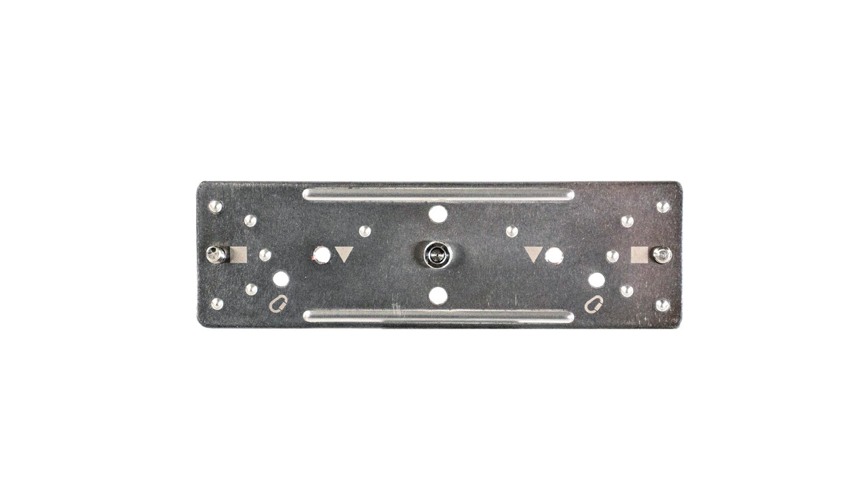
The WingPlate joins two Astera tube holders on a single aluminium plate. The two clips support one tube and leave a central thread behind it for the mounting hardware. A bare WingPlate arrives without the clips.
- Plate code
- AX1-WP
- Required holders
- 2 × AX1-H
- Rear thread
- ¼″-20 UNC
Compatible fixtures
Astera lists the same plate for the AX1 PixelTube, FP1 Titan, FP2 Helios and FP3 Hyperion. The plate, holders and spigot have separate order codes. Spell out all three when a rental house lists only “Astera tube mount”.
Key specifications
| Specification | Details |
|---|---|
| Plate dimensions | 180 × 55 × 19 mm |
| Plate weight | 0.13 kg |
| Required tube holders | Two AX1-H holders, supplied separately |
| Holder fasteners | Two screws listed on the WingPlate data sheet |
| Rear connection | ¼″-20 UNC for the Astera AX1-BLT double-ended spigot |
What to put on the order
| Setup | What to check |
|---|---|
| AX1-WP | One plate with the mounting points for both clips. |
| 2 × AX1-H | A pair of holders for each WingPlate assembly. Count holders by plate when several tubes appear in shot. |
| AX1-BLT | The matching double-ended spigot for the rear thread. Confirm the receiving hardware for the planned position. |
On set
For a line of tubes in frame, lay out the plates, clip pairs and connecting hardware by position before the fixtures arrive. Look along the camera sightline once the tubes are in place. A visible bracket or a connector trapped against the set can force a change after the tubes have been addressed.
Rental and used-gear checks
- Check the part label on the plate and verify two matching holders per assembly.
- Inspect the clips, both holder screws and the centre thread for damage.
- For a suspended installation, have the responsible rigger confirm the support and secondary retention for the full assembly. The plate weight is not a load rating.