
Last Updated 5 hours ago
ColorSource PAR V Zoom Overview
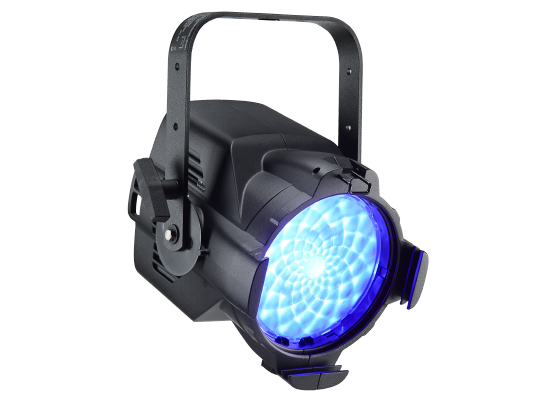

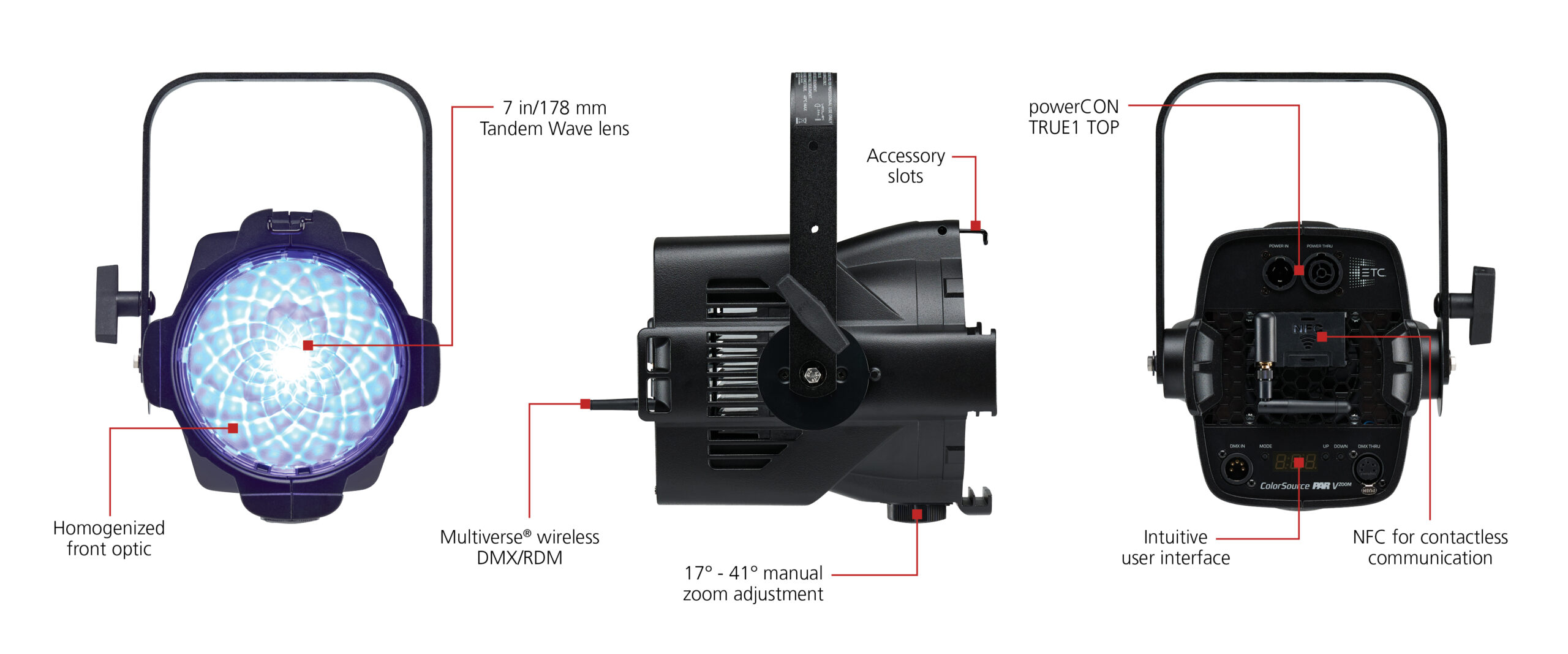
The ETC ColorSource PAR V Zoom is a five-colour RGBIL LED wash fixture with a manual optical zoom. Indigo and lime extend the colour-mixing options beyond a basic RGB fixture; this is a different engine from ETC’s eight-colour Lustr X8.
- RGBIL LED PAR RGBIL: red, green, blue, indigo and lime
- 162 W Typical At 120 V AC.
- Colour Temperature 3,200 K and 5,600 K ETC’s published photometry settings.
- Weight 4.45 kg / 9.8 lb
- Beam Angle 19–41° per the datasheet; the product page lists 17–41°
- IP Rating IP20 · indoor dry locations. Read the IP Rating.
ColorSource PAR V Zoom Specifications
| Specification | Details |
|---|---|
| Light engine | RGBIL: red, green, blue, indigo and lime |
| White-light range | Colour mixing; white settings depend on the control profile |
| Optical system | 190mm aperture |
| Beam coverage | 19–41° in datasheet; 17–41° on product page |
| Typical input at 120V | 162W; see power section for test conditions |
| Published weight | 4.45kg; see working-package notes |
| DC operation | AC powered; no direct battery input listed |
| Protection | IP20; indoor dry-location equipment |
| Control | 5-pin DMX/RDM; Multiverse on equipped models; NFC configuration |
| Flicker settings | 5kHz default / 25kHz via RDM |
| Wireless | Multiverse on equipped versions; verify the ordered model |
Output Calculator
Estimate centre-beam output or compare two settings at the same throw. The calculator uses candela from the ETC ColorSource PAR V Zoom datasheet, revision E, pp. 4–5. ETC separately prints unlabelled throw illustrations whose numbers do not match the labelled candela rows. This calculator uses only the mode-specific candela and does not import the illustration values as measurements.
Camera Settings
At 5 m (16.4 ft) in spot (about 19°), 5,600 K gives about 1,230 lx at beam centre; Full On Direct gives about 1,508 lx. The reference table works without JavaScript.
Published intensity data and calculation method
Lux = candela ÷ distance in metres squared. Foot-candles = lux ÷ 10.7639. The camera estimate uses f-number = √(lux × ISO × shutter time ÷ meter reference). The small digit is tenths of a stop, not a T-stop.
The 3.048 m (10 ft) floor is a conservative calculator limit, not a tested accuracy threshold. Beyond that, these are inverse-square estimates at beam centre, not measurements or coverage predictions. Only ETC’s published focus and output settings are included; diffusion, accessories and dimming are not modelled. Meter the working setup.
| Focus | Full On Direct | 3,200 K | 5,600 K |
|---|---|---|---|
| Spot (about 19°) | 37,695 | 34,087 | 30,747 |
| Mid (26.3°) | 24,741 | 19,366 | 18,499 |
| Flood (40.8°) | 13,981 | 11,332 | 10,873 |
Strengths and Limitations
| Aspect | Working implication |
|---|---|
| Strength | Adjustable coverage without replacing the whole head. |
| Strength | NFC setup and a console control path for repeatable programming. |
| Limitation | Wash optics cannot project sharp gobos or shutter cuts. |
| Limitation | Active cooling and IP20 protection require attention to sound and location conditions. |
Practical Uses
- Set a repeatable top or back wash for filmed performances and stage productions.
- Use a narrower setting for an accent, then widen for a larger scene without exchanging the whole fixture.
- Balance saturated scenic colour against white keys through the production camera; equal console percentages do not produce equal exposure.
The manual zoom varies the optical coverage without requiring a spread filter. ETC’s product page gives 17–41°, while the downloaded datasheet specifies 19–41°. Use the photometric file for the actual setup and verify coverage at the required throw.
Output and Colour
| Manufacturer reference | Published value |
|---|---|
| Published field flux | 5,780 lumens |
| Published sphere flux | 6,773 lumens |
Lumen ratings describe total flux, while lux describes light arriving at a surface. Do not read the flux table as a lux measurement at a particular distance. Use ETC’s linked photometry for the exact array, lens, focus and diffusion configuration. Meter the working setup after adding colour, diffusion or other modifiers.
The RGBIL engine uses five colours, including indigo and lime. It is a colour-mixing system rather than a dedicated variable-white fos/4 engine. Select the correct console personality and calibrated operating mode before matching units; a raw emitter mix is a different control choice from a calibrated colour request.
Power and Batteries
ETC lists 162W typical input at 120V. The operating range is 100–240V AC, 50/60Hz. Supply constant power and use the fixture’s electronic dimming; the power-through connector does not make the fixture suitable for a conventional phase-dimmed circuit.
Check the supply lead, grounding, connector rating and total circuit load. Published fixture-per-circuit counts assume a particular breaker and supply condition; they are not a universal instruction for every outlet or distribution system. Account for startup current as well as steady running draw.
Control, Cooling and Camera Operation
| Control path | Operation |
|---|---|
| Wired control | 5-pin DMX and RDM. Match operating mode and DMX footprint to the console profile. |
| Wireless control | City Theatrical Multiverse on equipped versions. It is a different system from CRMX; confirm the transmitter and receiving hardware. |
| NFC | ETC Set Light configures supported fixture properties at close range. NFC setup is separate from continuous wireless DMX control. |
| Cooling and PWM | Active fan cooling; use the specified frequency choices and test the actual fan setting, dimming level, shutter and frame rate. |
Test low-level fades as well as full output. A high PWM frequency alone does not prove flicker-free results at every frame rate and shutter combination. Listen to the fan at the microphone position after the fixture has reached working temperature. Save cooling, colour and operating-mode settings with the lighting notes.
Modifiers, Rigging and the Working Package
Use the correct frame and retention system for the 190mm aperture. Fit only approved accessories, keep the fan path clear and support the fixture through its yoke. A nominal seven-inch lens description is not a universal accessory fitting.
IP20 describes an indoor fixture, so plan a suitable dry environment. Keep vents unobstructed and follow the regional manual’s mounting and clearance instructions. For overhead work, use the designated mounting and secondary attachment points with hardware rated for the complete assembly.
Alternatives and Related Fixtures
| Compare | When it helps |
|---|---|
| ETC Source Four tungsten | A tungsten profile when shutter cuts and pattern projection matter; it needs an appropriate lamp and external dimming. |
| ETC lighting hub | Compare ETC’s panel, Fresnel and profile formats by the beam needed for the job. |
| All equipment | Compare other manufacturers with the same source size, working distance and modifier. |
What People Are Saying
Field Feedback at a Glance
The notes below use ETC’s demonstration and model documentation, not independent owner testing.
What works
- Adjust the beam without swapping lenses. The manual zoom moves from a narrower beam to a broader wash on the same head. ETC’s datasheet lists 19°–41°; the product demo describes 17°–41°. Use the exact published setting and measured beam when planning coverage. Model datasheet; Zoom demonstration.
- One fixture for white and colour cues. The red, green, blue, indigo and lime emitters support programmed colour. The 3,200 K and 5,600 K rows in the calculator are reference measurements, not the only available colours. See the colour and photometric references.
- Set addresses at the head or via NFC. ETC’s Set Light app and wireless Multiverse options help configure a set of fixtures without relying on local buttons for every change. Verify the hardware and console settings for the chosen control path. See installation and control options.
Drawbacks to plan for
- Do not force the zoom ring. ETC’s instructions say it has a mechanical travel limit and is not designed to turn in a full circle. Confirm both ends of travel during prep. Manufacturer setup directions.
- Check firmware before a quiet or high-speed shot. ETC’s 4.3.0 release notes list fixes for colour oscillation with the fan off and for different dimming thresholds at standard and high PWM frequency. Check the installed version and test the planned fan and frequency settings. ETC firmware release note.
- Dry indoor use only. The datasheet lists IP20. It also identifies 162 W as typical at 120 V, not a universal reading or a substitute for circuit and thru-connection planning. ETC installation and electrical data.
ETC’s official video demonstrates the fixture and control arrangement. Treat it as a manufacturer demonstration, rather than independent evidence of output or silent operation. View the source.
ETC’s exact-model installation guide confirms the zoom knob has a travel limit and is not designed to turn a full circle. Check its full travel during prep. This is manufacturer guidance, not an owner reliability report.
Videos
The following demonstration provides an operating reference. Specifications above refer to the named model and configuration.
Rental and Used-Fixture Checks
- Confirm the model label, array and regional power rating; housing appearance alone may not identify the light engine.
- Inspect the front PAR optic, manual zoom travel, accessory retention and yoke lock.
- Test every colour channel, low-level fades, fan operation and the intended wired or wireless control mode.
- Check firmware against the manufacturer’s support notes and run the required camera test before rigging.
- Check the fixture software and test the first visible steps of the fade at the intended output frequency. ETC’s v4.3.0 release note identifies fixes for a different low-end threshold at 25 kHz versus 1.2 kHz and colour oscillation with the fan disabled. These were software issues, not general behaviour of all PAR V Zoom units.
Documentation and Specifications
ETC colour-calibration modes · ETC fixture directory and photometry downloads
Photographs: ETC. Family photographs and shared housing details are identified in their captions.
Browse ETC lighting · all equipment.