
Last Updated 5 hours ago
fos/4 Panel 8 Overview

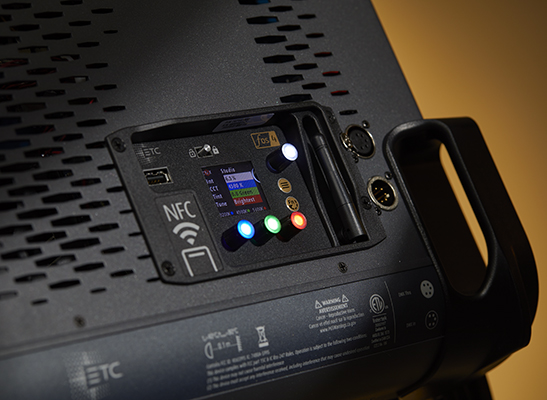

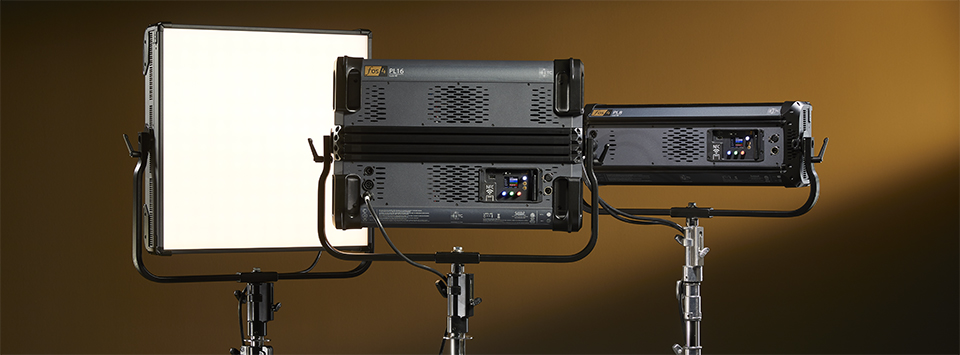
The ETC fos/4 Panel 8 is an 8 × 24 inch LED soft panel for studio keys, overhead ambience and broad bounced light.
It is offered as a Lustr X8 full-colour model or a Daylight HDR tunable-white model. These are different LED arrays, rather than two modes selectable on the same head.
- LED Soft Panel Lustr X8 full colour or Daylight HDR tunable white.
- Power 475 W typical at 120 V; 465 W at 230 V AC.
- Colour Temperature 1,900–10,450 K
- Weight 14.5 kg / 32 lb published weight
- Beam Angle 108° with standard diffusion
- IP Rating IP20 · indoor dry use. Read the IP rating.
fos/4 Panel 8 Specifications
| Specification | Details |
|---|---|
| Light engine | Lustr X8 full colour or Daylight HDR tunable white |
| White-light range | 1,900–10,450K |
| Optical system | 8 × 24 inch aperture |
| Beam coverage | 108° with standard diffusion |
| Typical input at 120V | 475W; see power section for test conditions |
| Published weight | 14.5kg; see working-package notes |
| DC operation | 24–36V DC; reduced output may apply |
| Protection | IP20; indoor dry-location equipment |
| Control | 5-pin DMX/RDM; Multiverse on equipped models; NFC configuration |
| Model codes | fos4PL8 (Lustr X8); fos4PD8 (Daylight HDR) |
| Flicker settings | 5 kHz Low; 20 kHz High on originals, 25 kHz High on later hardware; 11 kHz Medium on supported firmware. ETC user manual. |
Compare Lustr X8 and Daylight HDR with ETC’s standard diffuser. To compare arrays directly, select the same colour temperature and Studio mode for both. ETC’s revision I datasheet reports foot-candles at 1, 2 and 3 m; the calculator converts those readings to lux and does not extrapolate beyond them.
Output Calculator
Select the published setup and a manufacturer distance, or enter a custom throw where supported. The results describe centre-beam output, not the brightness across the whole beam.
Camera Settings
If the calculator does not load, use the published photometric table or source on this page. JavaScript is required.
F-stop is a planning estimate, not a meter reading. It uses direct, on-axis illuminance and includes only the optics and diffusion named in the selected setup. Meter on set to account for lens transmission, filters, added diffusion, bounce, dimming and ambient light.
How the exposure estimate works
N = √(E × ISO × t / C), where E is illuminance in lux and t = shutter angle ÷ (360 × fps). The default C = 340 is a dome reference; C = 250 is a flat reference. These are calibration constants, not a measured T-stop. A small nonzero digit is tenths of a stop above the displayed full stop.
Distance estimates and comparisons
Published points are used as given. Between published points the calculator fits a curve through the two nearest readings. Outside those points it uses the inverse-square law only when the fixture’s dataset permits it. Distances outside a configuration’s supported range are reported separately. Comparisons use one shared distance and camera setup; equal lux does not imply equal coverage.
View published readings for the selected configuration
Published ETC readings by array and Studio mode
| Engine and setup | 1 m | 2 m | 3 m |
|---|---|---|---|
| Lustr X8 · 3,200 K Brightest | 465 fc | 121 fc | 54 fc |
| Lustr X8 · 3,200 K Hybrid | 364 fc | 95 fc | 42 fc |
| Lustr X8 · 3,200 K Spectral | 262 fc | 68 fc | 30 fc |
| Lustr X8 · 4,500 K Brightest | 552 fc | 144 fc | 64 fc |
| Lustr X8 · 4,500 K Hybrid | 468 fc | 122 fc | 54 fc |
| Lustr X8 · 4,500 K Spectral | 384 fc | 100 fc | 45 fc |
| Lustr X8 · 5,600 K Brightest | 596 fc | 155 fc | 69 fc |
| Lustr X8 · 5,600 K Hybrid | 512 fc | 133 fc | 59 fc |
| Lustr X8 · 5,600 K Spectral | 429 fc | 112 fc | 50 fc |
| Daylight HDR · 3,200 K Brightest | 221 fc | 56 fc | 25 fc |
| Daylight HDR · 3,200 K Hybrid | 191 fc | 49 fc | 22 fc |
| Daylight HDR · 3,200 K Spectral | 161 fc | 41 fc | 18 fc |
| Daylight HDR · 4,500 K Brightest | 452 fc | 115 fc | 51 fc |
| Daylight HDR · 4,500 K Hybrid | 354 fc | 90 fc | 40 fc |
| Daylight HDR · 4,500 K Spectral | 255 fc | 65 fc | 29 fc |
| Daylight HDR · 5,600 K Brightest | 654 fc | 167 fc | 74 fc |
| Daylight HDR · 5,600 K Hybrid | 502 fc | 128 fc | 57 fc |
| Daylight HDR · 5,600 K Spectral | 351 fc | 90 fc | 40 fc |
Strengths and Limitations
| Aspect | Working implication |
|---|---|
| Strength | Broad emitting area and selectable colour/white array options. |
| Strength | NFC setup and a console control path for repeatable programming. |
| Limitation | A broad panel needs grids or flags to contain spill; it cannot produce a profile cut. |
| Limitation | Substantial head weight and electrical demand for the panel format. |
Practical Uses
- A narrow interview key in a cramped set; turn the rectangular aperture vertically for a tall reflection.
- Place the fixture close to a diffusion frame for a larger apparent source; use a grid or flags to stop the panel washing the background.
- For product work, position the panel by watching its reflection in the object rather than judging only the incident light level.
The standard diffusion produces a broad 108° distribution. This is a soft panel, so it does not replace a Fresnel for a narrow beam or a profile for shutter cuts. Additional diffusion increases the emitting area only when the diffusion itself is illuminated across a useful surface.
Output and Colour
ETC fos/4 Panel Lustr X8 colour gamut (PDF). The CIE 1931 plot covers the eight-colour Lustr X8 array, not the Daylight HDR version.
| Manufacturer reference | Published value |
|---|---|
| Typical input at 120V | 475W |
| Typical input at 230V | 465W |
| Published beam | 108° with standard diffusion |
Lumen ratings describe total flux, while lux describes light arriving at a surface. ETC’s published maximum flux for this size at 5,600 K is 20,569 lumens. That is not the lux delivered at a given distance; use the Output Calculator for the standard diffuser’s illuminance. Use ETC’s linked photometry for the exact array, lens, focus and diffusion configuration. Meter the working setup after adding colour, diffusion or other modifiers.
Lustr X8 combines deep red, red, amber, lime, green, cyan, blue and indigo for full-colour mixing. Daylight HDR uses deep red, red, mint, cyan, blue and indigo for tunable white. Both arrays have a dedicated Deep Red emitter; it does not make the Daylight HDR version a Lustr X8 full-colour fixture. The identical Kelvin range does not mean that the two versions have the same gamut or output. Record array, colour settings and spectral/output preference when matching units.
Power and Batteries
The 8-inch panel remains a 475W typical AC load at 120V and weighs 14.5kg; it is small within this family, rather than a lightweight battery panel.
Check the supply lead, grounding, connector rating and total circuit load. Published fixture-per-circuit counts assume a particular breaker and supply condition; they are not a universal instruction for every outlet or distribution system. Account for startup current as well as steady running draw.
Direct battery operation is available on this size through the specified DC input and supported adapter arrangement. Check voltage, connector polarity, continuous current and battery-output limits. Watt-hours estimate energy capacity; they do not establish whether a battery can supply the required load.
Control, Cooling and Camera Operation
| Control path | Operation |
|---|---|
| Wired control | 5-pin DMX and RDM. Match operating mode and DMX footprint to the console profile. |
| Wireless control | City Theatrical Multiverse on equipped versions. It is a different system from CRMX; confirm the transmitter and receiving hardware. |
| NFC | ETC Set Light configures supported fixture properties at close range. NFC setup is separate from continuous wireless DMX control. |
| Cooling and PWM | Active fan cooling; use the specified frequency choices and test the actual fan setting, dimming level, shutter and frame rate. |
Test low-level fades as well as full output. A high PWM frequency alone does not prove flicker-free results at every frame rate and shutter combination. Listen to the fan at the microphone position after the fixture has reached working temperature. Save cooling, colour and operating-mode settings with the lighting notes.
Modifiers, Rigging and the Working Package
A rear Griprail accepts the specified M6 standard T-nut hardware. Use the documented yoke or Griprail mounting arrangement; handles and accessory channels do not make arbitrary overhead attachments suitable.
IP20 describes an indoor fixture, so plan a suitable dry environment. Keep vents unobstructed and follow the regional manual’s mounting and clearance instructions. For overhead work, use the designated mounting and secondary attachment points with hardware rated for the complete assembly.
Alternatives and Related Fixtures
| Compare | When it helps |
|---|---|
| ETC Source Four tungsten | A tungsten profile when shutter cuts and pattern projection matter; it needs an appropriate lamp and external dimming. |
| ETC lighting hub | Compare ETC’s panel, Fresnel and profile formats by the beam needed for the job. |
| All equipment | Compare other manufacturers with the same source size, working distance and modifier. |
What People Are Saying
Creel’s hands-on review covers the PL8 with Lustr X8, not the Daylight HDR PD8. ETC’s manual and project notes cover details outside that test.
Field Feedback at a Glance
What worked
- The rear-panel presets were easy to reach on the PL8 Creel tested. Brandon Creel, PLSN.
- Creel saw his PL8 fade cleanly all the way to black. Brandon Creel, PLSN.
- Creel could see the fan running but couldn’t hear it in his setup. That isn’t a silent-mode or close-mic test. Brandon Creel, PLSN.
Drawbacks to plan for
- The boxed PL8 was heavier than Creel expected; ETC lists the fixture alone at 14.5 kg (32 lb). Brandon Creel, PLSN; ETC datasheet.
- PL8 and PD8 take 24–36 V DC when AC is unavailable, but ETC warns that battery operation can reduce maximum output. ETC user manual.
- The 8 × 24 in aperture is the shallowest of these panels. It fits a lower trim, but expect less source height than the Panel 16 or 24 at the same distance. ETC datasheet.
Mobeon’s green-screen studio used twelve small Lustr X8 panels, alongside four medium panels and four Fresnels. The ETC’s Mobeon Studios case study confirms the package, not which individual panel lit each position.
Videos
Levi Whitney of UpHill Cinema demonstrates the fos/4 Panel and Fresnel family. This is an operating reference, not a separate test of the Panel 8 and its two arrays.
Rental and Used-Fixture Checks
- Confirm the model label, array and regional power rating; housing appearance alone may not identify the light engine.
- Inspect the diffuser, accessory retainers and Griprail mounting hardware.
- Test every colour channel, low-level fades, fan operation and the intended wired or wireless control mode.
- Check firmware against the manufacturer’s support notes and run the required camera test before rigging.
Documentation and Specifications
ETC’s additional fos/4 family mounting view.
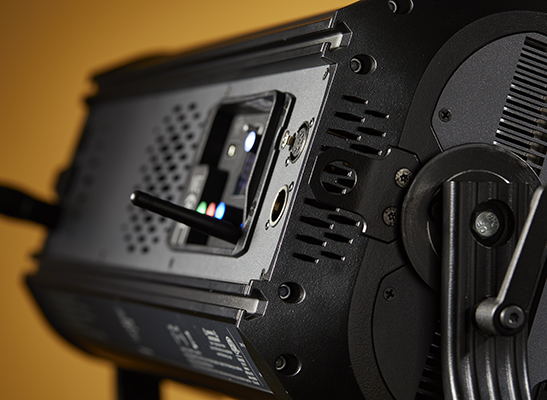
ETC colour-calibration modes · ETC fixture directory and photometry downloads
Photographs: ETC. Family photographs and shared housing details are identified in their captions.
Browse ETC lighting · all equipment.