
Last Updated 6 hours ago
Overview
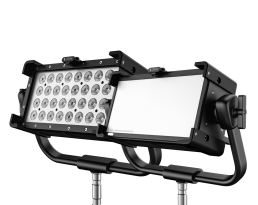
The Creamsource Vortex2 is a 160W full-colour hard LED panel with two controllable zones, a native 20° beam and an integrated power supply. It brings the Vortex control system into a nominal 1 × 0.5ft body for smaller locations, accents and directional light.
The hard Vortex2 and Vortex2 Soft are separate optical versions. Choose this model when concentrated output matters more than broad coverage. Its compact face fits between set pieces, but the complete fixture still weighs 7.45kg with its yoke.
Key specifications
| Specification | Details |
|---|---|
| LED engine / CCT | RRGBBW; 2,200–15,000K with green–magenta adjustment |
| Rated power / zones | 160W / 2 |
| Native beam | 20° half-peak |
| Colour quality | CRI / TLCI typically 95, manufacturer rating |
| Colour operation | CCT, hue/saturation, x,y, gels, direct RGBW and effects |
| AC supply | 100–240V, 50/60Hz; max 1.6A; powerCON TRUE1 with AC pass-through |
| DC supply | 48V, max 3.3A; 3-pin XLR |
| Weight without / with yoke | 5.98kg / 7.45kg |
| Body dimensions | 390 × 207.6 × 183.6mm, excluding yoke |
| Weather / maximum ambient | IP65 / 40°C |
| Mounting | Quick-release yoke; four ⅜in threaded points; nine LNX sockets |
| Cooling / interface | Variable-speed fans; onboard, 5-pin DMX, CRMX/BLE, one etherCON, USB-A |
Strengths and limitations
Strengths
- Directional native optics concentrate the available output for a small bounce or a controlled accent.
- Integrated AC power, direct 48V DC and Vortex console control suit a fixture that moves between setups.
Limitations
- A 20° beam needs additional spreading or diffusion to cover a close subject evenly.
- The 7.45kg working head needs substantial support for its size; it is not a camera-mounted light.
Practical uses
| Setup | Working approach |
|---|---|
| Window accent | Aim the narrow beam at the intended patch of room or set dressing. Move the lamp far enough back to cover the opening before adding diffusion. |
| Small bounce | Fill a modest bounce surface, checking its edges rather than judging exposure only at the brightest centre. |
| Interactive colour | Use the two zones for a moving colour cue or directional change; increase diffusion distance if the separate zones become visible on the subject. |
Output and colour
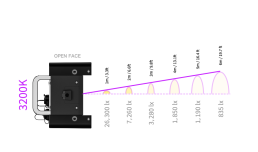
| Distance | 3,200K — lux | 5,600K — lux |
|---|---|---|
| 1m | 26,300 | 27,500 |
| 3m | 3,280 | 3,410 |
| 5m | 1,190 | 1,240 |
These are the manufacturer’s open-face readings. A lens, dome or softbox changes the beam and the exposure; the native result does not describe the softened package. A narrow beam can give a strong meter reading while covering relatively little of the set.
For saturated colours, judge the result on the production camera and actual set materials. A white-light CRI figure does not describe the exposure or spectral behaviour of every colour cue. Record the chosen colour mode, values and modifier for repeat setups.
Power and batteries
AC pass-through is convenient for a row of small panels, but the permitted chain depends on the connector, supply voltage and combined load. Add the whole chain before selecting its feed. Direct DC requires a compatible regulated 48V system with enough continuous output; an ordinary camera battery is not a direct substitute.
Control, cooling and camera operation
Set the two-zone DMX scenario before patching the fixture. Single-zone operation and pixel operation use different channel layouts. The single etherCON connection should not be mistaken for a two-port network switch: plan the network around the ports actually present on the head.
Creamsource separates continuous High Speed mode from FrameSync for timed flashes. Sync is not required merely to run continuous light at high frame rates. Test shutter, level and cue together; the published Vortex capability is mode-dependent. Camera timing guide.
Auto varies fan speed with temperature; Pause can restart cooling as the head warms. Check sound after warm-up rather than treating an initially quiet lamp as permanently silent. Fan-mode guide.
Modifiers, rigging and the working package
The front-loading rails take Vortex2-specific lenses and modifiers. A dome can make the near-field source less harsh, while a SNAPBAG increases the emitting area. Use a grid or flags to recover direction after softening. Confirm the centre-mount or yoke arrangement before ordering a tight-location package.
Alternatives and related fixtures
| Fixture | When to compare it |
|---|---|
| Vortex4 | A larger directional panel when the smaller head cannot cover the required area. |
| Vortex8 Soft | A larger broad source when close soft coverage is the priority. |
What people are saying
Manufacturer demonstration
Creamsource’s introduction shows the hard and Soft models together and their location-oriented form factor. It is a product demonstration rather than an independent output test. View the source.
Videos
Product introduction and working-package walkthrough.
Rental and used-fixture checks
- Confirm the hard model on the label; the Soft version has a different native beam and lower centre illuminance.
- Test the intended AC pass-through chain or regulated DC system under load.
- Check the front latch, lens retention and optional centre mount; run the full cue in the chosen two-zone profile.
Documentation and specifications
- Manufacturer product overview
- Technical specification and output data
- Operating documentation
- Vortex model-specific data sheets
- Current lens and intensifier guide
Product images and technical illustrations: Creamsource. Paired-model photographs show both optical versions; kit photographs include accessories that vary by package.
Related Creamsource fixtures: Creamsource Vortex2 Soft.
Browse Creamsource lights · all equipment.