
Last Updated 2 days ago
Overview
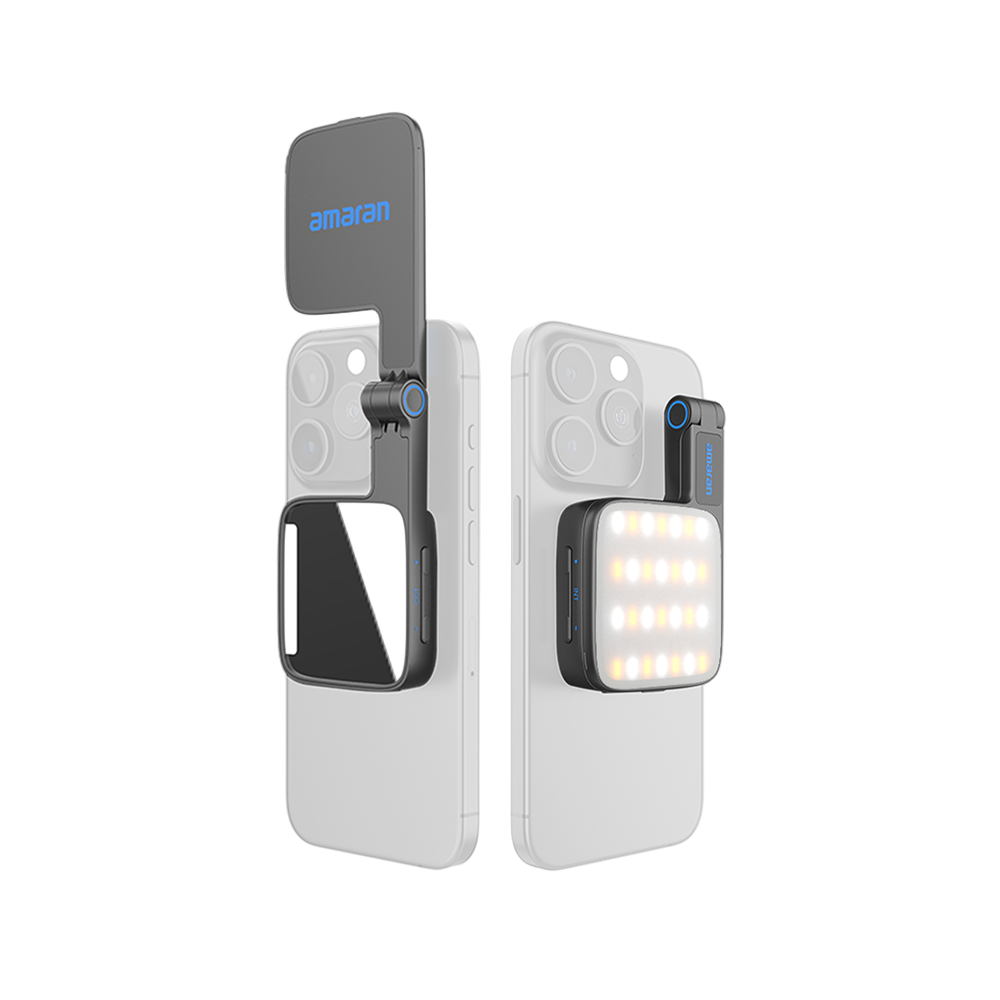
The amaran Go is a rechargeable, MagSafe-compatible bi-colour phone light with a hinged body and a separate mirror light. It is intended for close phone videos, calls and quick personal lighting rather than for illuminating a room.


Product photographs: amaran. Select an image to view it at full size.
The main light is rated 2W and the mirror light 1W. They serve different directions and tasks; the two ratings should not be added together as a single 3W production key.
Key specifications
| Specification | Details |
|---|---|
| Main / mirror light rating | 2W / 1W |
| CCT | 2,700–6,500K |
| CRI / TLCI | 97+ / 99 |
| SSI P3200 / D56 | 83 / 73 |
| Battery | 3.7V; 800mAh / 2.96Wh |
| Full-output runtime | About 1 hour 21 minutes, manufacturer reference |
| Charging | USB-C; about 70 minutes at 5V/1A |
| Dimensions | 90 × 58 × 16mm |
| Weight | 85g |
| Cooling | Passive |
| Controls | Onboard, amaran app, Sidus Link |
| Reference illuminance | 235 lux at 0.5m, manufacturer maximum |
Strengths and limitations
Strengths
- Very small, with an internal battery.
- Magnetic phone attachment and a flip design suit front- or rear-camera use.
- Passive cooling avoids fan sound beside the phone.
Limitations
- Limited reach and emitting area.
- White-light adjustment only; no RGB colour mixing.
- Phone cases, magnetic alignment and the hinge position affect mounting clearance.
Practical uses
| Setup | Working approach |
|---|---|
| Phone interview | Keep the phone near the subject and use Go as restrained fill. Move away from a bright window rather than expecting a 2W light to overpower it. |
| Video call | Place the light slightly above eye height, reduce screen brightness if it contaminates skin tone and adjust the CCT to suit the room. |
| Detail shot | Flip the head for the rear camera and check the light does not reflect directly in a glossy product or enter the lens. |
Output and colour
Keep the 0.5m test distance attached to the maximum lux figure. Output on a person moving away from a phone-mounted light falls quickly, while the small face becomes harder relative to the subject. Automatic phone exposure can also disguise how little background illumination the light provides.
For a specific CCT, distance and accessory, use the model’s manufacturer specification and photometric reference. Test the final lighting and camera combination when colour consistency or high-speed recording is critical.
CRI, TLCI and SSI describe different aspects of colour reproduction. A high CRI value does not establish a perfect match to daylight, tungsten or another LED. Compare important skin tones, wardrobe and product colours on the camera used for the job.
Power and batteries
The battery is 800mAh / 2.96Wh, charged through USB-C. The manufacturer quotes about 1 hour 21 minutes at full output, much longer at 10%, and about 70 minutes for charging under the stated 5V/1A conditions.
The magnetic mount is a positioning system, not wireless charging for the light. Include a charged Go and a suitable USB source in a travel kit; check both light directions before relying on the battery indicator.
Control, cooling and camera operation
Onboard controls switch the light and adjust brightness/CCT, while amaran app and Sidus Link are listed wireless options. Set the main and mirror functions deliberately rather than assuming both deliver the same forward light.
Passive cooling is useful for phone audio. There is no listed DMX or CRMX route. For long recordings, test exposure, phone processing and flicker at the actual brightness and frame rate rather than relying only on a still preview.
Modifiers, rigging and the working package
The compact built-in face is the working source. Positioning and a nearby bounce usually provide more useful changes than trying to attach a large modifier to a phone-mounted light.
Check MagSafe or Qi2 magnetic alignment through the actual case. A supplied adapter sticker supports other mounting surfaces, but adhesion and device balance still need checking. Keep the hinged assembly clear of the camera and controls.
Alternatives and related fixtures
| Fixture | Choose it for |
|---|---|
| Aputure MC | A rechargeable RGBWW pocket light for off-camera accents. |
| Aputure MC Pro | A compact production light with a different control and protection package. |
| amaran P60x | A larger panel when lighting a fixed interview or desk. |
Setup resources
Go operation guide. The manufacturer’s guide explains the main and mirror functions and the control sequence. It is operating documentation rather than an independent test.
Videos
amaran Go: manufacturer introduction
Manufacturer demonstration of magnetic phone mounting and the flip design.
Rental and used-fixture checks
- Confirm the exact model and generation on the label, then compare the included supply, cables and accessories with the matching manual.
- Inspect the emitting face, housing, connector pins, mounting threads and locks. Test every supplied modifier and make sure the release mechanism fully engages.
- Run the light at the intended output until it reaches normal operating temperature. Check for flicker, unexpected shutdown, uneven emitters and unusual fan noise.
- Test white light and every available colour mode; check low-level dimming, blackout and the camera/shutter combination used for the job.
- Test the battery under load rather than accepting a full-charge indicator as proof of capacity. Include the correct charger, cable and any removable grip in the handover.
Documentation and specifications
- Official model information
- Manufacturer kit contents and accessories
- Go specifications
- Go operation guide
- Manufacturer product manual
Browse amaran lights or search the equipment directory.