
Last Updated 3 hours ago
Overview
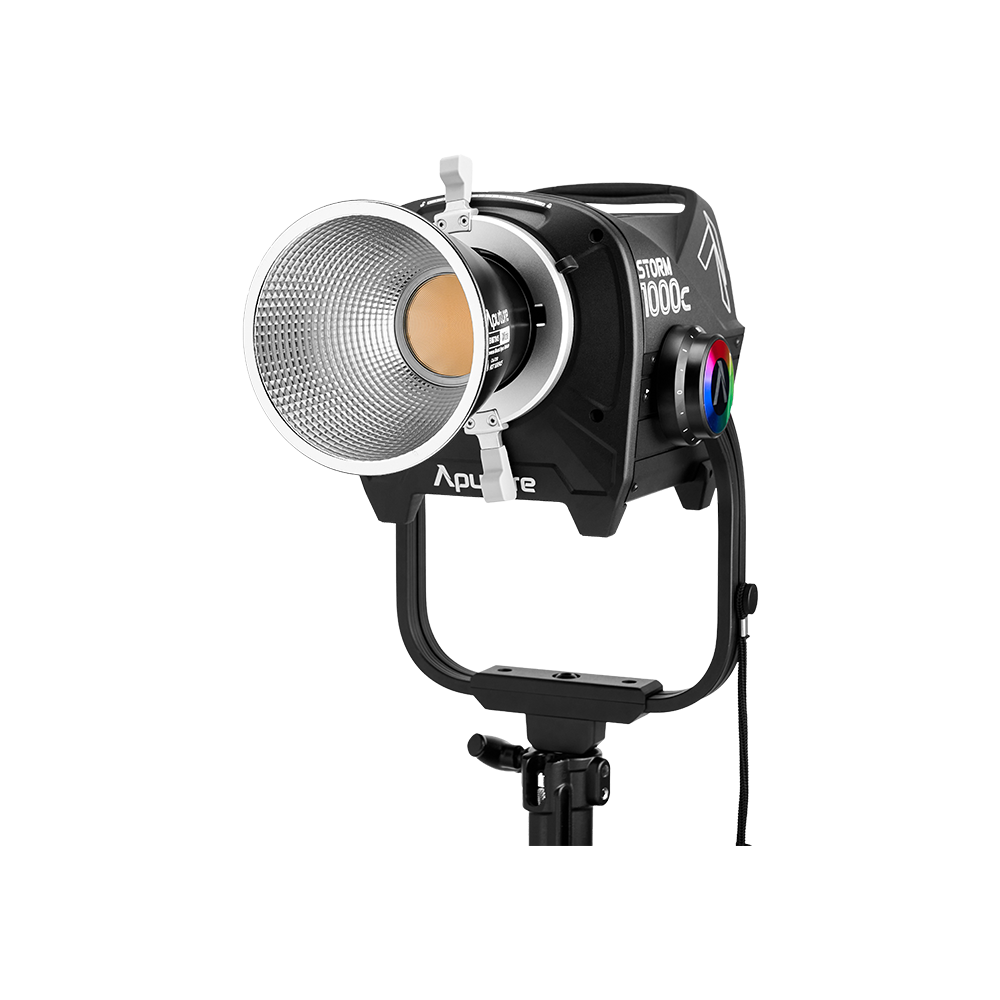
The Aputure STORM 1000c is a full-colour point-source LED fixture built around Aputure’s seven-colour BLAIR-CG engine. Its job is to combine a substantial hard-light source with a broad colour palette, a locking Bowens mount and professional control.
The same head can provide a controlled daylight push, warm motivated light, saturated background colour or a source for a large softbox. Its optic, AC supply and operating modes determine how it fits the shot.
Key specifications
| Specification | Manufacturer specification |
|---|---|
| Fixture class | 1,000W full-colour point-source LED |
| Light engine | BLAIR-CG: Blue, Lime, Amber, Indigo, Red, Cyan, Green |
| CCT range | 1,800–20,000K |
| Green/magenta adjustment | −100% to +100%; manufacturer describes full ASC MITC range |
| Colour gamut | 90%+ Rec.2020 coverage in x,y mode, manufacturer claim |
| CRI / TLCI | 97 / 97; Help Center lists 97+ |
| SSI | 88 against tungsten / P3200; 86 against D5600 |
| TM-30 averages | Rf 96; Rg 100 |
| Dimming | 0.1–100% specified; selectable dimming curves |
| Accessory mount | ProLock locking Bowens |
| Native / included reflector angle | 67° bare; 45° included reflector |
| Maximum electrical consumption | 1,440W on product page and data sheet; conflicting 1,300W Help Center figure discussed below |
| AC input | 100–240V, 50–60Hz |
| Environmental rating | IP65 |
| Operating temperature | −20°C to +45°C (−4°F to +113°F) |
| Control | Onboard, Sidus Link / Link Pro, DMX/RDM, CRMX, Art-Net, sACN |
Strengths and limitations
| Strength | Limitation |
|---|---|
| Full-colour BLAIR-CG combines a broad CCT range with saturated colour and tint control. | Different CCT, colour, optic and output-mode choices give different useful brightness. |
| ProLock Bowens and CF12 options suit soft, hard and focused setups. | Large modifiers add substantial weight, leverage and wind area. |
| CRMX, wired DMX and Ethernet support controlled studio or location packages. | It needs AC power, and the 1440W published maximum load leaves little room for other loads on many location circuits. |
Practical uses
The following are production applications suggested by the documented design and photometrics. They are not claims from a hands-on test.
| Application | How to approach it |
|---|---|
| Window-motivated daylight | Choose the optic for the required coverage and throw; check exposure through the actual glazing |
| Soft key or book light | Use a compatible softbox, bounce or diffusion; budget for the light lost through that arrangement |
| Hard backlight or edge | Use a reflector or Fresnel, then control spill around the subject |
| Coloured background | Build the intended colour and measure that setting instead of using white-light output figures |
| Projected pattern | Choose a compatible Spotlight Max configuration for the cut or gobo |
| Interactive fire / television / emergency light | Start with an appropriate built-in effect and adjust timing and colour for the scene |
A bright point source cannot solve every lighting problem by itself. The distance required to cover a large frame, the amount of diffusion, the exposure you need and the available circuit can make a different fixture or a different lighting arrangement more practical.
The STORM 1000c makes a strong case as a flexible colour-capable head for a production package. Its useful combination is the broad colour engine, interchangeable optics and control options. The tradeoffs are the complete rig’s size, its power requirement and the need to choose cooling settings around sound and output.
Plan it as a lighting system: head, optic, controller, stand, power and control. If that complete package fits the job, it can cover a substantial range of hard-light, soft-light and coloured-light tasks. If the job needs a small quiet interview source or the maximum possible white-light punch, make that requirement the starting point for the choice.
| Setup | Working approach |
|---|---|
| Large soft key | Choose the modifier or diffusion area first, then fill it evenly and check remaining exposure. |
| Night exterior colour | Match a street-light or creative colour through the camera, keeping colour output separate from white-light charts. |
| Window push | Use the reflector or CF12 setting that covers the window treatment at the intended distance. |
| Repeatable studio cue | Match white standard, output mode, fan mode, dimming curve and fixture profile across units before programming. |
Output and colour
BLAIR-CG and colour
BLAIR-CG adds cyan and green to the Blue/Lime/Amber/Indigo/Red architecture used by the STORM x-series. The distinction is the engine’s colour capability: Aputure positions the c-series for a wider range of saturated colours, while the x-series concentrates on tunable white light.
The indigo emitter is also intended to activate fluorescing materials in a way that more closely resembles daylight and tungsten. Aputure describes this as a calibrated near-UV component. That is a manufacturer explanation of the design, rather than proof that every fabric or paint will reproduce identically under every camera.
In production, treat the expanded gamut as more room to build a colour, rather than a guarantee that a camera will record the exact appearance you see by eye. Test the actual wardrobe, set finishes, camera and viewing transform when a particular colour is critical. This is especially useful for product work, strong coloured backgrounds and matching a practical source.
The published CRI, TLCI, SSI and TM-30 figures describe different aspects of light quality. They should not be collapsed into a single “colour accuracy” score. A high CRI figure alone cannot establish a perfect match with daylight, another LED engine or a particular camera.
Colour modes
| Mode | What it controls / why it is useful |
|---|---|
| CCT | White-light temperature and green/magenta correction |
| HSIC+ | Hue and saturation, with CCT and green/magenta parameters |
| RGB | Red, green and blue values with master intensity |
| x,y | Chromaticity coordinates for a specified colour target |
| Gel | LEE or Rosco gel equivalents over a 3,200K or 5,600K base |
| Source | Source emulation with x,y fine tuning |
| FX / Sidus FX | Built-in effects and supported custom effects |
RGB is a control mode; the physical engine still uses seven emitter colours. Similarly, a gel preset is an electronic approximation of a source-and-filter combination. Check it against the actual reference if matching matters.
For normal white-light work, start in CCT mode and correct green/magenta after looking at the scene through the camera. For repeatable coloured looks, record the mode and its values. Writing down only “blue at 50%” leaves too much information out.
The fixture can store ten light-mode presets. Lead/Follow operation can synchronize settings across fixtures; Aputure also documents batch firmware updates over a wired DMX connection.
The White Light Standard menu offers CIE Daylight and Blackbody. Record that choice alongside CCT and green/magenta values when matching a look; the selected white-light reference is part of the setup.
Manufacturer photometrics
With the included 45° reflector, Aputure publishes 14,200 lux at 3m at 5,600K in Normal mode, approximately 1,320 foot-candles. The much higher figure from the 15° reflector refers to an optional, narrower optic.
5,600K output at working distances
| Distance | Bare head | 45° included | 30° optional | 15° optional |
|---|---|---|---|---|
| 3m / 9.8ft | 6,300 lux | 14,200 lux | 31,000 lux | 70,000 lux |
| 5m / 16.4ft | 2,450 lux | 5,000 lux | 10,000 lux | 24,000 lux |
| 7m / 23.0ft | 1,300 lux | 2,600 lux | 5,000 lux | 12,000 lux |
How CCT affects output
| CCT | Bare head at 3m | Included 45° at 3m |
|---|---|---|
| 1,800K | 3,500 lux | 7,900 lux |
| 3,200K | 6,500 lux | 14,500 lux |
| 4,300K | 6,600 lux | 14,700 lux |
| 5,600K | 6,300 lux | 14,200 lux |
| 6,500K | 6,200 lux | 14,000 lux |
| 10,000K | 5,200 lux | 11,500 lux |
| 20,000K | 3,900 lux | 8,800 lux |
These are white-light figures. They do not establish the output of a fully saturated red, blue, cyan or any other colour. Do not budget exposure for a coloured effect using the daylight reading.
At 3m, the 15° reflector’s quoted centre reading is about 4.9 times the included 45° reflector’s. It concentrates the beam into a smaller area; that is not a claim of 4.9 times the total light. If the job requires lighting a large surface, coverage can matter more than the largest lux number.
Beam coverage: an estimate, not a measured field
| Nominal beam angle | Approximate diameter at 3m | Approximate diameter at 5m |
|---|---|---|
| 15° | 0.79m / 2.6ft | 1.32m / 4.3ft |
| 30° | 1.61m / 5.3ft | 2.68m / 8.8ft |
| 45° | 2.49m / 8.2ft | 4.14m / 13.6ft |
Use those estimates to judge whether an optic is likely to cover a window, bounce or diffusion frame. Then check the actual edges. A narrow reflector can produce a strong centre while leaving a large diffusion frame unevenly filled.
Max Output and Constant Output are separate settings. Aputure describes Constant Output as maintaining brightness across the CCT range; Max Output prioritizes available brightness. Record this setting when comparing units or repeating a setup.
Tests and reviews
Matthew Allard’s STORM 1000c test reports TLCI 97 and R9 red reproduction of 88.6 at 5600 K with the wide 45° reflector in Max Output mode. The review includes separate measurements for reflectors and the CF12. Those results are distinct from the manufacturer’s Normal-mode charts.
Power and batteries
“1000c” is not a 1,000W wall-draw specification. Aputure’s product page and official data sheet list 1,440W maximum consumption; the Help Center specification page lists 1,300W. The documentation does not explain that disagreement. Use the higher published figure as a planning allowance, then verify the supplied unit’s electrical label and current requirements.
At 120V, 1,440W divided by voltage is 12A before considering power factor. That calculation is an estimate, not a substitute for the rated input current or a circuit assessment. Count other loads on the same circuit and have the electrical crew assess the supply, distribution and cable run.
The documented supply is AC mains. If the location needs battery operation, plan around an AC power station or inverter that can support the fixture’s actual load and operating requirements. Do not assume a portable station can run it because its headline battery capacity looks large. Watt-hours describe stored energy; the inverter’s continuous output describes the load it can support.
Powering a long interview and powering a brief lighting effect are different jobs. Establish expected runtime, usable battery capacity, conversion losses and the chosen brightness before relying on a battery solution.
Control, cooling and camera operation
Fan modes and noise
| Lamp-head fan setting | Published noise at 1m |
|---|---|
| Smart, maximum | 52dBA |
| High | 43dBA |
| Medium | 34.4dBA |
| Silent | 0dBA listed for lamp-head fan noise |
These are lamp-head figures. The “0dBA” listing should not be read as a measurement proving that the whole head-and-controller system produces no sound.
Aputure’s system-settings guide and English manual state that Silent mode turns the fan off and limits lamp output power to 75W. Medium mode’s specified ambient range ends at +35°C, compared with +45°C for Smart and High. Verify the unit’s firmware before relying on a particular fan/output combination.
For dialogue, test the light from the microphone position at the intended output after it has warmed up. A quiet initial setup tells you little about what the microphone will hear once the fixture changes fan speed. If the scene needs both substantial output and low noise, work with sound on placement, distance and the selected fan mode.
High-Speed mode and dimming
Aputure documents a 20% minimum intensity in High-Speed mode and disables FX in that mode. High-Speed operation therefore changes what the fixture can do at the bottom of its dimming range.
| 5,600K at 3m | Normal mode | High-Speed mode |
|---|---|---|
| Bare head | 6,300 lux | 7,400 lux |
| Included 45° reflector | 14,200 lux | 16,500 lux |
| Optional 15° reflector | 70,000 lux | 82,000 lux |
Use the exact frame rate, shutter setting, intensity, colour mode and camera intended for the shot when testing flicker or banding. A supported high-speed setting is useful, but it cannot replace checking the image you are actually recording.
Linear, logarithmic, exponential and S-curve dimming options affect the relationship between control values and brightness. Keep the curve consistent when reproducing cues or comparing dimming behaviour.
Control paths
| Method | Where it fits |
|---|---|
| Onboard | Direct operation at the control box |
| Sidus Link / Sidus Link Pro | App-based operation; Aputure documents Auto-Patching and Auto-Configuration support |
| 5-pin DMX / RDM | Wired control and supported remote management |
| LumenRadio CRMX | Wireless DMX integration |
| Art-Net / sACN | Ethernet-based lighting networks through the control box’s LAN ports |
For wired DMX, select the fixture profile and starting address together with the console patch. Aputure’s V1.3 chart includes, for example, a seven-channel 8-bit CCT/RGB profile and a fourteen-channel 16-bit equivalent. A profile mismatch can make a functioning fixture appear to respond incorrectly.
Set signal-loss behaviour deliberately. Aputure documents Hold Last Look, Black Out, Fade to Black, and a timed hold followed by a fade. A setup intended to preserve a background during a brief dropout needs a different choice from one that must go dark when control disappears.
CRMX settings include unlinking a previous transmitter and forwarding received data through DMX Out. The documented interface also includes transmit operation. Confirm the selected RX/TX role, link state and presence of DMX data when troubleshooting.
Ethernet setup supports Art-Net, sACN or automatic protocol recognition, plus DHCP or static addressing. Match the network configuration, universe and DMX start address to the controller. An Ethernet connection alone does not establish a valid patch.
Firmware
At the time of checking, Aputure’s product resources linked firmware V1.8, released January 30, 2026. Its notes require a USB-drive update and include fixes involving 16-bit DMX brightness consistency, VRGB behaviour and unexpected flashes when switching high-speed mode or dimming curves.
Check the current release notes against the unit you will use. After an update, verify the control patch, stored looks, fan behaviour and camera test before the shoot. Avoid making an untested firmware change in the middle of a working setup.
Modifiers, rigging and the working package
ProLock clamps a Bowens accessory into place to reduce movement and help maintain optical alignment. It does not establish that every Bowens accessory is suitable for the fixture. Physical clearance, heat, optical design and the modifier’s own support requirements still matter.
| Accessory | Use / compatibility note |
|---|---|
| 45° reflector | Included with the standard fixture kit |
| 15° / 30° STORM reflectors | Optional tighter beams; available separately or as a reflector kit |
| CF12 Fresnel | Manufacturer-designed match; 12-inch lens with a 15–45° focusing range |
| CF12 barn doors | Beam shaping with the CF12; check the selected package for inclusion |
| Spotlight Max | Aputure lists compatible 19°, 36° and 50° lens kits |
| Light Dome III / Light Dome 150 | Listed softbox options for a larger apparent source |
| Lantern 90 | Listed compatible omnidirectional soft modifier |
| Original 26-inch Aputure Lantern | Listed under “Do Not Use” for this fixture |
| STORM 1000c/1200x Skid | Optional base accessory; also part of the Cine Kit |
The original 26-inch Lantern and the Lantern 90 are different products. This is a useful example of why “it has a Bowens mount” is not enough to approve a modifier.
CF12 Fresnel output
| 5,600K, Normal mode | 15° spot | 45° flood |
|---|---|---|
| 3m / 9.8ft | 58,500 lux | 12,500 lux |
| 5m / 16.4ft | 20,000 lux | 4,500 lux |
The CF12 page’s introductory copy assigns one of these readings to a different distance, and the STORM Help Center table contains a conflicting flood entry. This guide uses the labelled CF12 table above. Confirm critical output with a meter rather than relying on an isolated marketing number.
For projection, the Spotlight Max 19° table lists 21,300 lux at 3m at 5,600K in Normal mode, and 25,490 lux in High-Speed mode. Its purpose includes defined cuts and gobo projection; those are different requirements from obtaining the highest reflector reading.
Size and support
| Component | Published size / weight |
|---|---|
| Head with yoke | 33.5 × 33.8 × 55.7cm; 9.66kg / 21.3lb |
| Head without yoke | 33.5 × 23.2 × 25.1cm |
| Control box | 13.6 × 20.0 × 34.4cm; 6.12kg / 13.49lb |
| Included 45° reflector | 0.40kg / 0.88lb |
| Loaded rolling case | 27.62kg / 60.89lb on current product page |
Aputure’s setup guide specifies a Junior receiver for the lamp head. Do not assume the native mount fits a basic Baby-pin light stand. The guide also specifies an eight-pin head cable and cable strain relief; do not substitute another STORM or LS cable because the connector looks similar.
The CF12 weighs 4.72kg. Added to the 9.66kg head, that is approximately 14.38kg / 31.7lb before barn doors, cable loading or other accessories. That arithmetic is useful when planning the complete assembly; a stand’s suitability also depends on height, offset and wind loading.
Choose support for the assembled load and the intended position. Give a large softbox the same rigging consideration you would give any other large sail outdoors. Keep the controller secure, allow cable movement when tilting or raising the head, and use the appropriate secondary safety when rigging overhead.
Aputure specifies IP65 protection for the head, controller and associated cabling. The Help Center additionally gives a recommended head-angle diagram for heavy rain and warns that moisture damage is excluded from warranty coverage. Follow those model-specific instructions.
IP65 does not mean submersible. It also does not protect an ordinary wall socket, an open connector or an unrelated accessory. Consider the entire supply path, connector condition, cable routing and accessory arrangement when planning an exterior setup.
Kit contents and price
The standard kit is listed with the lamp head and yoke, control box, 45° reflector, 6m AC cable, 7.5m head cable and rolling case. The Cine Kit adds the CF12 Fresnel, CF12 barn doors and skid base. Check the exact regional bundle rather than assuming accessories shown in a photograph are included.
On October 25, 2026, Aputure’s US storefront displayed the fixture at US$2,990, reduced from US$3,990. This is a dated manufacturer-store listing, subject to regional prices, taxes and availability. Use the official product page for current regional availability and pricing.
Alternatives and related fixtures
STORM 1000c and 1200x comparison
| Difference | STORM 1000c | STORM 1200x |
|---|---|---|
| Primary role | Tunable full colour | High-output tunable white |
| Engine | Seven-colour BLAIR-CG | Five-colour BLAIR |
| CCT | 1,800–20,000K | 2,500–10,000K |
| Manufacturer gamut claim | 90%+ Rec.2020 | Approximately 70% Rec.2020 |
| Colour workflow | Broader saturated-colour adjustment | White-light priority with more limited colour capability |
| Maximum electrical consumption | 1,440W published | 1,550W published |
Choose the 1000c when saturated colour is a recurring requirement and you want one head to handle both white and coloured light. Consider the STORM 1200x when the central requirement is white-light output and the broader colour controls add little value to the job.
Aputure’s comparison page also lists 15,720 lux for the 1000c with its included reflector at 5,600K and 3m, without reconciling it with the Normal- and High-Speed-mode figures elsewhere. This guide keeps the explicitly labelled mode tables separate instead of selecting the largest number.
A manufacturer’s HMI-equivalence claim is not a universal replacement rule. Compare the actual optic, beam coverage, distance, colour and exposure. A single centre reading cannot establish that this fixture replaces an M18, a 2.5K HMI or a tungsten Fresnel in every setup.
- Aputure STORM 1200x
- Aputure STORM 700x
- Aputure LS 1200d Pro
- Nanlux Evoke 900C
- Aputure Light Dome 150
- Aputure Lantern 90
| Fixture | Choose it for |
|---|---|
| Aputure STORM 1200x | High-output tunable white with limited-gamut colour from the five-emitter BLAIR engine. |
| Aputure LS 1200d Pro | A daylight-only Light Storm package with different optics and spectrum. |
| NANLUX Evoke 900C | Another high-output full-colour point source with a separate accessory ecosystem. |
What people are saying
Matthew Allard: versatile with CF12, with an AC-power limitation
Allard’s review favours the 1000c/CF12 combination, ProLock mount and broad colour controls. He found the fan acceptable in his use but potentially noticeable near critical audio. He also identifies the absence of direct DC power as a limitation for remote work.
Dapper Gaffer: practical night and commercial setups
Dapper Gaffer’s review includes a night exterior, lift mounting, flagging, street-light matching and a commercial look. It also discusses colour output, build, modifier compatibility and whether the fixture can replace a daylight 1200d in a working package.
Videos
Gaffer & Gear 302: STORM 1000c
A detailed review of the full-colour fixture.
Dapper Gaffer: practical STORM 1000c review
Night-exterior and commercial setups, followed by a working-package assessment.
Rental and used-fixture checks
- Planning electrical demand from the “1000” model name.
- Comparing a 15° reflector reading with another fixture’s broad beam.
- Mixing Normal- and High-Speed-mode photometrics.
- Expecting daylight output levels from every saturated colour.
- Selecting Silent mode without accounting for the documented output limit.
- Assuming every Bowens accessory is approved.
- Ignoring the Junior mount and the weight added by a Fresnel or projector.
- Copying a colour value without recording the mode, white standard and output settings.
Inspect the ProLock mechanism, yoke, controller supports, fan paths, locking head cable and AC connector. Confirm the supplied reflector, cables and case against the actual Standard or Cine Kit. Test a low-level fade, white and saturated colour, the intended control path and the selected fan mode after warm-up.
Documentation and specifications
Use Aputure’s official resources for the complete manual, photometric data, control profiles and accessory compatibility information. Product photograph: Aputure.