Last Updated 6 hours ago
SkyPanel X23 Overview


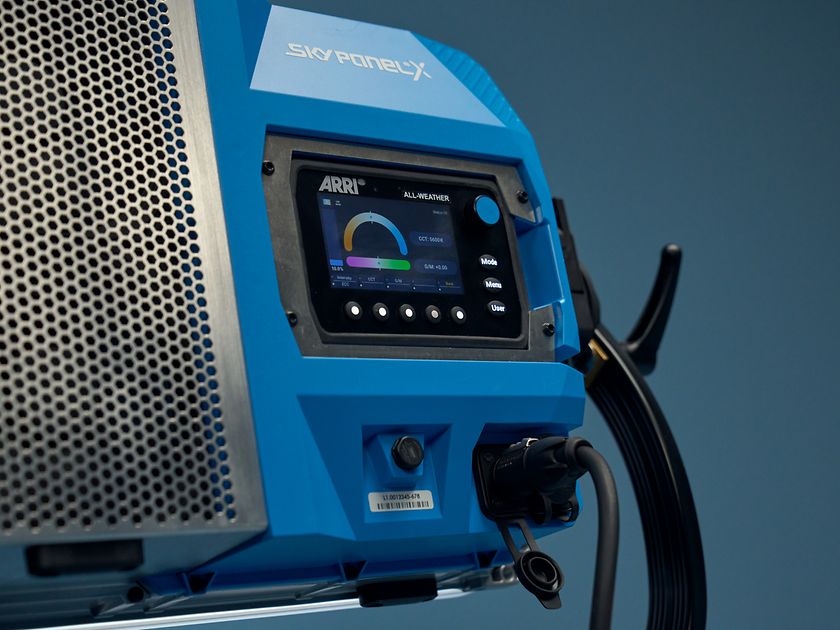
The ARRI SkyPanel X23 is a three-module, 2:3 SkyPanel X array. Three X21 heads are joined with the appropriate modular hardware to create a taller source or a powerful bank of hard optics. Plan it as a 2,400W, multi-part lighting package rather than simply a larger panel on a normal stand.
The SkyPanel X21 guide and family comparison explain the shared platform. This page focuses on the X23 configuration, its complete package and its own ARRI-published output values.
- RGBACL LED Panel Three X21 modules in a 2:3 vertical array. Learn about RGBACL
- 2,400W + Integrated PSUs 800 W per module; 100–240V AC, 50/60Hz.
- Colour Temperature1,500–20,000 K variable CCT with six-colour RGBACL control.
- WeightApprox. 54 kg / 119 lb with modular yoke; about 45 kg / 99 lb fixtures only. Optics, modifiers and cables add to the load.
- Beam Angle11° hard, 107° soft or 121° open-face in ARRI’s native-optic specs. These are not a measured mixed-array footprint.
- IP RatingIP66 Dust-tight and resistant to powerful water jets in the prescribed setup, with unused connectors capped. Not an immersion rating. Read the IP Rating.
X23 Specifications
| Configuration | 3 × X21 modules · 2:3 format |
|---|---|
| Nominal power | 2,400W |
| Maximum pixel zones | 24 |
| Colour engine / CCT | RGBACL · 1,500–20,000K |
| Fixture-only dimensions | 738 × 1,002 × 154mm |
| Fixture-only weight | Approximately 45kg |
| With modular yoke | Approximately 54kg |
| AC supply | 100–240V AC, 50/60Hz; integrated PSU in each module |
| Weather rating | IP66, subject to the manual’s prescribed setup and connector protection |
X23 Output Calculator
Select the operating mode, optic and camera settings for one X23 array (3 X21 modules). All three heads use the same optic, mode and CCT; mixed optics aren’t calculated. Use an ARRI-published distance (1, 3, 6 or 10 m) or enter a custom distance from 1 to 100 m. Readings at other distances are estimates.
Camera Settings
F-stop is a planning estimate, not a meter reading. It uses the selected published illuminance at the target for a direct, on-axis setup. No added diffusion, bounce, filters, dimming or ambient light is included. The selected Dome or standard diffuser is already part of its published reading. Meter the actual setup; lens transmission, camera response and meter calibration can change the working stop.
How the exposure estimate works
N = √(E × ISO × t / C), where E is illuminance in lux and t = shutter angle ÷ (360 × fps) in seconds. The default incident-meter calibration constant is C = 340 (Sekonic Lumisphere reference); C = 250 is available as a flat Lumidisc reference. These are calibration assumptions applied to the selected lux value, not a simulation of a dome’s angular response or a guarantee that every meter will agree. The result is a calculated f-number, not a measured T-stop or an exposure recommendation for every subject. No ND or lens-transmission compensation is applied. The display uses a full-stop mark plus tenths of an exposure stop. For example, f/5.6 followed by a smaller 3 means three tenths of a stop above f/5.6. The display runs from f/0.5 to f/64; a lens may cover a much narrower range. This is still a planning estimate, not a measured T-stop.
The calculator uses ARRI’s readings at published distances. Results at other distances are approximate on-axis estimates for one X23 array, not new manufacturer measurements. Other CCTs, different diffusers and mixed-optic arrays need their own photometrics. Foot-candles here are converted from lux (1 fc ≈ 10.7639 lux), so rounding may differ from ARRI’s chart.
Distance estimates, comparisons & beam width
At 1, 3, 6 and 10 m the tool returns ARRI’s published readings for the selected setup. Between measured distances it fits a power curve through the two adjacent published readings. Beyond 10 m it estimates falloff using E(d) = E(10 m) × (10 ÷ d)². That assumes far-field, direct on-axis illumination, an unchanged beam and no intervening losses. The tool does not estimate below 1 m. Limits are not an accuracy guarantee; meter the actual setup.
Comparisons use the same X23 array, selected operating mode, CCT and distance. The cards show illuminance and estimated f-stop at the reference point, not total light output or equal coverage.
Ideal cone width = 2 × distance × tan(beam angle ÷ 2), using ARRI’s listed angle. Shown only at 10m or farther, it is geometry, not a measured footprint, an even-light diameter or a rigging clearance. A real rectangular panel, beam edge and falloff will differ.
View ARRI-published readings for the selected mode
Swipe sideways to see all distances on a small screen.
| Optic | CCT | 1m | 3m | 6m | 10m |
|---|---|---|---|---|---|
| 3 × HyPer Optic | 5600K | 1,440,000 | 160,000 | 40,000 | 14,400 |
| 3 × HyPer Optic | 3200K | 1,393,800 | 154,900 | 38,700 | 13,900 |
| 3 × X21 Dome | 5600K | 41,400 | 4,600 | 1,150 | 414 |
| 3 × X21 Dome | 3200K | 39,900 | 4,430 | 1,110 | 399 |
| 3 × X21 open-face | 5600K | 45,900 | 5,100 | 1,280 | 459 |
| 3 × X21 open-face | 3200K | 44,700 | 4,970 | 1,240 | 447 |
| 3 × S60 Adapter + standard diffuser | 5600K | 42,900 | 4,770 | 1,190 | 429 |
| 3 × S60 Adapter + standard diffuser | 3200K | 41,100 | 4,570 | 1,140 | 411 |
Source: ARRI SkyPanel X photometric resources · Mode data: ARRI Photometric Data V1.0, January 2024.
Choose the X23 Optics
- Three HyPer Optics: Use the native X23 frame to align the beams for a rounded hard source at longer throws.
- Three X21 Domes: Use the wider configuration as a soft source, especially for overhead work; check coverage at the working distance.
- Three S60 Adapters: Adjust the Quick-Lock bracket spacing as prescribed by ARRI; confirm the exact diffusers and additional supported load.
- Mixed optics: A set-specific option, not a calculator preset. Meter the centre and across the frame.
ARRI modular optics and spacing guide.
Strengths and Limitations
Strengths
- Three HyPer Optics make one rounded hard beam in the native X23 frame, useful when the source has to sit far from the set.
- Three X21 Domes make a larger soft source, or choose a mixed-optic arrangement for a specific setup.
- Group the three heads as one array for a single control panel and DMX profile, with up to 24 individually addressable zones.
Limitations
- The native frame and yoke bring the package to about 54 kg before adding optics, cables and accessories.
- The 2,400 W array can reach 20 A at 120 V; verify the distribution, cable ratings and local electrical requirements before committing to one feed.
- The overlapping beam of three lampheads depends on distance and optical configuration. Mixed arrays need an on-set reading; the calculator does not represent those combinations.
Practical Uses
- A tall three-module source for larger frames, or a bank of three HyPer Optics for long-throw work.
- A substantial soft array with three Domes. Softness depends on apparent source size and distance, not just the model name.
- A package that can be reconfigured into smaller arrangements when the production has the required individual mounting hardware.
Choose the optic before comparing output. HyPer concentrates light into a narrow beam; the Dome and S60 diffusion spread it over a much wider area. A larger centre reading does not make two setups equivalent in coverage or softness. Select the intended operating mode too: Standard, High Output, High CRI Vari Fan and the ALEXA modes have different published values.
Output and Colour
Use ARRI’s X23 rows for output at the selected distance, optic, CCT and operating mode. For example, its modular guide lists up to 14,400 lux at 10 m (33 ft), but that is not a promise for every setup. Check beam coverage as well as the centre reading, particularly close to the three emitting surfaces. ARRI X23 technical and photometric data.
Colour Gamut with the HyPer Optic
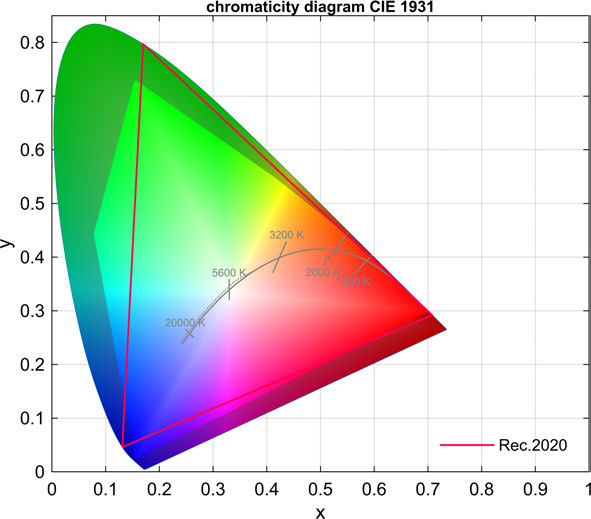
The CIE 1931 chart in the gallery is ARRI’s typical measurement for a single SkyPanel X lamphead with its HyPer Optic. It describes the shared RGBACL engine and optical configuration, not a separate three-head gamut measurement. It does not show colour uniformity across the X23 beam. When the heads run different CCTs or colours, judge the overlaps and reflected colours at the subject with the actual camera.
Power and Batteries
The nominal 2,400W figure is for the X23 configuration. Each X21 contains its own power supply and has AC input/through connections plus a 48V DC input. Plan the supply from the actual fixture labels, circuit protection, voltage, connectors and upstream load; the wattage alone does not establish that an ordinary outlet or daisy-chain arrangement is suitable. Battery capability and available runtime depend on the approved DC supply and complete setup.
ARRI rates the grouped X23 at up to 20 A at 120 V and documents a single feed with the appropriate TRUE1 mains and interconnect cables. Check the actual distribution and regional cable ratings. The lampheads’ 48 V DC inputs are not an array runtime rating; base any DC plan on the approved supply, cabling and draw of all three heads. ARRI X23 power and cabling guidance.
Control, Cooling and Camera Operation
Control options include local operation, DMX/RDM, Art-Net, sACN and CRMX. Match the DMX profile and firmware to the intended pixel arrangement. For modular arrays, confirm the operating mode, CCT, dimming, addressing and inter-module configuration before judging output. Listen to the selected fan behaviour in the actual recording position; do not assume the brightest mode is the quietest.
DMX and Firmware Checks at Prep
- Confirm all three lampheads are on compatible, matching LiOS versions and check the console library for the intended X23 profile.
- Group the heads in Array Setup on the ALL-WEATHER Control Panel. The X23 can run as one fixture with 24 RGB zones; ARRI documents an 85-channel profile for that arrangement. Check the footprint for the chosen profile before programming.
- Run the intended dim level, fan mode, shutter angle and frame rate. Heun’s successful high-speed setup does not establish performance across other camera or operating modes.
ARRI LiOS releases and known issues · ARRI control options.
Modifiers, Rigging and the Working Package
The X23 needs 3 X21 modules plus the matching modular frames, mounting arrangement and interconnections. The X Modular Yoke uses a 28mm spigot; do not treat the bare-module weight as the supported load. ARRI also documents frame mounting with specified spigots. Use the exact assembly instructions and qualified rigging personnel rather than improvising a larger bracket.
ARRI supports mixed HyPer/Dome configurations, but the finder covers only uniform arrays matching its tables. A hybrid array has different beam coverage and is not represented by choosing a single optic here. Frame spacing needs adjustment for S60 adapters; an accessory that fits one X21 is not automatically a complete modifier for the entire array.
- Confirm the exact optic quantity, diffusion type and any grids, barndoors or softboxes on the rental list.
- Count the head, yoke, frames, optics, modifiers and cables when planning support and transport. Follow the manufacturer’s mounting and secondary-retention requirements.
- Check locking points, connector condition, optic fit and all included cable lengths before the package leaves the rental house.
Alternatives and Related Fixtures
- SkyPanel X21: one 800 W lamphead when you don’t need the X23’s height or output. The native HyPer and Dome optics are shared.
- SkyPanel X22: two heads in a square frame when the taller 2:3 shape or the third lamphead is unnecessary; the SkyPanel X family guide compares the formats.
- ARRI M-Series HMI: an alternative for a hard beam if you do not need RGB colour or an LED pixel array. Compare actual beam, throw, ballast, power and dimming rather than taking production anecdotes as a watt-for-watt substitution.
What People Are Saying
ARRI interviewed these filmmakers about their own X23 setups. These are production accounts, not independent lab comparisons.
Field Feedback at a Glance
What worked
- Three-head hard key for high speed. DP Winnie Heun used an X23 with three HyPer Optics on tabletop work with reflective, heat-sensitive subjects. Heun’s report.
- Shape reflections without moving the reflector. Heun changed intensity and colour temperature across the three modules, which created gradients in mirrored surfaces. See how Heun controlled the array.
- DMX effects or overhead softness. The Tempest crew used hard arrays for a sequenced sweep and separate Dome-equipped arrays for broad overhead light. Merz’s production breakdown.
Drawbacks to plan for
- High-speed performance is setup-specific. Heun’s production account does not establish freedom from flicker at every shutter angle or dimming level. Test the intended camera, mode and output before shooting. See the camera and light setup.
- Three heads mean a larger rig and load. The modular frame, wiring and all three chosen optics need to be included in the package; the bare-head weight is not the working rig weight. See ARRI’s frame and cabling layout.
- Do not substitute one optic’s figures for a mixed array. ARRI’s published figures describe named configurations, such as three HyPer Optics. Test on location if heads will use different optics or dimming levels. See which configurations ARRI measured.
Winnie Heun: high-speed tabletop
On a commercial reshoot, DP Winnie Heun used an X23 with three HyPer Optics as the high-speed key. Individual intensity and colour-temperature settings let the crew make colour gradients on mirrored surfaces. Heun reports using a Phantom Flex4K for settings above 200 fps and describes the set working above 900 fps with heat-sensitive material. This was a production setup, not a controlled flicker or output test. ARRI interview with Winnie Heun.
Gideon Merz: Tempest
The crew used five X23 arrays in a row, sequenced over DMX, to create a moving hard-light effect. In a separate studio setup, two X23 arrays fitted with Domes provided top light; a single X21 with a Dome lit the background. A third scene used two HyPer-equipped X23s through an overhead lighting setup where the location required LED sources. ARRI interview with Gideon Merz.
Videos
ARRI Tech Tip: Array Setup on the SkyPanel X. The official tutorial demonstrates configuring a grouped X22 or X23 in LiOS. For the mechanical three-head assembly, see ARRI’s “Assembling the X23” video on the manufacturer site.
Rental and Used-Fixture Checks
Before You Book
Ask for the full X23 frame and support package and confirm its configured load including all three optics. Test the selected addressing and power arrangement with all three modules before raising the array.
- Inventory three matching lampheads, the X23 frame, the correct yoke/spigot hardware and all links, clamps, caps, and secondary restraints for the configured package. Confirm the kit contains the exact quantities of optics you need.
- Check the frame, quick locks and retention points for damage or wear. Use the assembled load, including optics and modifiers, for the planned support. Do not use the upper lamphead handle to transport the assembled X23.
- At prep, test all three lampheads independently and as a grouped X23. Check dimming, pixel order, remote control, power/data interconnects, and output with the rented optics.
ARRI SkyPanel X operating manual · Official X23 kit contents.
Documentation and Specifications
- ARRI technical data and downloads: model specifications, photometric charts and current document collections.
- ARRI modular system guide: configurations, frames and mixed-optic arrangements.
- ARRI current manuals: follow the exact operating, safety and assembly instructions for the rented hardware.
- SkyPanel X21 guide and family comparison: single-module specifications, shared features and reviews.