Last Updated 2 days ago
SkyPanel X21 Overview
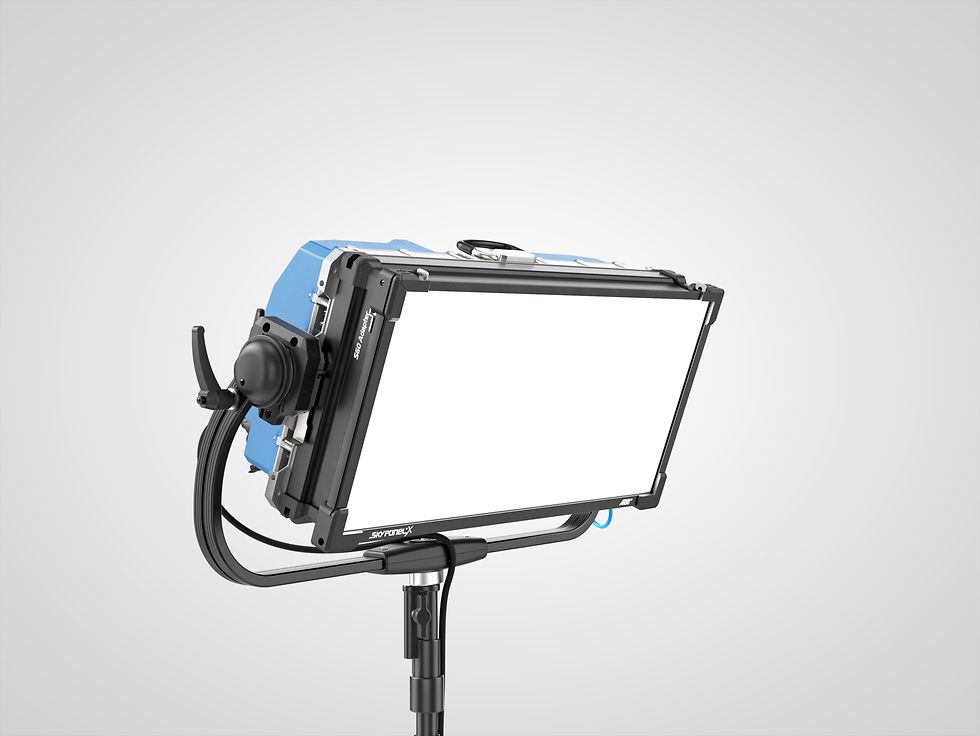
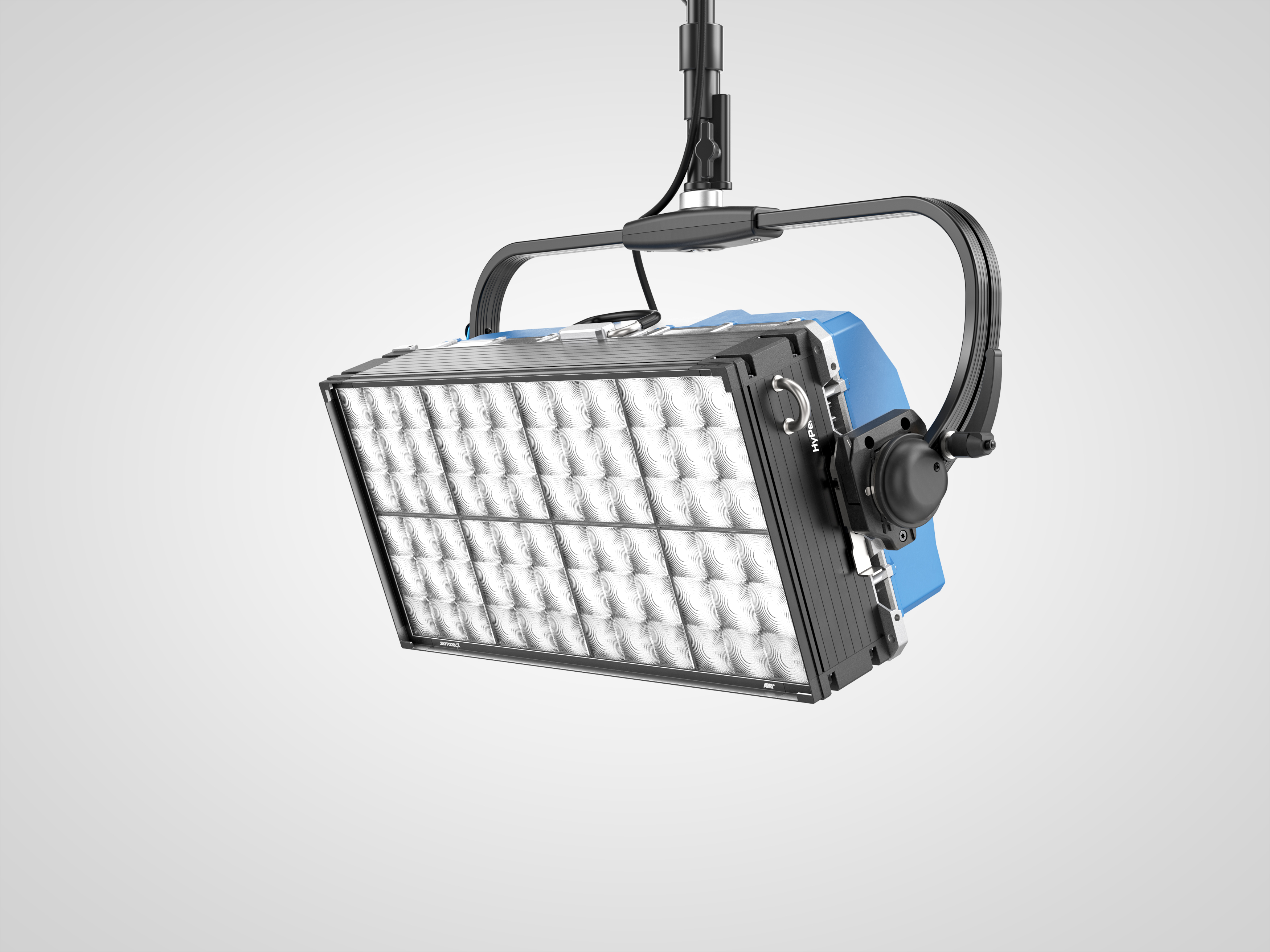
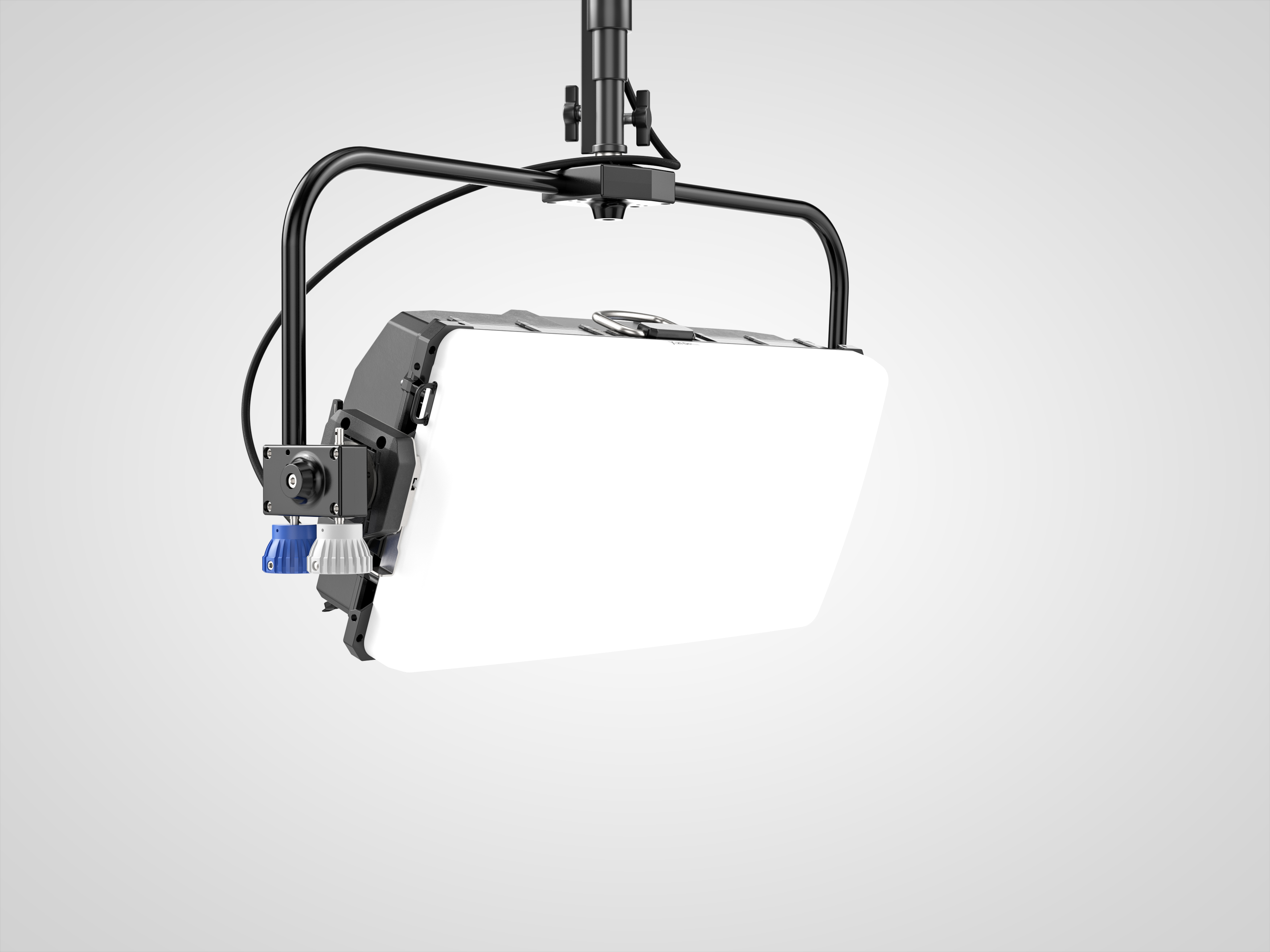
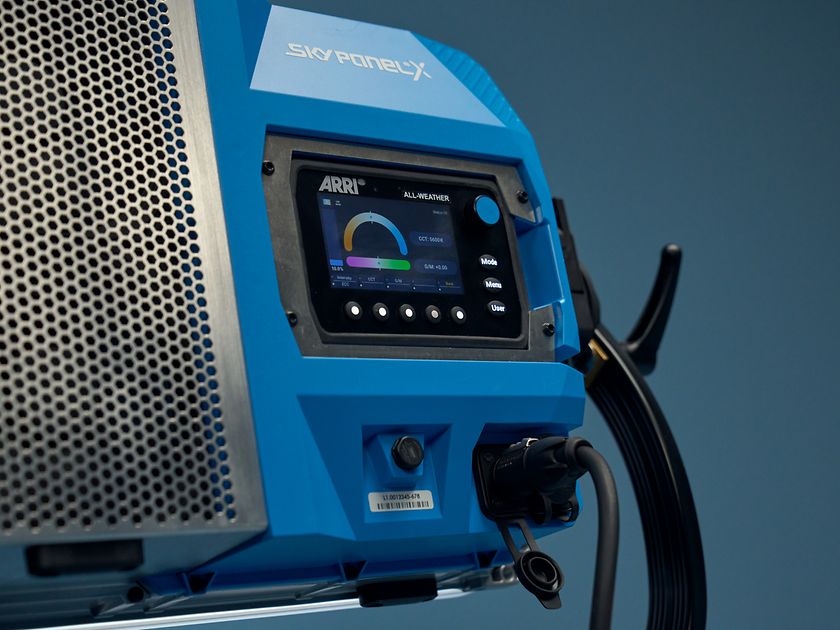
The ARRI SkyPanel X21 is the single-module, 800W fixture in the modular SkyPanel X RGBACL system. Fit the HyPer Optic for a narrow hard beam, the X21 Dome for soft direct light, or the S60 Adapter for compatible SkyPanel S60 modifiers. ARRI also publishes open-face readings; see the optic guide for the operating manual’s restriction.
SkyPanel X is the family; X21 is one module. X22 combines two modules and X23 combines three. This page focuses on the X21 while retaining the family comparison below. The optic and operating mode determine output, coverage and the working package; the X21 Output Calculator estimates lux, foot-candles and a meter-style f-stop for one X21, not an X22 or X23 array.
- RGBACL LED Panel One X21 module; hard, soft and open-face configurations. Learn about RGBACL
- 800W + Integrated PSU Single X21 fixture; 100–240V AC, 50/60Hz.
- Colour Temperature1,500–20,000 K variable CCT with six-colour RGBACL control.
- Weight 18 kg / 39.7 lb with the X21 manual yoke; optics, modifiers and cables add to the load.
- Beam Angle 11° HyPer Optic (hard), 107° X21 Dome (soft), 101° S60 Adapter with standard diffuser (soft), or 121° open-face (reference data).
- IP RatingIP66 Dust-tight and resistant to powerful water jets under test conditions, only in the prescribed connected setup. Not an immersion rating. Read the IP Rating.
Jump to Output Calculator ↓ · Compare output
Compare this fixture’s optics and rental kit in the SkyPanel X21, Vortex8 and NOVA II 2×1 lighting comparison.
X21 Specifications
On small screens, swipe wider tables sideways to see all columns.
| Configuration | One X21 module · 2:1 format |
|---|---|
| Power / pixels | 800W nominal · up to 8 pixel zones |
| Colour engine / CCT | RGBACL · 1,500–20,000K |
| Fixture-only dimensions | 738 × 339 × 154mm |
| Fixture-only weight | Approximately 15kg / 33lb |
| With manual yoke | Approximately 18kg / 39.7lb |
| Optic choices | HyPer Optic, X21 Dome, open-face, or S60 Adapter with the selected diffuser |
X21 Output Calculator
Select the operating mode, optic and camera settings for one X21. Use an ARRI-published distance (1, 3, 6 or 10 m) or enter a custom distance from 1 to 100 m. Readings at other distances are estimates.
Camera Settings
F-stop is a planning estimate, not a meter reading. It uses the selected published illuminance at the target for a direct, on-axis setup. No added diffusion, bounce, filters, dimming or ambient light is included. The selected Dome or standard diffuser is already part of its published reading. Meter the actual setup; lens transmission, camera response and meter calibration can change the working stop.
How the exposure estimate works
N = √(E × ISO × t / C), where E is illuminance in lux and t = shutter angle ÷ (360 × fps) in seconds. The default incident-meter calibration constant is C = 340 (Sekonic Lumisphere reference); C = 250 is available as a flat Lumidisc reference. These are calibration assumptions applied to the selected lux value, not a simulation of a dome’s angular response or a guarantee that every meter will agree. The result is a calculated f-number, not a measured T-stop or an exposure recommendation for every subject. No ND or lens-transmission compensation is applied. The display uses a full-stop mark plus tenths of an exposure stop. For example, f/5.6 followed by a smaller 3 means three tenths of a stop above f/5.6. The display runs from f/0.5 to f/64; a lens may cover a much narrower range. This is still a planning estimate, not a measured T-stop.
The calculator uses ARRI’s readings at published distances. Results at other distances are approximate on-axis estimates for one X21, not new manufacturer measurements. Other CCTs, added diffusion and X22/X23 arrays need their own photometrics. Foot-candles here are converted from lux (1 fc ≈ 10.7639 lux), so rounding may differ from ARRI’s chart.
Distance estimates, comparisons & beam width
At 1, 3, 6 and 10 m the tool returns ARRI’s published readings for the selected setup. Between measured distances it fits a power curve through the two adjacent published readings. Beyond 10 m it estimates falloff using E(d) = E(10 m) × (10 ÷ d)². That assumes far-field, direct on-axis illumination, an unchanged beam and no intervening losses. The tool does not estimate below 1 m. Limits are not an accuracy guarantee; meter the actual setup.
Comparisons use the same X21, selected operating mode, CCT and distance. The cards show illuminance and estimated f-stop at the reference point, not total light output or equal coverage.
Ideal cone width = 2 × distance × tan(beam angle ÷ 2), using ARRI’s listed angle. Shown only at 10m or farther, it is geometry, not a measured footprint, an even-light diameter or a rigging clearance. A real rectangular panel, beam edge and falloff will differ.
View ARRI-published readings for the selected mode
Swipe sideways to see all distances on a small screen.
| Optic | CCT | 1m | 3m | 6m | 10m |
|---|---|---|---|---|---|
| HyPer Optic | 5600K | 480,000 | 53,300 | 13,300 | 4,800 |
| HyPer Optic | 3200K | 464,600 | 51,600 | 12,900 | 4,650 |
| X21 Dome | 5600K | 13,800 | 1,530 | 383 | 138 |
| X21 Dome | 3200K | 13,300 | 1,480 | 369 | 133 |
| Open-face | 5600K | 15,300 | 1,700 | 425 | 153 |
| Open-face | 3200K | 14,900 | 1,660 | 414 | 149 |
| S60 Adapter + standard diffuser | 5600K | 14,300 | 1,590 | 397 | 143 |
| S60 Adapter + standard diffuser | 3200K | 13,700 | 1,520 | 381 | 137 |
Source: ARRI SkyPanel X photometric resources · Mode data: ARRI Photometric Data V1.0, January 2024.
How X21 Fits into the SkyPanel X Family
| Configuration | X21 | X22 | X23 |
|---|---|---|---|
| Modules / format | 1 / 2:1 | 2 / 2:2 | 3 / 2:3 |
| Power | 800W | 1,600W | 2,400W |
| Maximum pixel zones | 8 | 16 | 24 |
| Fixture only | 15kg | 30kg | 45kg |
| With manual / modular yoke | 18kg | 38kg | 54kg |
For the assembled arrays, see the SkyPanel X22 guide and two-head Output Calculator or the SkyPanel X23 guide and three-head Output Calculator.
All configurations use 100–240V AC, 50/60Hz, with an integrated power supply per module. ARRI technical data.
Choose the X21 Optic
These are different beam shapes, not interchangeable brightness ratings. The example values below use one X21, High Output, 5,600K, at 10m. Use the output calculator above for your mode, distance and camera settings.
Swipe sideways to see all columns on a small screen.
| Optic | Listed beam | Example on-axis output | Planning use & package |
|---|---|---|---|
| HyPer Optic | 11° · hard | 4,800 lux | Narrow direct beam for longer throws or controlled window light. Allow approximately 4.8kg for the optic. |
| X21 Dome | 107° · soft | 138 lux | Broad direct soft light. Approximately 0.6kg; still plan any added grid or softbox separately. |
| Open-face | 121° · open | 153 lux | Direct reading, not bounce output. For reference only; see the operating note below. |
| S60 Adapter + standard diffuser | 101° · soft | 143 lux | Use compatible S60 front accessories. The adapter is approximately 2kg, excluding diffuser and other accessories. |
Open-face operating note: ARRI publishes open-face photometrics, but its operating manual requires a diffuser or intensifier in use. The calculator retains the published readings for reference; confirm the approved configuration with ARRI before operating.
Sources: ARRI photometrics and the HyPer Optic, X21 Dome and S60 Adapter specifications.
For a rental request, name the configuration and optic together: “X21 with HyPer Optic” is much clearer than “SkyPanel X.” Include the yoke, control panel and cables in the package.
Strengths and Limitations
Strengths
- One module family can provide hard, soft and multi-module sources.
- Internal wireless/network control and pixel zones support more involved programmed rigs.
Limitations
- Module count, optic and operating mode make a generic 'SkyPanel X output' figure unhelpful.
- Large assembled systems bring substantial rigging, handling and distribution requirements.
Practical Uses
Use the appropriate optic for a long-throw source, or fit soft-light accessories for broader coverage. Specify the number of modules and all optics when requesting a rental or comparing output.
| Setup | How to use this fixture |
|---|---|
| Long-throw hard source | Fit one X21 with the HyPer optic for a narrow 11° beam. Use the X21 Output Calculator to check output at the working distance; these figures do not describe Dome output. |
| Broad soft key | Use the X21 Dome or S60 Adapter/front system. Judge the result as a soft source, with its own coverage and transmission. |
| Programmed color and effects | Choose the X21 pixel profile before building cues, with up to eight zones on one fixture. Orient and label the X21 so spatial movement agrees with the console layout. |
Output and Colour
Specify X21, X22 or X23, then the optic. Native hard uses an 11° HyPer Optic, soft uses an X21 Dome/S60 adapter configuration, and open-face is 121° in ARRI's table. At 10m/5,600K ARRI lists maximum outputs of 4,800, 9,600 and 14,400 lux for X21/X22/X23 in native-hard configuration. These are not dome readings. The systems expose up to 8, 16 or 24 pixel zones.
| 5,600K native-hard configuration, 11° | 10m |
|---|---|
| X21, one module | 4,800 lux |
| X22, two modules | 9,600 lux |
| X23, three modules | 14,400 lux |
Sources: ARRI SkyPanel X technical data.
Each additional module adds emitting area, power and addressable zones. The official native-hard 10m figures scale from 4,800 to 9,600 to 14,400 lux across X21/X22/X23; that table does not establish the same scaling at every distance, optic or saturated colour.
Operating modes include Standard low-noise, High Output, High CRI VariFan and ARRI ALEXA. Each prioritises different output, colour or noise requirements. ALEXA mode is designed for matching ARRI’s camera sensors.
Colour Gamut with the HyPer Optic
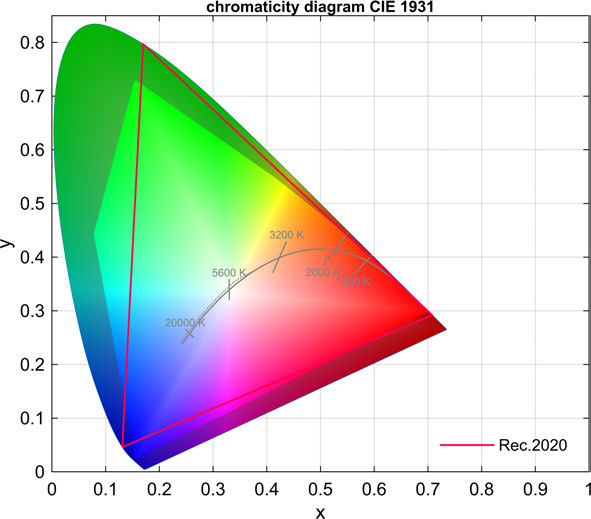
The chart shows ARRI’s typical CIE 1931 x–y chromaticity values for the SkyPanel X with the HyPer Optic fitted. The red triangle is the Rec. 2020 reference, not an outline of the fixture’s gamut. Learn about RGBACL.
Colour Rendering and Spectrum
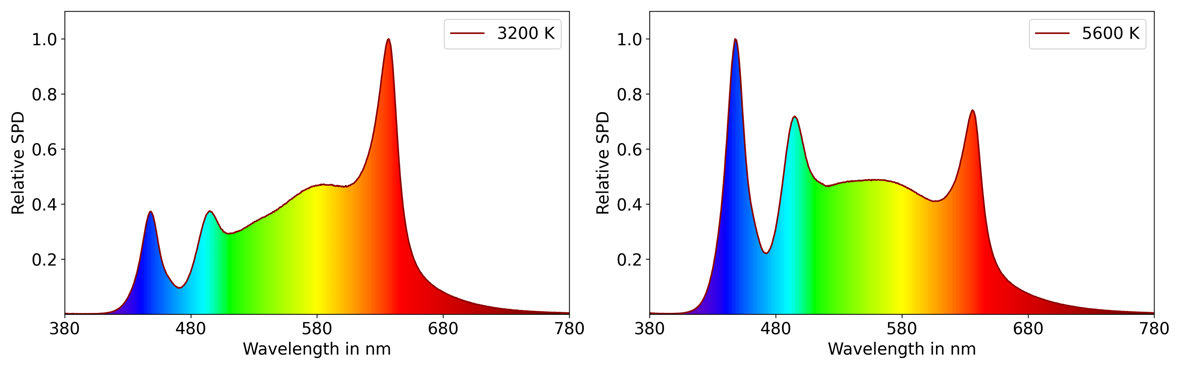
These are ARRI’s results for the HyPer Optic in High CRI mode, not the calculator’s High Output readings. At 3,200 K ARRI lists a TLCI of 90; at 5,600 K it lists 94. At the 1,500 K setting, the TLCI is 64 even though CRI is 92. If you’re using the warmest settings on skin or wardrobe, test with the production camera rather than relying on CRI alone.
| CCT | CRI | TLCI | Rf | Rg |
|---|---|---|---|---|
| 1,500 K | 92 | 64 | 89 | 98 |
| 2,000 K | 97 | 79 | 93 | 102 |
| 3,200 K | 98 | 90 | 95 | 101 |
| 4,300 K | 99 | 93 | 96 | 101 |
| 4,700 K | 99 | 93 | 96 | 101 |
| 5,600 K | 99 | 94 | 96 | 102 |
| 6,500 K | 99 | 95 | 95 | 101 |
| 10,000 K | 99 | 96 | 94 | 100 |
| 20,000 K | 99 | 96 | 93 | 100 |
Independent Measurements
Matthew Allard’s independent Newsshooter test measured 2,270 lux at 3 m with the X21 Dome, High Output and 5,600 K. ARRI’s calculator source gives 1,530 lux for those nominal settings. The two readings come from different test setups; the calculator uses ARRI’s published dataset.
Read Allard’s SkyPanel X review and measured configurations.
Power and Batteries
The X21 is an 800W fixture with an integrated power supply, 100–240V AC input and a nominal 48 V DC input. The ARRI operating manual lists a 48–52 V DC battery supply range. Use direct AC or a suitable battery supply, not power from a dimmer system. For a single-head package, confirm the available supply, approved DC equipment and required cable lengths. Battery runtime depends on the complete supply and operating setup, not just the presence of a DC connector. The family comparison above lists the separate X22/X23 totals.
ARRI lists TRUE1 TOP AC input/through connectors and a 20A maximum connector reference. That is not a promise that the available circuit can supply 20A or that any chain of heads is suitable. Check the actual voltage, circuit capacity, cable ratings and permitted through-load before linking another fixture.
Control, Cooling and Camera Operation
| Control path | Hardware and operating notes |
|---|---|
| Wired console | DMX512-A/RDM and Art-Net 4/sACN, with a profile matched to module count and mode. |
| Wireless | Integrated CRMX Classic/CRMX2, supported W-DMX versions and Bluetooth facilities. |
| Array control | Up to three units in one supported DMX profile; maximum zones 8/16/24. |
| Legacy compatibility | ARRI documents S60-C Mode 1 and 6 compatibility; this is distinct from full multi-zone X control. |
Select the desired camera, colour-quality or noise mode before taking meter readings. A change made late to quiet a lamp can affect the result the camera department approved. Test the actual low-end fade and production frame rate with that mode.
For a modular rig, run a simple spatial colour test before loading the final show cues. Establish module order, orientation and pixel mapping while every part remains physically accessible.
DMX and Firmware Checks at Prep
On the ALL-WEATHER Control Panel, open Menu → Fixture Info and record the head and control-panel firmware, DMX mode and start address. Match the console profile to the head’s firmware, module count and chosen mode. Check the universe on the console and the fixture’s network configuration if you’re using Art-Net or sACN.
Before loading cues, bring up one zone at a time and confirm physical order and orientation. Use DMX Live View on the fixture to confirm it sees the console’s values. ARRI’s LiOS 3.3.0 release notes list improvements to DMX Live View and smoothing for DMX Zone Modes. Check the rental head’s version against the ARRI LiOS release notes and SkyPanel X DMX profile files before changing firmware or repatching.
X21 Size and Connections
| X21 detail | Specification |
|---|---|
| Body only | 738 × 339 × 154mm / 29.1 × 13.3 × 6.1in |
| With manual yoke | 875 × 588 × 170mm / 34.4 × 23.2 × 6.7in |
| DMX | 5-pin XLR in/out |
| Network | Two EtherCON-compatible RJ45 ports |
| Battery input | 48 V nominal; 48–52 V DC supply range. Confirm supply and cabling in the operating manual |
Modifiers, Rigging and the Working Package
Compatible accessory profiles · ARRI S60 Adapter for SkyPanel X21 · DoPchoice SNAPGRID for ARRI SkyPanel S30, S60, S120 and S360 · DoPchoice SNAPBAG for ARRI SkyPanel S60
ARRI lists approximately 15kg for the X21 head alone and 18kg with its manual yoke. Add the actual optic, modifiers, cables and secondary-retention hardware when planning the load. The X21 manual and pole-operated yokes use a 28mm spigot; confirm the complete support arrangement with the grip crew. ARRI requires the yoke to stand or hang vertically without side-loading. Secure the fixture and accessories against falling when mounted above floor level. For the S60-style soft front-accessory configuration, include the S60 Adapter. IP66 applies only under the prescribed setup and connector conditions. Fit the protective caps to unused ports that require them, and use connections that maintain IP66 when mated. The ARRI operating manual rules out immersion and high-pressure or steam cleaning. ARRI also warns against long-term rain or moisture exposure in fixed installations.
| Configuration | Manual/modular-yoke weight | Native-hard beam / maximum zones |
|---|---|---|
| X21 | Approximately 18kg | 11° / 8 |
| X22 | Approximately 38kg | 11° / 16 |
| X23 | Approximately 54kg | 11° / 24 |
For an X21 rental, specify the yoke, optic, control panel, cables and required modifiers, not just the lamphead. The operating manual limits ambient temperature to 40 °C. Keep at least 0.5 m clear around the vents and at least 1 m from the aperture to illuminated people, objects or surfaces. Leave transport space for the Dome or HyPer Optic and any S60 accessories. If the job later calls for an X22 or X23 array, add the correct modular frames and quick-lock hardware rather than assuming the single-head package includes them.
Alternatives and Related Fixtures
| Fixture | When to compare it |
|---|---|
| ARRI Skypanel S60-C | Choose the Classic soft-panel package when its coverage and existing inventory suffice; it is not the same optical or control system. |
| Creamsource Vortex 8 | Compare a native-hard panel with diffusion options for a single-head package. |
| Litepanels Gemini 2×1 Hard RGB LED Light Panel | Compare a 20° hard panel and its diffusers when modular arrays are unnecessary. |
| ARRI SkyPanel S60 Pro | A native-soft RGBW alternative with S60-C accessory compatibility and IP20 protection. |
| ARRI Omnibar 4 | A narrower battery-powered pixel bar for visible lines, concealed sources and connected arrays. |
What People Are Saying
Field Feedback at a Glance
What worked
- At the 5,600 K and 3,200 K settings, Allard measured 5,592 K and 3,184 K in Standard mode. Matthew Allard ACS, Newsshooter.
- The HyPer optic concentrated the beam for long throws. Matthew Allard ACS, Newsshooter.
- The Dome gave Allard a broader, softer field without costing as much output as he expected. Matthew Allard ACS, Newsshooter.
Drawbacks to plan for
- Allard found the fixture and its optics large and heavy to move between locations. Matthew Allard ACS, Newsshooter.
- The HyPer beam is fixed. Spreading it with diffusion costs output; you can’t simply flood it like a Fresnel. Matthew Allard ACS, Newsshooter.
- Allard measured slightly weaker color rendering in High Output mode. Check the mode before a color-critical shot. Matthew Allard ACS, Newsshooter.
Matthew Allard ACS, Newsshooter
Allard praises construction, colour-temperature accuracy and the versatility of the optical system. His main reservations are weight and price, plus the transport space needed for the accessories that deliver that versatility. He also found SSI results lower than he expected, despite being pleased with the practical light. Read article.
DVXuser, Owner Discussion
One contributor finds their SkyPanel X kit large and heavy beside their COB lights, while appreciating its construction and integrated power supply. View discussion.
X21 Field Notes
Aircraft fill: On a Lufthansa commercial, gaffer Albrecht Silberberger used single X21s through quarter grids or soft frost opposite the key side. He controlled the lighting from inside the fuselage via CRMX. Silberberger’s account at ARRI Rental.
Clean projection: Gaffer Haikal Ismail reported a clean projection with little spill while using an X21 with the HyPer Optic on a television commercial. Ismail’s account in ARRI’s user stories.
Flagging and dome output: In a loading-bay test, the Geronimo Creek crew found the X21 harder to cut neatly with their 2 × 3 solid. They also reported slightly more output from the Vortex8 when both fixtures were fitted with their domes in that setup. Geronimo Creek’s side-by-side test.
Videos
Gaffer & Gear examines the SkyPanel X, its optics, controls and measured performance.
Rental and Used-Fixture Checks
- Confirm one X21 head, the chosen yoke, control panel, optic and required AC/DC and control cables. Include the S60 Adapter and specific diffuser or softbox when needed.
- Confirm every quick-lock and accessory latch and the exact assembled load.
- Match the X21 firmware, selected output/colour mode, fan behaviour, pixel layout and console profile. Test the intended control method before loading out.
Before You Book
- Package: Specify “X21 with HyPer Optic,” “X21 with Dome,” or the exact S60 Adapter/diffuser combination. Match that choice and operating mode in the output calculator.
- Power: Plan for the X21’s nominal 800W demand. Have the crew check the supply, cables, approved DC equipment if used, and any through-connected load.
- Support: The X21 with manual yoke is approximately 18kg before extra accessories. Confirm its 28mm mounting interface, total configured weight and suitable support with the grip crew.
- Control: Match firmware, DMX mode and console profile before prep. Specify wired DMX, network control or CRMX, with the necessary cables or transmitter.
Check ARRI’s configuration specifications before confirming the order.
Documentation and Specifications
Go straight to ARRI’s official resources. The labelled PDFs open specific editions; the download collections let you check for newer revisions and other languages.
- Operating manual · PDFVersion 1.2, September 2024. Setup, handling and safety.
- User manual · PDFVersion 1.1, November 2024. Fixture operation and controls.
- Current manual collectionCheck for newer editions and other languages. The linked 2024 PDFs predate LiOS 3.3.0; consult the current firmware notes too.
- DMX, RDM & technical filesProfiles, photometric files, 2D drawings and 3D files. Match the profile to your firmware and module arrangement.
- Data sheets & specificationsManufacturer reference documents for the X-Series.
- LiOS firmware & release notesCheck compatibility, installation instructions and known issues before updating a production fixture.
- Photometrics & configuration dataSeparate X21, X22 and X23 output charts, plus dimensions, weight and connections.
Browse Arri lights · LED panels · all equipment.