
Last Updated 2 days ago
Overview
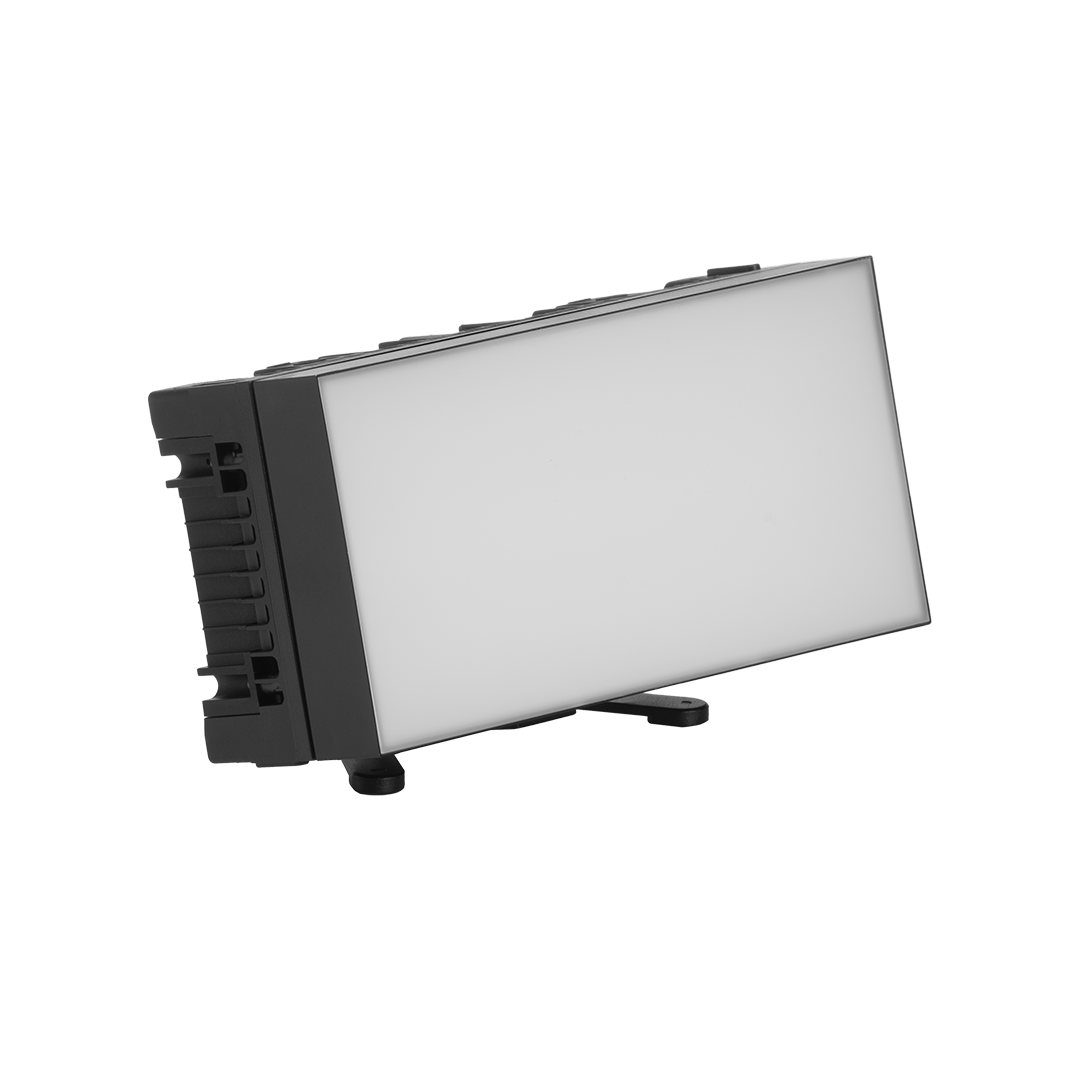
The Astera HydraPanel (FP6) is a compact battery-powered colour panel for concealed keys, close fill, product accents, vehicle interiors and linked lighting arrays. Its Titan RGBMintAmber engine has six controllable pixels, with native CRMX and Astera wireless operation.
The standard modifier set and multiple mounting options give the small face several uses. The July 2025 version 4 data sheet specifies the weather-sealing conditions. The photograph shows the SoftFrame 100 and FlexBase fitted.
Key specifications
| Specification | Details |
|---|---|
| Order code / engine | FP6 / Titan RGBMintAmber |
| LED power draw / maximum consumption | 17 W / 17 W in current data sheet |
| Total LED inventory | 25 W in manual; separate from actual 17 W draw |
| Pixels | 6; console grouping depends on profile |
| Colour modes | White/CCT, tint, RGB/HSI and xy options, profile dependent |
| Published colour metrics | CRI (Ra) / TLCI ≥96 across specified 3200–6500 K white settings |
| Flux / illuminance at 5500 K | 1,298 lm / 516 lux at 1 m |
| Beam / field | 110° × 100° beam; 150° × 145° field |
| Full-brightness runtime | 1 hour 45 minutes, manufacturer reference |
| Maximum runtime setting | Up to 20 hours, at reduced output |
| Nominal charging time | 3 hours |
| DC input / connector | 24 V DC, 0.85 A; 5.5 × 2.1 mm |
| Wireless | Built-in CRMX; UHF; BluetoothBridge; IR control |
| Wired DMX | Through compatible Astera PowerBox / DataLink hardware |
| Weather protection | IP65 only with the specified plugs or weather-sealed power/data cables |
| Dimensions / weight | 166 × 85 × 43.5 mm / 604 g |
| Operating ambient | 0–40°C |
| Fixture mounts | 2 cold shoes, 3 M5 threads, safety-wire eyelet; additional mounting accessories |
Strengths and limitations
Strengths
- Six pixels and a small diffused face support close lighting.
- Astera wireless control supports remote colour and level changes.
Limitations
- Beam filters and diffusion change both coverage and exposure.
- Confirm hardware revision, runtime setting and the required power/data accessories.
Practical uses
The 166 mm body can fit close to a dashboard, shelf, camera or product where a larger panel is difficult to hide. Its useful exposure comes from close placement and a suitable beam, rather than from replacing a large studio key at distance.
Six pixels allow a coarse gradient or spatial effect across the face. The selected DMX personality determines whether the console sees the panel as one source or multiple groups. Diffusion and subject distance determine how much pixel structure remains visible in a reflection or on a nearby surface.
ConnectorPlates can link up to four panels into a larger mechanical array. This increases the apparent area, but it also increases mass, wiring and power requirements. Check the final joint alignment, support and pixel orientation before treating the assembly as one coherent source.
| Setup | Working approach |
|---|---|
| Visible practical | Set brightness and colour through the camera so the fixture retains the intended detail in frame. |
| Accent or reflection | Position the source for its beam and emitting shape, then control spill with the correct accessory. |
Output and colour
The current data sheet publishes the white-light values below. It does not provide separate illuminance tables for every supplied modifier, so these figures should not be transferred unchanged to an eggcrate, intensifier, SoftFrame or SnapBag setup.
Beam angle and field angle describe different intensity thresholds; 110° × 100° is the stated beam, while 150° × 145° is the broader field. A wide field is useful close to a subject but also creates spill. Evaluate the real coverage and reflections after choosing the modifier.
| White setting | Published flux, lm | Published illuminance at 1 m, lux |
|---|---|---|
| 3200 K | 1,102 | 443 |
| 4000 K | 1,287 | 512 |
| 5500 K | 1,298 | 516 |
Power and batteries
The published maximum-brightness runtime is 1 hour 45 minutes. “Up to 20 hours” describes reduced-output runtime management, not full output for an entire day. Set a realistic runtime target before final exposure and confirm the resulting intensity is sufficient.
The data sheet lists a nominal three-hour charge and a battery-life reference of 70% capacity after 300 cycles. Those are typical manufacturer values; battery age, temperature and use affect the result. For a used panel, test the actual runtime rather than relying on the indicator immediately after charging.
The 17 W actual LED draw is separate from the manual’s 25 W total emitter inventory. The 24 V / 0.85 A input rating also should not be mistaken for measured wall-plug consumption of a charging case or PowerBox. Budget the complete supply and charging arrangement.
Wired DMX uses the compatible Astera power/data system, including listed PowerBox and DataLink options. A plain 24 V power supply is not a DMX interface merely because it fits the DC socket. Use the approved cables, voltage and distribution hardware.
The current data sheet illustrates up to four HydraPanels per output on PowerBox 2×86, and up to two per output on Titan PowerBox FP1-PWB. These are hardware-specific arrangements. Do not transfer one box’s branch capacity to another supply.
Support distribution cables and preserve slack between linked fixtures. Include the charger or distribution hardware when assessing a kit: a bare panel, single-unit kit and four-unit charging-case kit contain different power and mounting components.
Control, cooling and camera operation
A CRMX receiver is built into the panel for compatible wireless-DMX systems. This is distinct from Astera’s UHF app-control route. Select and test the intended route, profile, address and signal-loss response before a timed cue.
BluetoothBridge allows the app to connect directly to a HydraPanel, which can relay AsteraApp commands over UHF to other compatible Astera fixtures. The version 4 sheet lists Bluetooth up to 3 m and CRMX/UHF up to 300 m under suitable conditions. The short Bluetooth hop and longer fixture-network link are different parts of the system.
The onboard display and TouchSlider provide local operation. ControlSync uses the linked fixtures’ IR contacts to synchronize adjustments from a keypad. Confirm physical alignment and the actual linked behaviour instead of assuming it is an unlimited radio synchronization feature.
Astera’s 2024 version 2 DMX-profile document offers multiple pixel counts, colour representations, dimmer resolutions and strobe options. Match the console personality to the actual profile; an RGB patch alone does not expose every calibrated-white, tint, xy or pixel-control option.
Modifiers, rigging and the working package
The six listed modifiers are DiffusorSheet 100, Intensifier 80, SoftFrame 100, EggCrate 40, EggCrate 60 and GelHolder. They offer different spread, diffusion and spill control. A separate DoPchoice SnapBag is also listed. Use the actual modifier when assessing softness and exposure.
FlexBase, the BabyPin arrangement, cold shoes, threads and backside magnet provide several mounting routes. Choose the specified hardware for the surface and orientation and use the safety eyelet for suitable independent retention where needed. A magnet’s performance depends on the complete surface and load.
Version 4 makes the IP65 conditions explicit: unwired use requires the PB15-PLG sealing plugs, and wired IP65 use requires the listed PWB-CAB weather-sealed cables. An open socket or an ordinary unsealed lead does not meet that stated setup. Keep the side cooling fins unobstructed.
Inspect the face, modifiers, magnet, mounting threads, sealing plugs, sockets and charging contacts. Test all six pixels, white/tint settings, app control and CRMX, then check sustained battery operation. Verify the correct accessories and sealing parts are present in a used kit.
Alternatives and related fixtures
The Astera Titan Tube uses another source geometry within Astera’s wider ecosystem. Choose HydraPanel for its compact rectangular face and modifier system; choose a tube when an extended linear reflection or visible practical shape is the goal. PixelBrick is another distinct fixture, with its own optics and photometric specifications.
| Fixture | Choose it for |
|---|---|
| Astera PixelBrick | A different source shape within the Astera system. |
| Aputure MC Pro | A separate power, mounting and control ecosystem. |
What people are saying
Graham Sheldon: a useful unexpected addition
Sheldon found the HydraPanel became a regular part of his kit after several weeks. He values its solid construction, small size, manual controls and CRMX operation for eye-lights and production-design accents. Read or watch the full account.
Videos
HydraPanel: review and operation
A model-specific walkthrough or review.
Rental and used-fixture checks
Verify the exact model, power components and control profile. Inspect mounts, optics or diffusion, connector locks and cables. Test a slow fade, colour matching and the complete intended remote-control path before rigging.
Documentation and specifications
official HydraPanel overview, version 4 data sheet, operating manual and version 2 HydraPanel DMX profiles.
Product photograph: Astera official HydraPanel photograph, SoftFrame 100 and FlexBase shown.
Browse Astera lights · LED panels · all equipment.