
Last Updated 6 hours ago
Overview
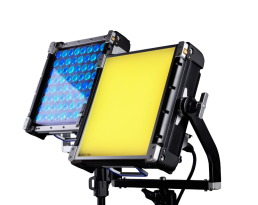
The Creamsource Vortex4 Soft is a 325W full-colour 1 × 1 LED panel with four controllable zones and a 110° native beam. Also identified as Vortex4S, it is a dedicated broad source with an integrated AC supply, direct 48V DC operation and IP65-rated housing.
This is a different optical model from the hard-beam Vortex4. Its square face is useful for close keys, fill and overhead units where spreading a narrow beam would add unnecessary setup. For a larger reflection or wider wrap, increase the emitting area with an appropriate modifier.
Key specifications
| Specification | Details |
|---|---|
| Engine / white range | RRGBBW / 2,200–15,000K with tint control |
| Power / zones | 325W / 4 |
| Native beam | 110° open-face half-peak |
| Colour quality | CRI / TLCI typically 95 |
| Colour modes | CCT, hue/saturation, x,y, gels, direct RGBW, effects |
| AC input | 100–240V, 50/60Hz; max 3.3A; powerCON TRUE1 |
| Direct DC | 48V; max 6.9A; full output with a suitable supply |
| Weight without / with yoke | 8.9kg / 10.7kg |
| Body dimensions | 380 × 380 × 121mm |
| Dimensions with yoke | 525 × 570 × 179.25mm |
| Mounting | Eight ⅜in threaded points; four LNX sockets; quick-release yoke |
| Cooling / protection / ambient | Variable-speed fans / IP65 / 40°C |
Strengths and limitations
Strengths
- A square native soft face fits close lighting positions without a separate beam-spreading frame.
- Four zones, Ethernet and built-in wireless control make it useful in programmed arrays.
Limitations
- The 110° field can wash walls and ceilings unless controlled with a grid or flags.
- A 10.7kg head plus accessories is a substantial load for a nominal 1 × 1 panel.
Practical uses
| Setup | Working approach |
|---|---|
| Dialogue key | Place the square face close to the actor for a larger apparent source. Check eye reflections and flag the far wall. |
| Overhead pool | Use an appropriate grid or skirt to hold the light on the playing area and keep it out of the lens. |
| Vehicle or screen interaction | Program the four zones for changing colour or brightness, then check whether added diffusion blends them enough for the shot. |
Output and colour
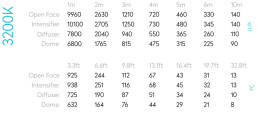
| Distance | 3,200K — lux | 5,600K — lux |
|---|---|---|
| 1m | 9,960 | 9,770 |
| 3m | 1,210 | 1,180 |
| 5m | 460 | 450 |
These readings describe the native Soft panel without an added modifier. At 3m its 5,600K centre value is 1,180 lux; the useful field is much wider than the hard Vortex4’s native beam. Choose between them by the final coverage and shadow quality needed.
For saturated colours, judge the result on the production camera and actual set materials. A white-light CRI figure does not describe the exposure or spectral behaviour of every colour cue. Record the chosen colour mode, values and modifier for repeat setups.
Power and batteries
The documented direct-DC requirement is 48V at up to 6.9A. Specify a regulated system and cable that can support the complete continuous load. A high watt-hour capacity alone does not show that a battery output can operate this head.
Control, cooling and camera operation
The four-zone arrangement can be patched as one uniform source or as separate areas, depending on the selected scenario. Save the scenario, colour space and firmware version with the console file when repeatability matters. A profile for the hard model may share controls, but the optical result remains different.
Creamsource separates continuous High Speed mode from FrameSync for timed flashes. Sync is not required merely to run continuous light at high frame rates. Test shutter, level and cue together; the published Vortex capability is mode-dependent. Camera timing guide.
Auto varies fan speed with temperature; Pause can restart cooling as the head warms. Check sound after warm-up rather than treating an initially quiet lamp as permanently silent. Fan-mode guide.
Modifiers, rigging and the working package
Vortex4 front accessories include domes, honeycombs and softboxes. Creamsource’s current lens guide also describes an intensifier arrangement for the Soft model; confirm the correct lens orientation and exact part before use. A narrower intensifier improves direction but does not reproduce the original hard panel’s 20° optics.
Alternatives and related fixtures
| Fixture | When to compare it |
|---|---|
| Vortex4 | Concentrated native output for bounce, diffusion at a distance or directional accents. |
| Vortex8 Soft | A rectangular larger face when the square source is too small. |
What people are saying
LCA product walkthrough
LCA’s Vortex Soft walkthrough shows the dedicated Soft versions and the shared operating system. It is useful for seeing the package and accessories rather than treating it as a laboratory output test. View the source.
Videos
Product introduction and working-package walkthrough.
Rental and used-fixture checks
- Confirm Vortex4S rather than a hard Vortex4 fitted with diffusion.
- Check the front-loading hardware, yoke locks and all rigging points used in the intended configuration.
- Run the chosen fan mode long enough to hear its behaviour at the microphone position.
Documentation and specifications
- Manufacturer product overview
- Technical specification and output data
- Operating documentation
- Vortex model-specific data sheets
- Current lens and intensifier guide
Product images and technical illustrations: Creamsource. Paired-model photographs show both optical versions; kit photographs include accessories that vary by package.
Related Creamsource fixtures: Creamsource Vortex2 Soft.
Browse Creamsource lights · all equipment.