
Last Updated 2 days ago
Overview
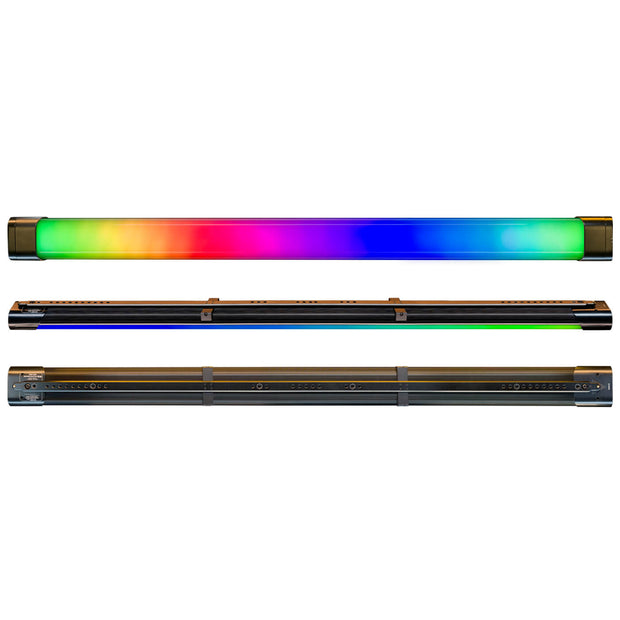


The Quasar Science Double Rainbow RR100 is the nominal four-foot, two-row RGBX linear LED fixture. Its two rows of 24 sections provide 48 pixels in total, a broader emitting strip than a single-row Rainbow 2 and a 100 W maximum rating.
This is the RR100, not a product called “Double Rainbow Q20.” The shorter Double Rainbow is RR50 with 20 total sections; the four-foot single-row Rainbow 2 is Q50R2. Identifying the actual label prevents errors in pixel maps, power planning, dimensions and control expectations.
- RR100 / 100 WNominal 4 ft Double Rainbow · 48 pixels in two rows of 24.
- 24 V DC Reference12 V marked N/A in model table
- Colour Temperature1750–10000 KManual range; firmware matters
- Weight2.60 kg Fixture
Mounts and cables add weight - Ethernet Node / SwitchConfigure LAN2 for its intended role
- IP Rating No numeric rating confirmed in the cited specifications. Read the IP rating guide.
Key Specifications
| Specification | Details |
|---|---|
| Exact model / part | RR100 / part 925-2302 |
| Fixture class | RGBX Spectral Science linear LED fixture |
| Maximum rated wattage | 100 W maximum |
| Pixel layout | Two rows of 24 = 48 total sections |
| White range in checked manual | 1750–10000 K; green/magenta adjustment |
| Body size | 1171 × 84.8 mm / 46.1 × 3.34 in; nominal 4 ft class |
| Fixture weight | 2.60 kg / 5.73 lb |
| Listed AC current examples | 120 V AC / 0.90 A; 240 V AC / 0.50 A |
| Listed DC examples | 24 V DC / 4.80 A in the model table; 12 V listed as not applicable |
| Battery | External source required; no internal operating battery specified |
| Mounting | Integrated Ossium rail with matching slider / baby-pin hardware |
| Network distinction | Ethernet node plus network-switch function; configure LAN2 for the intended task |
These are the RR100 readings in Quasar’s December 2020 chart, converted from foot-candles to lux. Results are limited to 10 ft (3.048 m). The RR50 curve, other firmware/test reports, added modifiers and other distances are not substituted. Manufacturer photometric source.
Output Calculator
Select the published setup and a manufacturer distance, or enter a custom throw where supported. The results describe centre-beam output, not the brightness across the whole beam.
Camera Settings
If the calculator does not load, use the published photometric table or source on this page. JavaScript is required.
F-stop is a planning estimate, not a meter reading. It uses direct, on-axis illuminance and includes only the optics and diffusion named in the selected setup. Meter on set to account for lens transmission, filters, added diffusion, bounce, dimming and ambient light.
How the exposure estimate works
N = √(E × ISO × t / C), where E is illuminance in lux and t = shutter angle ÷ (360 × fps). The default C = 340 is a dome reference; C = 250 is a flat reference. These are calibration constants, not a measured T-stop. A small nonzero digit is tenths of a stop above the displayed full stop.
Distance estimates and comparisons
Published points are used as given. Between published points the calculator fits a curve through the two nearest readings. Outside those points it uses the inverse-square law only when the fixture’s dataset permits it. Distances outside a configuration’s supported range are reported separately. Comparisons use one shared distance and camera setup; equal lux does not imply equal coverage.
View published readings for the selected configuration
Strengths and Limitations
Strengths
- A linear source gives distinctive visible lines and product highlights.
- Professional remote control supports programmed effects.
Limitations
- Pixel layout and source length determine the look and control patch.
- Power and network accessories remain part of the working kit.
Practical Uses
The two-row face can create a broader linear reflection or a larger visible practical element than a narrow single-row tube. It is useful for close keys, coloured edges and product or vehicle reflections where a linear source is part of the intended image.
Its 48 physical sections allow movement along the length and between the two rows. This helps pixel animation and image-based lighting arrays, provided the patch orientation and grouping match the source content. The family manual describes a column-based ordering for RR pixels; do not assume a generic left-to-right single-row map.
Multiple fixtures can form larger shapes or arrays using approved support hardware and a planned data/power layout. Their lighting pixels are intentionally much larger than a display’s picture elements. Evaluate the resulting illumination and reflection, rather than expecting a small array to act as a detailed video wall.
| Setup | Working approach |
|---|---|
| Visible practical | Expose through the camera to retain colour and face detail. |
| Interactive effect | Test direction, timing and repeatability at the actual shutter and frame rate. |
Output and Colour
The linked manufacturer chart, dated December 17, 2020, identifies RR100 illuminance at ten feet. It labels the vertical axis in foot-candles. Selected values and their calculated lux conversions are shown below; ten feet is 3.048 m, so these are not rewritten as measurements at exactly three metres.
Quasar also publishes an identified September 2021 R2/RR colour report. It gives different scores at different white settings: the 3200 K page reports CRI Ra 89 and TLCI 91, while the approximately 5600 K page reports Ra 95 and TLCI 97. These are archival report values, not a claim that every mode, current firmware or saturated colour has the same score.
The RGBX Spectral Science engine and its colour controls are useful working tools, but a maximum gamut or colour-count statement does not establish the output available in a particular saturated cue. Check the chosen white/tint or colour setting on the production camera and meter the intended working distance.
| CCT | At 10 ft, foot-candles | Calculated lux at 3.048 m |
|---|---|---|
| 1750 K | 9.83 | 106 |
| 3200 K | 12.1 | 130 |
| 4300 K | 13.2 | 142 |
| 5600 K | 14.2 | 153 |
| 6279 K | 14.7 | 158 |
| 10000 K | 13.4 | 144 |
Power and Batteries
The model table lists 100 W maximum, 0.90 A at 120 V AC and 0.50 A at 240 V AC. For DC it specifically lists 24 V / 4.80 A and marks 12 V as not applicable. The family manual also contains a broad generic DC-voltage statement and battery examples, so use the RR100-specific table and the actual unit’s approved power instructions when specifying a full-output battery solution.
The manual identifies direct AC through a True1-type connection and an AC operating description of 110–240 V. Match the actual regional unit, retained cable and electrical label. Digital control provides dimming; a phase-cut mains dimmer is not the normal control path to plan for this fixture.
There is no internal operating battery specified. A battery setup needs the correct external source, retained cable, discharge capacity and support. Watt-hours alone do not prove that a small camera pack can supply the required current. Include total cable load and battery support in the physical installation.
Control, Cooling and Camera Operation
The checked family manual provides a 1750–10000 K white range with green/magenta adjustment, plus colour and effects controls. Record firmware, colour mode, calibration setting, intensity and white/tint or colour values for matching. An older profile or firmware can expose different parameters from a current app interface.
Pixel grouping and 8/16-bit profile choices change the DMX footprint and control resolution. Match the personality and grouping at the console and fixture, then verify the orientation of a simple chase before sending complex content. A whole-fixture colour profile does not expose every physical pixel independently.
Test low fades and the intended camera frame rate/shutter at the actual level and effect speed. Smooth visual operation on one camera setting does not establish an unlimited high-speed performance specification.
The fixture supports local control, wired DMX, Ethernet Art-Net/sACN, wireless DMX through its LumenRadio system, and firmware-dependent Wi-Fi/Bluetooth app routes. The manual’s protocol and priority settings matter: a live wired data route can take priority over manual or wireless commands.
DMX uses the RJ45 ports with a suitable five-pin-XLR-to-RJ45 adapter when joining a conventional DMX chain. These same physical port types can serve different configured functions. Do not assume that an RJ45 connector always carries Ethernet, or connect a DMX output to network equipment without checking its mode and wiring.
Ethernet node plus network-switch function; configure LAN2 for the intended task. The family manual explains that LAN2 can output converted DMX in node mode; with that function disabled the RR’s LAN2 can act as a switch port, while the R2’s corresponding behaviour differs. Configure the intended role, universes, addressing and signal-loss response before a multi-light setup.
The current product pages promote starCTRL app control, while archival manuals also describe older app workflows. Verify compatibility with the installed firmware and device rather than treating every historical app example as the only current method.
Modifiers, Rigging and the Working Package
Use accessories approved for the exact head and support their complete working load. Confirm retention, clearances and cable routing before raising or hanging the fixture.
Alternatives and Related Fixtures
Rainbow 2 Q50R2 offers a narrower single row of 24 sections at a lower load and weight. The Crossfade family serves a simpler variable-white role. Choose RR100 when the two-row geometry, pixel layout and network-switch capability are useful to the setup.
| Fixture | Choose it for |
|---|---|
| Quasar Rainbow 2 Q50R2 | A different row and pixel layout in the RGBX family. |
| Astera Titan Tube | An internal-battery tube and a different control ecosystem. |
What People Are Saying
Field Feedback at a Glance
Graham Sheldon handled and metered these two 4 ft models separately for CineD. Quasar’s specifications below identify the matching pixel and power configurations.
What worked
- More light from one 4 ft position. Sheldon measured about 1,300 lux in his bare RR100 test at a 5,600 K setting and full output. This is a separate test, not the calculator’s Quasar data. See the side-by-side measurements.
- Play moving colour across the width as well as down the length. Quasar lists 48 pixels in two rows of 24. That is useful for reflections or pixel effects where the strip stays in a fixed position. Quasar pixel specifications.
- Easier local access than a narrow tube. Sheldon preferred the Double Rainbow controls to the Rainbow 2’s. The larger housing gives the operator more panel space. See the hands-on control notes.
Drawbacks to plan for
- The larger housing needs different hardware. Sheldon noted fewer third-party accessories fit its double-width form than a standard T12-style tube. Confirm the RR100 accessory, not just “4-foot tube.” Read the shape and accessory caveat.
- Use a controller for detailed pixel programming. Sheldon found setting different colours across individual pixels from the fixture menu fiddly. Patch the intended groups and control profile before the shot. See the menu comments.
- Bring separate power for each tube. Data can pass through an Ethernet chain, but that does not pass AC power. There is no internal battery; check the appropriate DC lead and supply. Read the reviewer’s power and connectivity notes; Quasar electrical data.
Blackout: Connecting and Controlling the Tubes
Blackout Lighting Console’s paired review examines hardware, connection routes, node modes and colour science. It gives practical control-system context for the Rainbow 2 and Double Rainbow without treating their pixel layouts as identical. View the source.
Videos
Quasar Science Double Rainbow RR100: Family Guide
Paired Rainbow 2 / Double Rainbow review; identify the exact length and pixel layout.
Rental and Used-Fixture Checks
The Ossium rail and matching slider/baby-pin hardware support positioning along the body. Use the correct retained slider, accessory and stand or array support, and follow the current rigging guide for the complete load. Include any battery, diffusion, grid and cable tension in the installation.
A tube/linear-light label does not make the housing compatible with every fluorescent clip or improvised clamp. Keep support away from optics, control interfaces and connector strain. Use appropriate secondary retention for elevated installations and keep heat-dissipation surfaces clear.
Inspect the diffuser, rail, slider locks, end caps, AC/DC connections and every pixel section. Test whites, colours, local controls, wired data, radio and network functions. Protect the fixture and power connections from conditions outside the matching instructions; neither a robust rail nor a retained mains connector alone establishes unrestricted weather use.
Documentation and Specifications
official product page, manufacturer operating manual, Rainbow rigging guide, identified RR brightness chart and 2021 R2/RR colour report.
Product photograph: Quasar Science official product photograph.
Browse Quasar Science lights · LED tubes · all equipment.