
Last Updated 22 hours ago
Joker-Bug 200 Overview
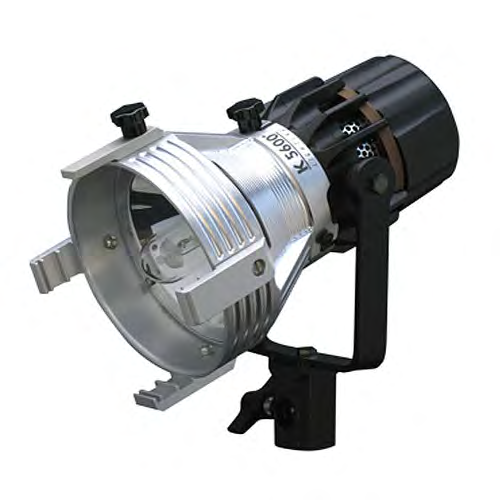


The original K5600 Joker-Bug 200 is a compact 200 W daylight HMI system that works as a bare-bulb Bug-Lite or with the PAR Beamer and four interchangeable lenses. The current Joker 200 Evolution uses a different longer light-centre-length lamp, so its lamp data must not be silently applied to this earlier head.
The documented original rental kits use a 200 W MSR/SE lamp. Match the actual ballast, head cable, lamp and front optic as one package; the AC/DC and Powergem photos describe different rental configurations.
- Fixture Type PAR HMI / Bug-Lite
- Power 200 W lamp; external ballast
- Colour Temperature 5,600 K nominal daylight
- Weight 1.65 kg with PAR Beamer
- Beam Angle 5°–65° across the four PAR36 lenses
- IP Rating Not specified in the published documentation. Read the IP Rating Guide.
Joker-Bug 200 Specifications
| Specification | Details |
|---|---|
| Head | Original Joker-Bug 200, 200 W HMI |
| Lamp | Original-model 200 W HMI lamp; exact surviving lamp part remains an open check |
| Colour | 5,600 K daylight in the K5600 catalogue |
| Optic | PAR Beamer with medium, wide, super-wide and frosted Fresnel lenses |
| Beam range | Approximately 5° to 65° across the four-lens set |
| Head with Beamer | 21.5 × 19 × 15 cm; 1.65 kg |
| Accessory diameter | 125 mm; 5 in source scrim size |
| Electrical package | Catalogue lists 1 A at 230 V for the complete system |
| Kit | 49 × 34 × 22 cm; 13.4 kg |
| Status | Legacy/discontinued configuration |
Lamphead and lamp-circuit ratings are not ballast mains-input ratings. Confirm the exact ballast nameplate, input range, connector and head cable before planning distribution.
Output Calculator
Select the published setup and a manufacturer distance, or enter a custom throw where supported. The results describe centre-beam output, not the brightness across the whole beam.
Camera Settings
If the calculator does not load, use the published photometric table or source on this page. JavaScript is required.
F-stop is a planning estimate, not a meter reading. It uses direct, on-axis illuminance and includes only the optics and diffusion named in the selected setup. Meter on set to account for lens transmission, filters, added diffusion, bounce, dimming and ambient light.
How the exposure estimate works
N = √(E × ISO × t / C), where E is illuminance in lux and t = shutter angle ÷ (360 × fps). The default C = 340 is a dome reference; C = 250 is a flat reference. These are calibration constants, not a measured T-stop. A small nonzero digit is tenths of a stop above the displayed full stop.
Distance estimates and comparisons
Published points are used as given. Between published points the calculator fits a curve through the two nearest readings. Outside those points it uses the inverse-square law only when the fixture’s dataset permits it. Distances outside a configuration’s supported range are reported separately. Comparisons use one shared distance and camera setup; equal lux does not imply equal coverage.
View published readings for the selected configuration
Strengths and Limitations
| Strengths | Limitations |
|---|---|
| Compact daylight HMI system; model-specific K5600 optical design; multiple documented operating configurations. | External electronic ballast and head cable; hot-restrike discharge lamp; legacy parts and lamp variants; no calculator without a complete exact-model factory measurement table. |
Practical Uses
| Setup | Working approach |
|---|---|
| Hard daylight source | Choose the documented optic and meter the centre and edges at the actual working distance. |
| Bounce or diffusion | Open the field enough to cover the modifier evenly and meter after the loss. |
| Location package | Record the exact head, lamp, ballast, head cable and front optic before prep. |
Do not transfer readings between Joker PAR, Alpha Fresnel, open-eye and Jo-Leko configurations. Their optical systems produce materially different fields.
Output and Colour
The distributor’s original Joker-Bug 200 sheet tabulates illuminance for six optical setups at 3, 6, 10, 15 and 20 ft (0.91–6.10 m). The calculator uses that range only; values between published throws are estimates. The sheet does not say which rows were separately metered. The Spot row describes the narrow PAR pattern, not the bare Bug-Lite behind its protective beaker.
| Configuration | 3 ft | 6 ft | 10 ft | 15 ft | 20 ft |
|---|---|---|---|---|---|
| PAR Beamer · Spot | 65,750 | 16,438 | 5,918 | 2,630 | 1,479 |
| PAR Beamer · Medium | 10,750 | 2,688 | 968 | 430 | 242 |
| PAR Beamer · Wide | 3,350 | 838 | 302 | 134 | 75 |
| PAR Beamer · Super Wide | 1,000 | 250 | 90 | 40 | 23 |
| PAR Beamer · Frosted Fresnel | 1,300 | 326 | 117 | 52 | 29 |
| Super Wide + VPXS | 144 | 36 | 13 | 6 | 3 |
The Wide lens produces an oval pattern: at 10 ft the source lists roughly 8.7 × 2.7 ft, versus about 11 × 11 ft with Super Wide. VPXS is the modifier noted in the source, not a reading for another size of lightbank. The sheet’s printed f-stops assumed ISO 400 and 1/50 s; the calculator instead estimates an aperture from your camera settings.
The original Joker-Bug 200’s documented beam spread depends on its PAR36 lens. Meter the actual Beamer and lens combination rather than relying on figures from the later Evolution kit. Confirm the original lamp part with the rental house.
No output curve was inferred from wattage, a related K5600 head or a different optical accessory.
Power and Batteries
Use the lamphead only with the documented lamp family, compatible K5600 electronic ballast and connector-matched head cable. The lamphead is not connected directly to mains.
The HMI ballast reference separates verified K5600 ballast input data from source rows that actually describe LED power supplies.
Control, Cooling and Camera Operation
Control. The original 200 W kit documentation describes a local on/off button on the electronic ballast. Use the front optic, distance, a compatible scrim or a flag to set the level; do not assume that the ballast in a used kit supports dimming, remote control or a specific high-speed mode. Identify it by its own label. Period Joker-Bug 200 specifications.
Cooling. The documented 200 W power supply is convection-cooled. Leave its air path and the head’s vents clear, do not close the barndoors around a running lamp, and do not run without the original UV-absorbing safety beaker in place. K5600 owner’s manual.
Camera and sound. The period sheet calls its electronic ballast flicker-free, but it gives no frame-rate or shutter-angle test for this head. Roll a test at the intended frame rate and shutter before high-speed or critical takes. For a quiet interview, listen to the actual lamp and ballast at working temperature with the production mic in position.
Modifiers, Rigging and the Working Package
Keep the safety glass or beaker, retention hardware, front accessory lock and ventilation path complete. Disconnect the ballast before opening the lamp compartment.
Inspect the yoke, stand interface, socket, cable, connector and every removable optic before use. Include cable pull and front accessories in the support load.
Alternatives and Related Fixtures
| Fixture | Why compare it |
|---|---|
| K5600 Joker-Bug 400 | Original compact Joker PAR/Bug-Lite system. |
| K5600 Joker-Bug 800 | Higher-output original Joker PAR/Bug-Lite system. |
| All equipment | Compare exact lamp, optic, ballast and mount data. |
What People Are Saying
Firsthand experience below is identified by name. The other points come from the original kit instructions, specifications or published output chart, rather than from owner reviews.
Strengths
- Hard edge from a small head. Gaffer Tom Burke used his Joker 200 to put a streak across a defocused background or a hard edge on an interview subject. His comparisons with tungsten were impressions, not side-by-side meter tests. Burke’s Cinematography Mailing List account.
- One head for hard and soft setups. Remove the original PAR Beamer to fit a compatible lightbank in Bug-Lite mode; fit it again to use the PAR lens set. A crew can carry one compact head for both roles without treating the two beam patterns as equivalent. Original K5600 setup instructions.
- AC or matched DC options. The period 200 W package documents AC and DC supply options, handy around vehicles and on short location setups. Match the actual 200 W ballast and battery specification before committing to a DC rig. Original 200 distributor sheet.
Limitations
- Broad coverage sacrifices center intensity. At 20 ft, the period chart lists 23 fc with Super Wide and 3 fc with Super Wide plus VPXS. For a soft key at that throw, meter the setup or move the source closer. Original 200 output chart.
- A lens change is not a focus dial. In the original standard kit, Medium, Wide, Super Wide and Frosted Fresnel are separate lenses. Confirm the full set before a job; a head and a News or Evolution Beamer do not establish what the kit can do. Original S0200JB kit list.
- Optical changes need a safe setup. The original instructions call for the ballast to be off before connecting the head, warn against closed barndoors in operation, and specify disconnecting the head before relamping. Check the protective beaker and let the assembly cool before working on the front end. K5600 operating and relamping instructions.
Videos
K5600 operating instructions for the original Joker-Bug show Beamer removal and the original power supplies, including the 200 W unit. This is a written setup reference, not a video; original Joker-Bug 200 footage was not verified.
Rental and Used-Fixture Checks
Verify the exact K5600 model and generation, then record the lamp, ballast model, head cable and front optic. Inspect the beaker or safety glass, socket, retention, ventilation, yoke and connector. Test cold start, stable output and hot restrike.
Documentation and Specifications
K5600 model documentation · K5600 HMI range · K5600 lamp directory.
Product photograph: K5600 product photograph reproduced in the Lexicon Carbone source document for model identification.
Browse K5600 equipment · HMI lights · all equipment.