
Last Updated 6 days ago
Litepanels Gemini 1×1 Hard Overview
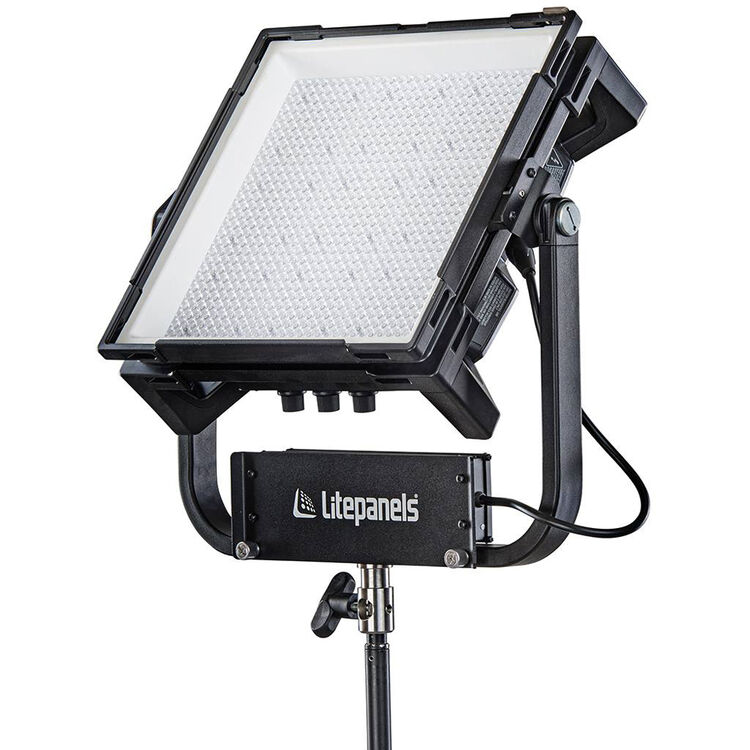
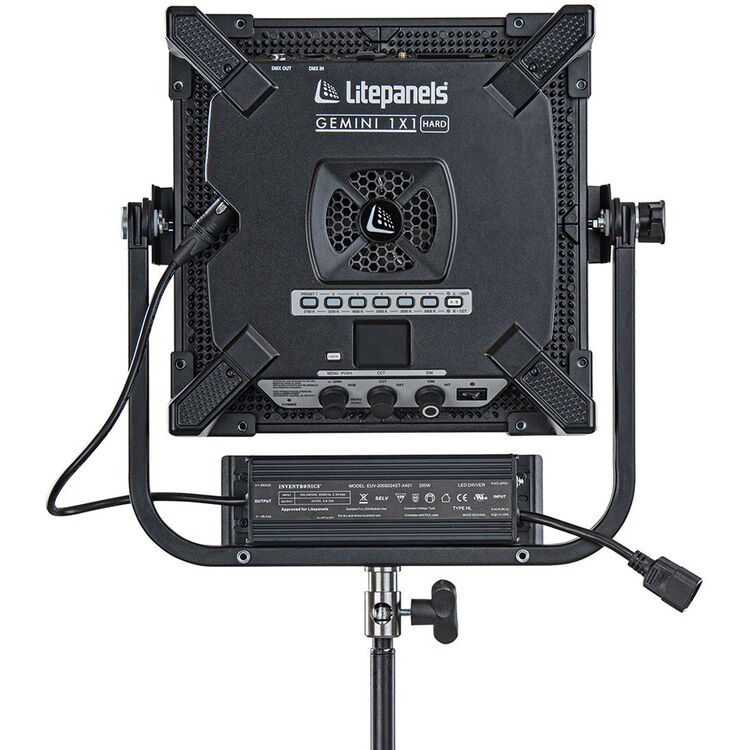
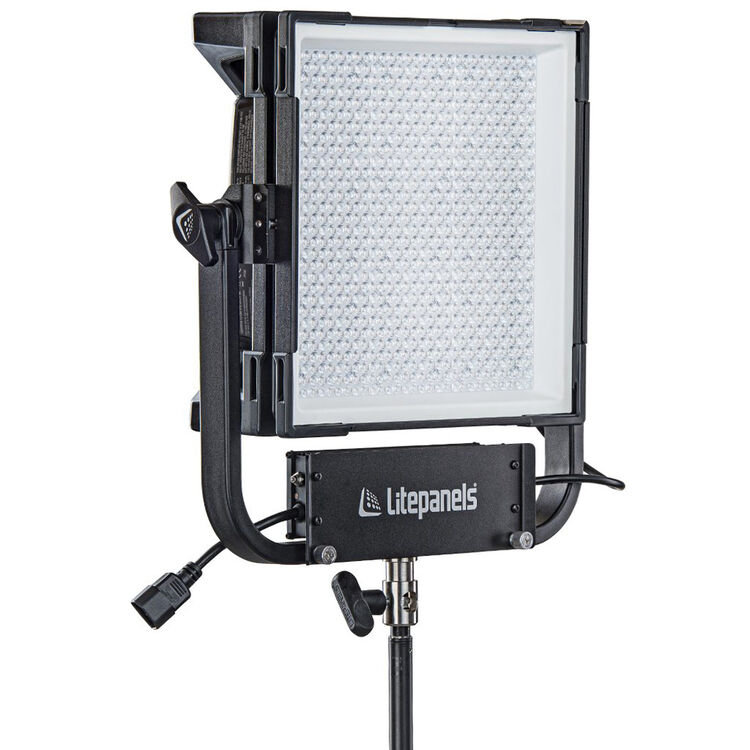
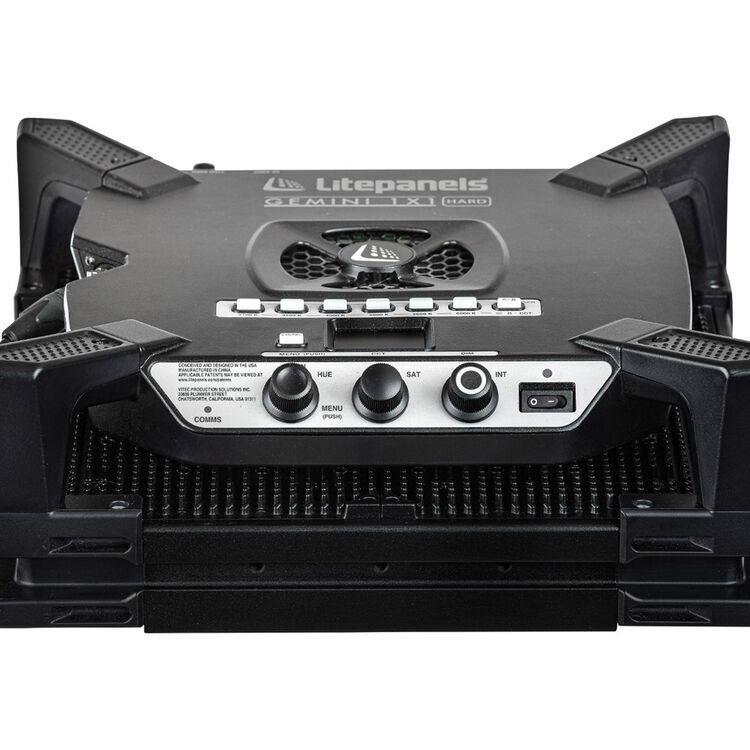
The Litepanels Gemini 1×1 Hard is a compact RGBWW panel with concentrated native optics and removable diffusion options. Its higher centre intensity comes with a different beam and coverage trade-off from the 1×1 Soft.
Gemini 1×1 Hard combines a directional native source with supplied diffusion options. Compare it through the modifier the job needs, and include optional receiver hardware and the yoke-mounted supply in the package.
- Type
RGBWW hard LED panel Learn about RGBWW - Power
200 W nominal; 100–240 V AC via yoke-mounted PSU; 13–33 V DC - Colour Temperature2,700–10,000 K
- Weight
6.0 kg standard / 8.1 kg pole-operated, including yoke and PSU; TVMP mount - Beam Angle
46° native; included Ultra Light diffusion and dome broaden/soften output - IP RatingIP20 Per the manufacturer specification. Read the IP rating guide.
Litepanels Gemini 1×1 Hard Specifications
| Specification | Manufacturer reference |
|---|---|
| Engine / CCT | RGBWW; 2,700–10,000K with green–magenta adjustment |
| Beam | 46° native; >100° with dome |
| Electrical draw | 200W nominal |
| AC supply | 100–240V, 50/60Hz; yoke-mounted supply |
| DC input | 13–33V |
| Dimming | 0–100% continuous; selected fan/battery mode may limit maximum |
| CRI / TLCI, manufacturer average | 98 / 98 |
| Control | Onboard, wired DMX/RDM; optional CRMX/W-DMX and Bluetooth dongles |
| Diffusion | Ultra Light and Domed included |
| Fan Off limit | 50% maximum intensity, per Litepanels help centre |
| Weight | 6.0kg manual; 8.1kg pole-operated; includes yoke and PSU |
| Mount | TVMP |
| Housing rating | IP20 |
| Operating temperature | −20°C to 45°C |
Output Calculator
Select the published setup and a manufacturer distance, or enter a custom throw where supported. The results describe centre-beam output, not the brightness across the whole beam.
Camera Settings
If the calculator does not load, use the published photometric table or source on this page. JavaScript is required.
F-stop is a planning estimate, not a meter reading. It uses direct, on-axis illuminance and includes only the optics and diffusion named in the selected setup. Meter on set to account for lens transmission, filters, added diffusion, bounce, dimming and ambient light.
How the exposure estimate works
N = √(E × ISO × t / C), where E is illuminance in lux and t = shutter angle ÷ (360 × fps). The default C = 340 is a dome reference; C = 250 is a flat reference. These are calibration constants, not a measured T-stop. A small nonzero digit is tenths of a stop above the displayed full stop.
Distance estimates and comparisons
Published points are used as given. Between published points the calculator fits a curve through the two nearest readings. Outside those points it uses the inverse-square law only when the fixture’s dataset permits it. Distances outside a configuration’s supported range are reported separately. Comparisons use one shared distance and camera setup; equal lux does not imply equal coverage.
View published readings for the selected configuration
Strengths and Limitations
Strengths
- A concentrated native beam and included diffusers provide hard-to-soft configuration options.
- Colour/tint control and a yoke-mounted supply suit a compact controllable source.
Limitations
- Dome output is much lower than the bare centre reading.
- Wireless communication is optional and Fan Off mode limits intensity; IP20 is not rain protection.
Practical Uses
Use the native beam for reach, or fit the supplied diffusion or a larger modifier for a softer source. Battery and console setups require the specified DC system and communications accessories.
| Setup | How to use this fixture |
|---|---|
| Directional key or bounce | The native 46° configuration gives more concentration than the Soft model. Choose coverage and shadow character before using the bare centre reading. |
| Close soft key | Fit Ultra Light or Domed diffusion as required. The dome’s broader emission changes the available exposure and reflection. |
| Portable colour panel | Order the correct DC/battery arrangement and communications dongles. “Gemini” alone does not establish that wireless console reception is fitted. |
Output and Colour
The bare 1×1 Hard uses a 46° TIR beam. Litepanels lists 3,023 lux at 3m/5,600K bare versus 1,003 lux with the dome; at 3,200K those figures are 2,456 and 912. Its supplied Ultra Light and Domed diffusers offer different source characters, but the bare reading must not be presented as the diffused result. RGBWW supplies white, tint, HSI, gel and effects modes.
| Configuration | 3,200K at 3m | 5,600K at 3m |
|---|---|---|
| Bare, 46° | 2,456 lux | 3,023 lux |
| Domed diffuser, >100° | 912 lux | 1,003 lux |
Sources: Litepanels Gemini 1×1 Hard RGB LED Light Panel documentation (PDF); Gemini fan behaviour and Fan Off intensity limit.
At 3m/5,600K, Litepanels’ dome reading is about one-third of the bare result. The dome spreads the light over a wider angle while reducing the centre intensity.
RGBWW supports CCT/tint, HSI and gel modes. For a setup you need to repeat, record the mode and settings (for example, Kelvin and green–magenta tint in CCT mode), plus the dimmer level.
Power and Batteries
Nominal draw is 200W, with a yoke-mounted 100–240V AC supply and a stated 13–33V DC input range. Use the model-specific battery plate/cable system; the 2×1 Hard arrangement is different.
Litepanels’ Gemini help centre limits maximum intensity to 50% in Fan Off mode. Set that quiet configuration before establishing exposure, especially when a dome or softbox already reduces the available level.
Control, Cooling and Camera Operation
| Control path | Hardware and operating notes |
|---|---|
| Local | Onboard white/tint, colour, gel and effects controls. |
| Wired console | DMX/RDM with the installed firmware’s personality. |
| Wireless console | Appropriate optional CRMX/W-DMX dongle required. |
| Bluetooth | Optional dongle and supported control system. |
| Cooling via desk | A profile exposing FAN MODE can control the documented fan choices. |
Fan settings include Auto, Delayed, Max, Off and supported DMX control. Delayed postpones fan operation until temperature rises, so fans may start during a longer take.
For a low fade or colour transition, test the chosen personality and curve through the final diffusion. Save the fan mode with the cue when the desk controls it, so another cue cannot unexpectedly change the exposure limit.
Modifiers, Rigging and the Working Package
The 6.0kg manual fixture figure includes yoke and supply; pole operation is listed at 8.1kg. Check that both supplied diffusers, their retention hardware and the intended 1×1 softbox/grid are included. The TVMP support and yoke should be balanced with the actual front accessory and battery fitted. The housing is IP20.
| Component | Published/package reference |
|---|---|
| Manual fixture | 6.0kg including yoke and PSU |
| Pole-operated fixture | 8.1kg reference |
| Diffusion | Supplied Ultra Light and Domed diffusers with retention hardware |
| Support | TVMP and correct 1×1 front-accessory arrangement |
| Additional kit | Battery plate/packs and optional communications dongles |
Balance the panel with the selected front system and battery fitted. Inspect diffuser retention and yoke condition before raising it. The IP20 housing has no rated water protection.
Alternatives and Related Fixtures
| Fixture | When to compare it |
|---|---|
| Litepanels Gemini 1×1 Soft RGB LED Light Panel | Choose the Soft for permanently broad native coverage; compare source size and diffuse output rather than bare lux. |
| Litepanels Gemini 2×1 Hard RGB LED Light Panel | Choose the larger Hard when the narrower 20° beam and additional output justify its input and working weight. |
| Creamsource Vortex 4 | Compare an IP65 native-hard panel with four zones and its own diffuser system. |
What People Are Saying
Field Feedback at a Glance
What worked
- Allard found it unusually bright for a 1×1 panel, with the narrow bare beam doing much of the work. Matthew Allard ACS, Newsshooter.
- The included Ultra Light and Dome diffusers let Allard switch between hard light, light diffusion and a much softer source. Matthew Allard ACS, Newsshooter.
- LensVid found the fan quiet even up close in its normal operation. LensVid hands-on review.
Drawbacks to plan for
- LensVid saw uneven shadows from the individual lenses with the bare beam. Try a diffuser if the subject shows multiple shadow edges. LensVid hands-on review.
- In LensVid’s test, switching off the fan capped output at 50%. LensVid hands-on review.
- LensVid’s review unit needed a separately sold Bluetooth dongle for control through the Litepanels app. LensVid hands-on review.
Matthew Allard ACS, Newsshooter
Allard praises output and diffusion options, while noting the narrow beam’s contribution to the high centre readings. He flags weight, price and battery size as drawbacks and reports weaker-than-expected CCT accuracy. Read article.
Curtis Judd
In his 2021 review, Judd favours the output and the different light qualities available from the included diffusers. Watch video.
Videos
Curtis Judd tests the Gemini 1×1 Hard and its diffusion options.
Rental and Used-Fixture Checks
- Count the Ultra Light and Domed diffusers and inspect their latches.
- Check optional communications/battery hardware and the yoke-mounted PSU.
- Meter bare versus dome and the selected fan mode, then test low-end fades.
Documentation and Specifications
- Gemini fan behaviour and Fan Off intensity limit
- Litepanels Gemini 1×1 Hard RGB LED Light Panel documentation (PDF)
Browse Litepanels lights · LED panels · all equipment.